June 24, 2024
Solved

Cart abandonment flow for subscription items.

  • June 24, 2024
  • 3 replies
  • 217 views

Our business had separate cart abandonment flows for one-time and subscription items. We could separate them based on item name and Shopify or Recharge (our subscription provider) checkout.

We have now upgraded our theme and are using Shopify unified checkout. With no longer having a separate Recharge checkout and item names being the same, we are no longer able to send cart abandonment emails for subscription items.

For our cart abandonment email we use item names to trigger the correct email with specific content. Whether a user selects one-time purchase or subscription, the item name is the same.


Question: How do Recharge users trigger a cart abandonment email for specific subscription items that would be different from when a user abandons a one-time purchase item?

    This topic has been closed for replies.
    Best answer by DavidV

    Hi @dbracamontes,

    Thank you so much for your question. This makes total sense - you’re trying to filter out subscription customers and offer them a different coupon or offer in your abandon cart.

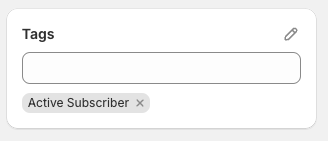
    Recharge will automatically add an “Active Subscriber” tag onto the customer profile in Shopify:

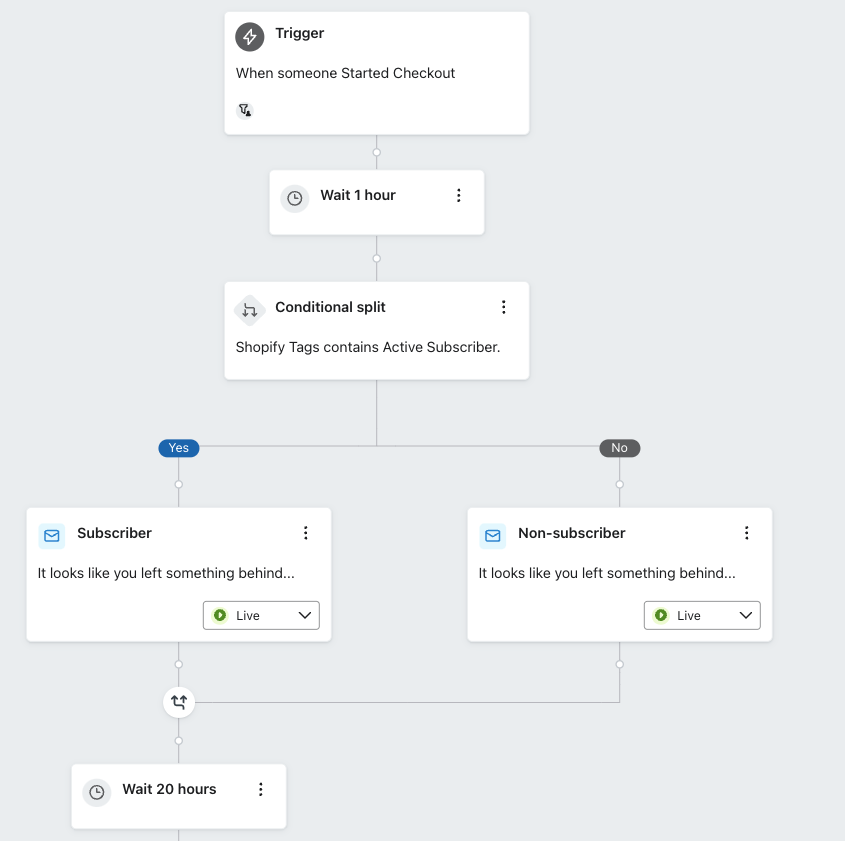
    So you should be able to add a conditional split based on a Shopify tag:


    Note that in the example above this would simply look to see if they have an active subscription, it won’t run through the actual cart itself.

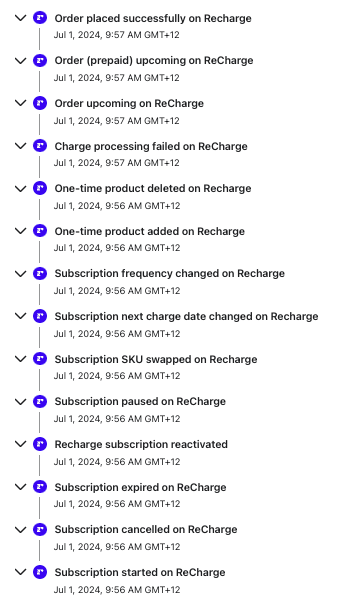
    Recharge has a number of states that are sent through as events as well around the product they have subscribed to - example of all of the events below (that can be used as a trigger as well): 


    I hope that helps - let me know if you have any other questions!

    Thanks
    David

    3 replies

    KatherineB
    Partner - Platinum
    Champion & Partner
    June 26, 2024

    Hi @dbracamontes thanks for posting in the Klaviyo community! Great question. 


    Are you able to identify by the variant of the product? Usually if the main name of the product is the same across all variants, you would be able to identify by the variant name. If that doesn’t work, can you identify by SKU? You should be able to use a trigger condition on the flow/email that specifies which SKU of the product you want. 

    This guide from Recharge shows all of the available metrics and custom properties Recharge shares with Klaviyo. 


    Hope this helps!

    Katherine

    Katherine - &BAM | 2023 Klaviyo Champion and Elite Partner
    June 27, 2024

    The problem we are facing is with the Shopify/Recharge unified checkout. The variant names and SKUs are all the same regardless if a customer chooses a one-time purchase or a subscription. I tried to use the Recharge metrics but they are not being triggered because there is no longer a Recharge checkout.

    We offer a discount for subscription items, thus we don’t want to present the same offer for a cart abandonment as would for a one-time item that is abandoned.

    When users select a subscription then pass on to the Shopify checkout, if they abandoned they are getting the abandonment email for one time purchases which is a different email than what we want them to receive.

    I’m curious what other business are doing that have migrated to the unified checkout? Are they able to send a different email for one-time and subscription items? And if so, how are they able to identify the subscription item if they are going through Shopify checkout?

    DavidV
    Partner - Platinum
    DavidVAnswer
    2025 Champion
    July 2, 2024

    Hi @dbracamontes,

    Thank you so much for your question. This makes total sense - you’re trying to filter out subscription customers and offer them a different coupon or offer in your abandon cart.

    Recharge will automatically add an “Active Subscriber” tag onto the customer profile in Shopify:

    So you should be able to add a conditional split based on a Shopify tag:


    Note that in the example above this would simply look to see if they have an active subscription, it won’t run through the actual cart itself.

    Recharge has a number of states that are sent through as events as well around the product they have subscribed to - example of all of the events below (that can be used as a trigger as well): 


    I hope that helps - let me know if you have any other questions!

    Thanks
    David

    Zyber is New Zealand's leading Shopify Premier & Klaviyo Master Platinum Partner passionate about helping merchants succeed. www.zyber.co.nz & www.unlocked.co.nz