

February 28, 2021
Solved

Changing button background colour for out of stock notifications

  • February 28, 2021
  • 16 replies
  • 2266 views

Hi all,


I’m currently trying to alter the background colour of the ‘Notify me when available’ button. From looking through the code, I can alter the modal button which is simple enough, but for changing the button on the actual product page I can’t see any immediate way to change this.


    klaviyo.enable('backinstock',{ 
trigger: {
product_page_text: 'Notify Me When Available',
product_page_class: 'btn',
product_page_text_align: 'center',
product_page_margin: '0px',
replace_sold_out: true
},


There doesn’t appear to be any way to change this in Shopify’s visual editor when changing colours, and after reading through the documentation on Klaviyos Back in Stock styling, I can’t see anything on there either.


Currently the button looks like this -



But I have been able to alter the modal so it appears like so -
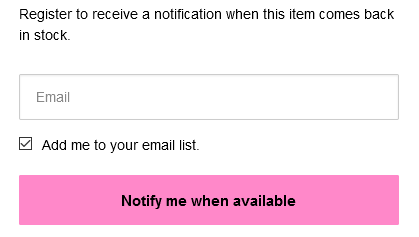


Any help would be greatly appreciated.

This topic has been closed for replies.
Best answer by caroline

Hi there,

The linked guide includes the following snippet:

     trigger: {
product_page_text: 'Notify Me When Available',
product_page_class: 'btn',
product_page_text_align: 'center',
product_page_margin: '0px',
replace_sold_out: false
},

To adjust the CSS of the “Notify Me When Available” button, change the “product_page_class” value to the CSS class that you want to use to style the button. In other words, if you add CSS for the class ‘btn’, it will style the “Notify Me When Available” button.

Best,

Caroline

16 replies

Contributor I
June 6, 2022

Hi. I’m also struggling with this issue. My ‘Notify Me when Available’ button is white and sits to the left.

I’d like the button to be black, writing to be white and the button to be central. I don’t understand the above instructions.

This is what my code looks like:


alex.hong
Klaviyo Alum
June 7, 2022

Hi @Coinick,

I would check with this Help Center article to customize that button.


Thanks,

Alex

Contributor I
June 7, 2022

Hi @alex.hong, yes I’ve checked that article and others mentioned in this thread but it makes no sense to me. There aren’t any pictures or videos explaining any of it. I added code from the ‘black & white’ section to the ‘btn’ but the button just disappeared altogether.

What am I supposed to do?

Contributor I
June 7, 2022

Hi @alex.hong, yes I’ve checked that article and others mentioned in this thread but it makes no sense to me. There aren’t any pictures or videos explaining any of it. I added code from the ‘black & white’ section to the ‘btn’ but the button just disappeared altogether.

What am I supposed to do?

I don’t have a free theme so none of the options in the article would work for me.

alex.hong
Klaviyo Alum
June 7, 2022

Hi there @Coinick,

Since it is a paid theme, we are limited in the assistance we can offer as all themes have variations and are not as uniformed as the free themes we offer guidance on. Unfortunately, Klaviyo's back-in-stock feature does not work as expected for custom (AKA, not free) Shopify themes. You will need to make some tweaks to your code in order to use Klaviyo BIS. Unfortunately, we're unable to advise specifically what changes will need to be made as each custom theme is different.

It is usually the work of a developer to get the Back-In-Stock code to work for your custom theme. Referring to the following article - Shopify Back in Stock for Developers - should assist with building the API call. 

I have some general guidance I can offer.

The appearance of the back-in-stock button is handled through the Trigger settings in our back-in-stock code. You can find that mentioned here.

You will want to try different values for "product_page_class" based on your store's theme. I would recommend removing the extra piece of code while testing this as it can impact the general performance. Many themes will use "btn" or "button" for standard classes, but these are not required for theme developers.

Theme developers are not required to follow some basic guidelines that allow our back-in-stock feature to function. Therefore we are not able to offer custom solutions for custom themes. Sometimes the theme developer will be able to help with this implementation or you can reach out to one of our approved partners here.

If you end up working with a developer, you also have the option to build a fully customized solution. Our Back In Stock feature works by sending an event metric into Klaviyo which triggers a flow. You just need to send the Variant ID, Product ID, and email address. All of this can be custom-built using our open API to work with your website. Here is the necessary documentation for that.

Otherwise, there are other back-in-stock solutions supported through Shopify that you can find through their apps section. Here is a link to their site.


Just from looking at the preview of your code, I can see options listed for button, text, and background color. 


Contributor I
September 16, 2023

Hello,


Is there a way to add css for mobile? Or adjust it?


The modal appears stuck on top on mobile devices. I want this to be displayed at the middle of the screen.


Thanks!