
Kwei
Problem Solver II
Problem Solver II
May 4, 2022
Solved

Changing the “From” name

  • May 4, 2022
  • 11 replies
  • 1138 views

On my email newsletter, the “From” line states my personal name rather than the name of my company. What part of the system do I need to go into in order to correct that?

    This topic has been closed for replies.
    Best answer by retention

    Hi @Kwei,

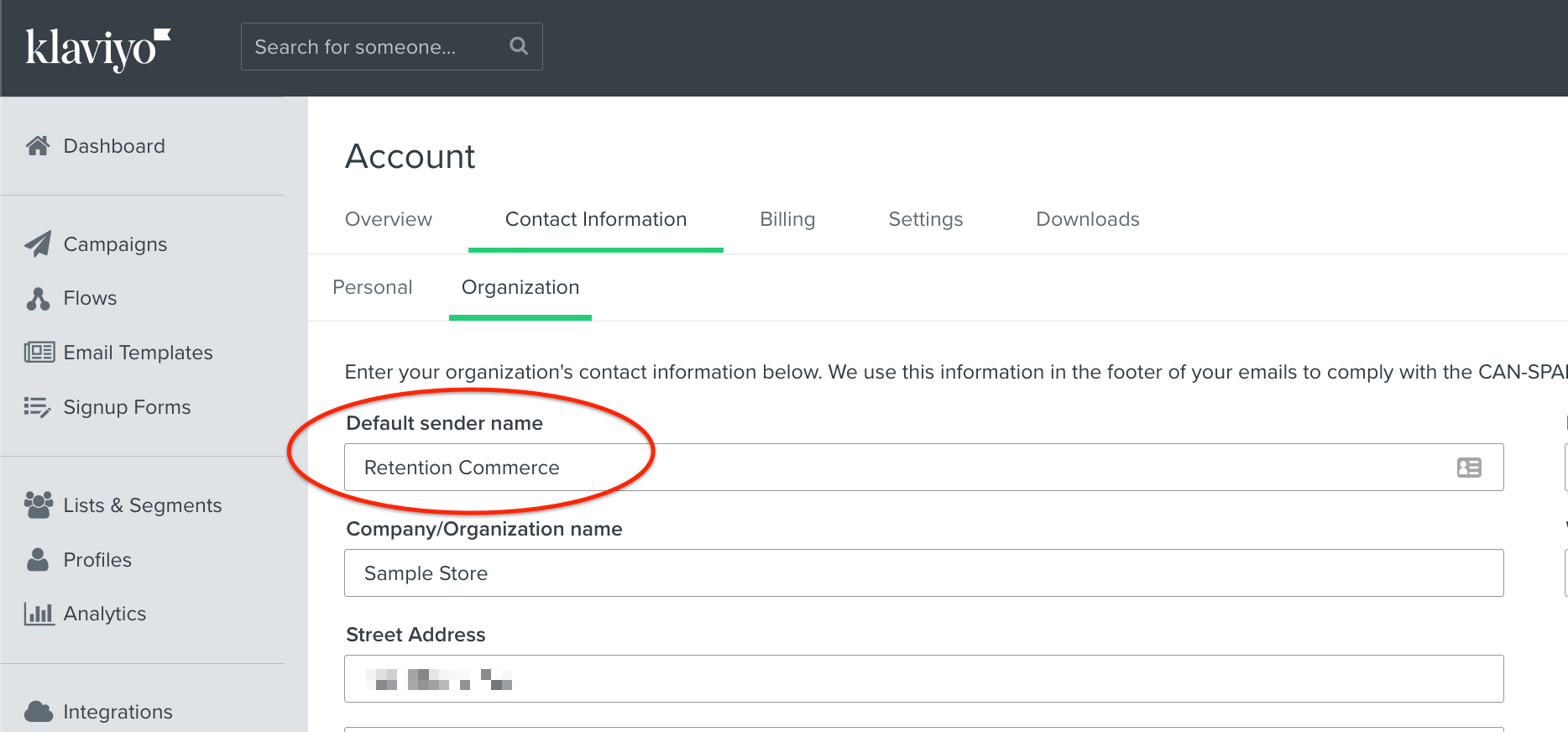
    The default “From” name is from your organization contact settings in your Accounts → Contact Information → Organization tab.

    Should look like this:

    Just note, this only sets the Sender Name moving forward with new messages in Campaigns and Flows.  You may want to go back to all your existing Flow Messages and change them manually.

    Hope that helps!

    11 replies

    retention
    Partner - Platinum
    retentionAnswer
    2025 Champion
    May 4, 2022

    Hi @Kwei,

    The default “From” name is from your organization contact settings in your Accounts → Contact Information → Organization tab.

    Should look like this:

    Just note, this only sets the Sender Name moving forward with new messages in Campaigns and Flows.  You may want to go back to all your existing Flow Messages and change them manually.

    Hope that helps!

    Joseph Hsieh // retentioncommerce.com // X: @retention
    Kwei
    Problem Solver II
    KweiAuthor
    Problem Solver II
    May 4, 2022

    Yes, understood, but all that is in place already. I just did another test with a random template to be sure I wasn’t mistaken. See the last panel, the sender name is Kwei Quartey, even though the contact email is contact@ediblecalm.com. So somewhere deep in settings there must be an incorrect entry.


    Edible Calm
    stephen.trumble
    Klaviyo Alum
    May 6, 2022

    Hey @Kwei 

    Quick question to follow up what @retention suggested. Is the sender email address associated with your profile in your email service provider or is that a completely separate account?

    -Stephen
    Kwei
    Problem Solver II
    KweiAuthor
    Problem Solver II
    May 6, 2022

    It’s under the same gmail account kweiquartey@gmail.com

    Edible Calm
    stephen.trumble
    Klaviyo Alum
    May 6, 2022

    Hey @Kwei 

    I believe that is the reason you are seeing your name still because the sending email is part of your profile and Gmail shows the name on the profile if its a know email address. Can you try sending the preview to another account to see if is showing your name there? 

    -Stephen
    Kwei
    Problem Solver II
    KweiAuthor
    Problem Solver II
    May 6, 2022

    hmm, you mean a non-gmail account? I was sending it to kjoq@earthlink.net, which is an alternative email I have.

    Edible Calm
    Kwei
    Problem Solver II
    KweiAuthor
    Problem Solver II
    May 8, 2022

    @stephen.trumble would you mind explaining your last response further? I wasn’t clear.

    Edible Calm
    stephen.trumble
    Klaviyo Alum
    May 9, 2022

    Hey @Kwei 

    Sorry for my confusion. In gmail and many other ESP you can have many email address associated with one profile. I thought you meant that your sending email address from the preview was also part of your receiving profile and therefore would show your name and not the business. Since this is not the case, have you tried clearing your browser history and cookies and then try resending? Your ESP may recognize the sender from previous emails sent and just needs to be reset, if clearing everything doesn't work, it is likely a bug and will need to be looked into by our Support team.

    -Stephen
    Kwei
    Problem Solver II
    KweiAuthor
    Problem Solver II
    May 13, 2022

    Well, couldn’t  fix it. I guess it doesn’t matter in the end--my name is on the blog post anyway so it probably doesn’t make any difference

    Edible Calm
    stephen.trumble
    Klaviyo Alum
    May 13, 2022

    Hey @Kwei 

    If you are still having an issue, I would reach out to Klaviyo Support and open a ticket. They will be able to go into your account and troubleshoot what is actually happening. You should definitely be able to change your name. Sorry my troubleshooting didn't help. 

    -Stephen