Hello, I’ve just started setting up some of my flows, including my welcome flow. I send out mini campaigns every week, and would like to exclude anyone that’s in the welcome flow so they don’t get the campaign emails just yet. I know I can exclude certain segments from the campaign but how do I go about creating a segment of anyone that’s in the welcome flow? I couldn’t see an option for ‘Is in X flow’ within the segments builder, what’s the best (neatest/easiest!) way to do this?
Hi @meetapapersandgems , thank you for sharing with the community.
The first thing you need to do is create a label for subscribers in the welcome email flow, and then you’d be able to exclude them from your campaigns.
You are going to update the profile property of these customers.
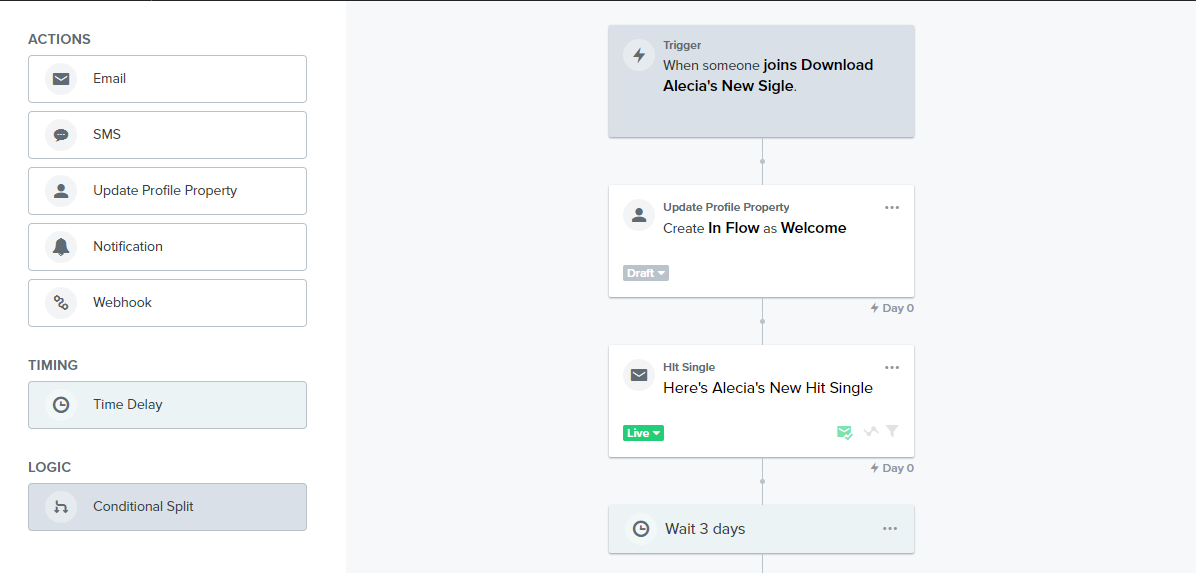
In your welcome email flow, drag the “Update Profile Property” block to the beginning of the flow before the first email. Select “Create New Property” as the property action .
For the Property Label, input “In Flow” and for the Property Value, input “Welcome”. This is an example I created here for you;
Now, if in future you want to exclude subscribers in a particular flow, all you need to do is input the Flow’s title as the property value since you have already created the label here;
At the end of your Welcome Email Flow, drag the “Update Profile Property” block again after the last email. This time select “Remove existing property” as property action.
You’d notice that the property value you assigned at the beginning doesn’t show in the drop down option of the “Remove existing Property” or in the segment builder in Klaviyo. This is become Klaviyo will update this when at least one profile in your account has the new property “in Flow” value (which is welcome) assigned to it. In other words, when at least one subscriber enter the welcome email flow.
Here’s the final step:
Once a Profile now has the property assigned, you can now create a segment for them.
In the “Properties about someone” » In Flow equals “Welcome”
Then, exclude them from your campaigns you are sending.
If I've helped you solve your question, feel free to book a call here: https://calendly.com/klaviyo-email-marketing/30min. Or email me at edgar.o@workean.net
Glad this thread was useful. That would depend on how you track those customers who have purchased. If there is a property that is added to them or some segment of buyers, then you could just create a flow to exclude those people. Another way would be to add a filter that excludes those that have placed an order within a certain time frame.
Glad this thread was useful. That would depend on how you track those customers who have purchased. If there is a property that is added to them or some segment of buyers, then you could just create a flow to exclude those people. Another way would be to add a filter that excludes those that have placed an order within a certain time frame.
Thanks Alex, how do you add an exclusion filter for a campaign?
You're able to add a Flow Filter to your current Flow to filter the Flow to specific customers and in this case, to those who haven't received that specific Campaign email. This definition would look like what someone has done or not done > Person has > Received Email > where > Message > equals > *Campaign Email Name* > zero times > over all time
You'll want to be sure its set where an individual has not received that email (zero times) to ensure that the audience filters into your Flow vs those who have received the email.
First, you'll need to add an Update Profile Property step to the Flow you want identify profiles who are currently actively in that Flow. This step will add a custom property to a profile where you can filter for properties about someone being 'In Flow'
Select Update Profile Property in the action buttons options and add this step right after the Trigger when someone enters the Flow.
Create New Property
Once this is step is added to your Flow this property will automatically be added to whatever profile enters the Flow. You can then create a segment filtering for that profile property. You can then exclude that specific segment from your campaign send: How to Exclude Lists or Segments from a Campaign Send
Got it thanks! If I wanted to update this profile property to then update when they completed the flow, would I have to wait for the flow to go live and for someone to enter the flow? As I can’t see an option for it at the moment?
It is just another step you add to the flow. The update step would just be placed at the end.
Hi Alex, I understand this, however I can’t see an option for this at the moment, is this because the flow isn’t live yet and no one has entered it yet?
Can you clarify what you mean when you mean when you can't see an option? Are you talking about the dropdown dimension? If so, that means no one has been in the flow yet as our dimensions to filter are only available based on things that have already happened. The Update Profile Property step in our flows wouldn't matter if the flow was Live or in Draft and that the Update Profile Property action should be available like any other action for a flow.
Can you clarify what you mean when you mean when you can't see an option? Are you talking about the dropdown dimension? If so, that means no one has been in the flow yet as our dimensions to filter are only available based on things that have already happened. The Update Profile Property step in our flows wouldn't matter if the flow was Live or in Draft and that the Update Profile Property action should be available like any other action for a flow.
Hi Alex, yep I’m talking about the dropdown dimension. So I can only set up the flow to remove people from the list when someone has entered the flow?