Hello, I’ve just started setting up some of my flows, including my welcome flow. I send out mini campaigns every week, and would like to exclude anyone that’s in the welcome flow so they don’t get the campaign emails just yet. I know I can exclude certain segments from the campaign but how do I go about creating a segment of anyone that’s in the welcome flow? I couldn’t see an option for ‘Is in X flow’ within the segments builder, what’s the best (neatest/easiest!) way to do this?
Hi @meetapapersandgems , thank you for sharing with the community.
The first thing you need to do is create a label for subscribers in the welcome email flow, and then you’d be able to exclude them from your campaigns.
You are going to update the profile property of these customers.
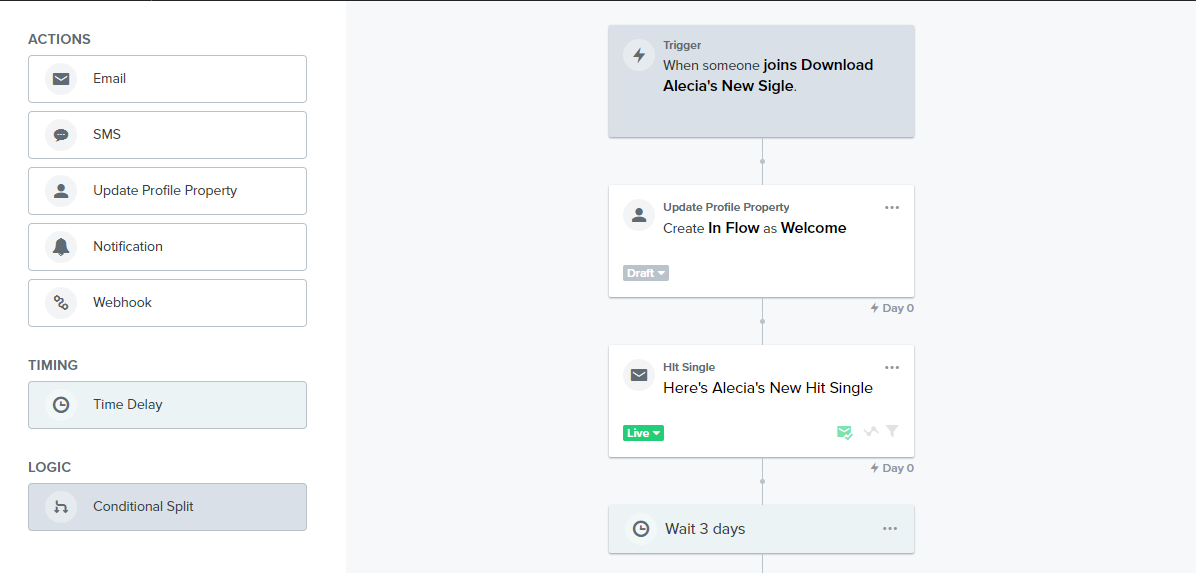
In your welcome email flow, drag the “Update Profile Property” block to the beginning of the flow before the first email. Select “Create New Property” as the property action .
For the Property Label, input “In Flow” and for the Property Value, input “Welcome”. This is an example I created here for you;
Now, if in future you want to exclude subscribers in a particular flow, all you need to do is input the Flow’s title as the property value since you have already created the label here;
At the end of your Welcome Email Flow, drag the “Update Profile Property” block again after the last email. This time select “Remove existing property” as property action.
You’d notice that the property value you assigned at the beginning doesn’t show in the drop down option of the “Remove existing Property” or in the segment builder in Klaviyo. This is become Klaviyo will update this when at least one profile in your account has the new property “in Flow” value (which is welcome) assigned to it. In other words, when at least one subscriber enter the welcome email flow.
Here’s the final step:
Once a Profile now has the property assigned, you can now create a segment for them.
In the “Properties about someone” » In Flow equals “Welcome”
Then, exclude them from your campaigns you are sending.
If I've helped you solve your question, feel free to book a call here: https://calendly.com/klaviyo-email-marketing/30min. Or email me at edgar.o@workean.net
The cleanest way I achieve this is two ways depending on the rules of your Welcome Flow.
1 - Putting a flow filter in your other flows that theProperties About Someone - Created - Is not in the last X days (And the days would match the length of your Welcome Flow).
2 - The other way is to add a profile property update in the beginning of your Welcome Flow so that it can mark that user’s profile property, something like ‘Welcome Flow’ is TRUE. And then clearing that profile property at the end of the flow when they go to exit. Then over your in other flows, you can again say Properties About Someone - FIELD - Is not TRUE.
Hi @meetapapersandgems , thank you for sharing with the community.
The first thing you need to do is create a label for subscribers in the welcome email flow, and then you’d be able to exclude them from your campaigns.
You are going to update the profile property of these customers.
In your welcome email flow, drag the “Update Profile Property” block to the beginning of the flow before the first email. Select “Create New Property” as the property action .
For the Property Label, input “In Flow” and for the Property Value, input “Welcome”. This is an example I created here for you;
Now, if in future you want to exclude subscribers in a particular flow, all you need to do is input the Flow’s title as the property value since you have already created the label here;
At the end of your Welcome Email Flow, drag the “Update Profile Property” block again after the last email. This time select “Remove existing property” as property action.
You’d notice that the property value you assigned at the beginning doesn’t show in the drop down option of the “Remove existing Property” or in the segment builder in Klaviyo. This is become Klaviyo will update this when at least one profile in your account has the new property “in Flow” value (which is welcome) assigned to it. In other words, when at least one subscriber enter the welcome email flow.
Here’s the final step:
Once a Profile now has the property assigned, you can now create a segment for them.
In the “Properties about someone” » In Flow equals “Welcome”
Then, exclude them from your campaigns you are sending.
If I've helped you solve your question, feel free to book a call here: https://calendly.com/klaviyo-email-marketing/30min. Or email me at edgar.o@workean.net
Hi @meetapapersandgems , thank you for sharing with the community.
The first thing you need to do is create a label for subscribers in the welcome email flow, and then you’d be able to exclude them from your campaigns.
You are going to update the profile property of these customers.
In your welcome email flow, drag the “Update Profile Property” block to the beginning of the flow before the first email. Select “Create New Property” as the property action .
For the Property Label, input “In Flow” and for the Property Value, input “Welcome”. This is an example I created here for you;
Now, if in future you want to exclude subscribers in a particular flow, all you need to do is input the Flow’s title as the property value since you have already created the label here;
At the end of your Welcome Email Flow, drag the “Update Profile Property” block again after the last email. This time select “Remove existing property” as property action.
You’d notice that the property value you assigned at the beginning doesn’t show in the drop down option of the “Remove existing Property” or in the segment builder in Klaviyo. This is become Klaviyo will update this when at least one profile in your account has the new property “in Flow” value (which is welcome) assigned to it. In other words, when at least one subscriber enter the welcome email flow.
Here’s the final step:
Once a Profile now has the property assigned, you can now create a segment for them.
In the “Properties about someone” » In Flow equals “Welcome”
Then, exclude them from your campaigns you are sending.
Hey @Edgar Emmanuel - this is massively helpful and what I was looking for- thank you so much! Can I just ask, where you say to remove the profile property at the end of the flow, I’ve done that (using a test email address where the profile property is assigned at the start) but it doesn’t allow me to add/choose any further text about the profile property name that I’d like to remove at the end of the flow? I only get the following. The is no option to remove ‘Welcome’ which I assigned at the start. Is this correct?
The cleanest way I achieve this is two ways depending on the rules of your Welcome Flow.
1 - Putting a flow filter in your other flows that theProperties About Someone - Created - Is not in the last X days (And the days would match the length of your Welcome Flow).
2 - The other way is to add a profile property update in the beginning of your Welcome Flow so that it can mark that user’s profile property, something like ‘Welcome Flow’ is TRUE. And then clearing that profile property at the end of the flow when they go to exit. Then over your in other flows, you can again say Properties About Someone - FIELD - Is not TRUE.
Hope that helps!
Thanks for this. that second option looks like just what I need! I can’t seem to add text to say ‘Is not True, - there’s no option to add any additional words?
The cleanest way I achieve this is two ways depending on the rules of your Welcome Flow.
1 - Putting a flow filter in your other flows that theProperties About Someone - Created - Is not in the last X days (And the days would match the length of your Welcome Flow).
2 - The other way is to add a profile property update in the beginning of your Welcome Flow so that it can mark that user’s profile property, something like ‘Welcome Flow’ is TRUE. And then clearing that profile property at the end of the flow when they go to exit. Then over your in other flows, you can again say Properties About Someone - FIELD - Is not TRUE.
Hope that helps!
Thanks for this. that second option looks like just what I need! I can’t seem to add text to say ‘Is not True, - there’s no option to add any additional words?
In the flow you want to filter them out of, it’d look something like this below depending on what field name and value you created.
Hey @meetapapersandgems , I’m so glad you found this very helpful. Yes, you are on the right track. You’d only have to input the property label In Flow you assigned at the beginning.
You can now send your campaigns and exclude them from your mails.
Take care.
If I've helped you solve your question, feel free to book a call here: https://calendly.com/klaviyo-email-marketing/30min. Or email me at edgar.o@workean.net
What about profiles that drop out of the welcome flow prior to completing the full flow due to making a purchase? Using the Update Profile Property method suggested above wouldn’t these profiles be permanently labeled as In Flow and thus not receive any campaign emails moving forward?
I would try work with positioning within that flow so that customers only receive the tag if they complete the flow by adding it as a last step. Or by creating a conditional statement that would path people differently in your welcome flow based on purchases.
Hi, this helped me as well thanks! Is there a way to do this to exclude people who have recently purchased too? I want to sent a flash sale campaign but don’t want it to go to people who have just paid full price!