


Problem Solver I
August 23, 2024
Solved

How do I add an image to sms campaign through via the API?

  • August 23, 2024
  • 7 replies
  • 168 views

Is there a way to add an image to an sms campaign through the api? I found a media_url field in the return data for the campaign-messages endpoint but when I try to set a value for that to update or create it doesn’t seem to work. 
 

This topic has been closed for replies.
Best answer by obviyo

I still don’t see a way to add a dynamic image using the api. The attempts above did not work for me. I only ever see null returned for the media_url as mentioned above and that doesn’t seem to correspond to the dynamic image url I set if I try to use the api to pull back an sms campaign I setup in the ux.


Thanks!

7 replies

Victoria_ap_G
Expert Problem Solver II
2025 Champion
August 29, 2024

Hi @obviyo 


Thanks for your question in the community.

I haven’t added images yet to MMS as its not available in all countries, but this article might be helpful for you. 


thanks

Vic

Email, SMS & CRM Consultant
ArpitBanjara
Principal User II
Principal User II
August 29, 2024

Hey @obviyo 

The media_url should be a publicly accessible URL. It cannot be a local file path or a URL that requires authentication. Make sure the image is hosted on a server that allows public access.

let me know if this fixes it.

Cheers and thank you for being part of this amazing community

Arpit

Arpit Banjara - Lead Email Marketing Specialist at Flowium
obviyoAuthor
Problem Solver I
August 29, 2024

Hi @ArpitBanjara 

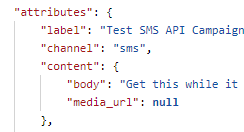
Even if I try to use a publicly available image I still get the same error message: “media_url” is not a valid field for the resource “content” (See screenshot below)

Thanks

ArpitBanjara
Principal User II
Principal User II
August 30, 2024

Hey @obviyo 

can you confirm if you have already done the below?

In your uploaded screenshot, the media_url is set to null. Make sure to replace null with the actual URL of your image. 

something like below 

{
"attributes": {
"label": "Test SMS API Campaign",
"channel": "sms",
"content": {
"body": "Get this while it lasts!",
"media_url": "https://example.com/path/to/your-image.jpg"
}
}
}

let me know

Arpit Banjara - Lead Email Marketing Specialist at Flowium
obviyoAuthor
Problem Solver I
August 30, 2024

Right, so I’m actually sending in a message through patch request to /api/campaign-messages/{MESSAGE_ID_HERE} that looks very similar to what you have above but it is returning to me with the media_url as null. I’m never setting media_url to null it just always returns as null. See my fuller screenshot below. The above json is what I’m actually sending in. I’ve tried with all kinds of different publicly available image links and it always comes back with the media_url as null.

Thanks again for your help in looking into this.

kaila.lawrence
Community Manager
Community Manager
September 6, 2024

@obviyo Have you figured this one out yet or do you still need help?

obviyoAuthorAnswer
Problem Solver I
September 6, 2024

I still don’t see a way to add a dynamic image using the api. The attempts above did not work for me. I only ever see null returned for the media_url as mentioned above and that doesn’t seem to correspond to the dynamic image url I set if I try to use the api to pull back an sms campaign I setup in the ux.


Thanks!