


Contributor I
July 1, 2024
Solved

How to add Variant of an product?

  • July 1, 2024
  • 1 reply
  • 661 views

Hi.


I am trying to add Variant of a product in the abandoned checkout.

The default setting is for Item quantity but I want to show Variant.

I used {{ event.extra.line_items.0.presentment_variant_title|default:'' }}  code for displaying the variant which works for a single product.

But when there are 2 or more products it shows the same weight and count of the variant (picking up the item count from 0)
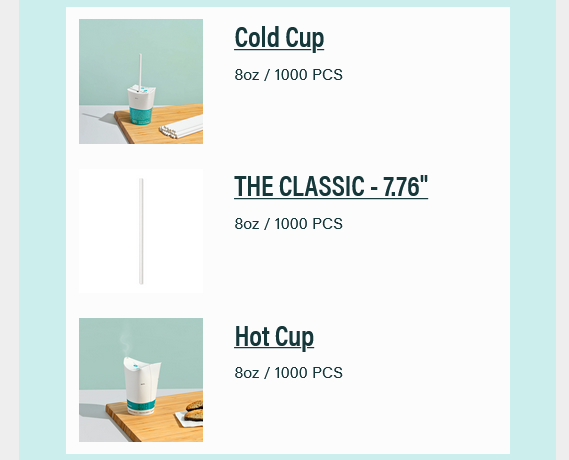
Can anyone share the correct version of the code so it displays the value of variant related to individual variants and not same for all.

    This topic has been closed for replies.
    Best answer by ArpitBanjara

    Hey @Abd.saif16 

    Welcome to Klaviyo community

    I think you will need to remove the 0 and make use of the repeat for and alias

    Let's say you have 3 items, in the event data you would have: 
    {{ event.extra.line_items.0.presentment_variant_title|default:'' }}
    {{ event.extra.line_items.1.presentment_variant_title|default:'' }}
    {{ event.extra.line_items.2.presentment_variant_title|default:'' }}
    Each variable corresponding to each item's presentment_variant_title


    So you'll set your repeat for as: event.extra.line_items The alias as: item

    And in the template, you'll use: {{ item.presentment_variant_title }}

    This is covered in more detail here:  How to use the content repeat feature : https://help.klaviyo.com/hc/en-us/articles/4408802445339


    Let me know if this helps

    Thanks,
    Arpit

    1 reply

    ArpitBanjara
    Principal User II
    Principal User II
    July 1, 2024

    Hey @Abd.saif16 

    Welcome to Klaviyo community

    I think you will need to remove the 0 and make use of the repeat for and alias

    Let's say you have 3 items, in the event data you would have: 
    {{ event.extra.line_items.0.presentment_variant_title|default:'' }}
    {{ event.extra.line_items.1.presentment_variant_title|default:'' }}
    {{ event.extra.line_items.2.presentment_variant_title|default:'' }}
    Each variable corresponding to each item's presentment_variant_title


    So you'll set your repeat for as: event.extra.line_items The alias as: item

    And in the template, you'll use: {{ item.presentment_variant_title }}

    This is covered in more detail here:  How to use the content repeat feature : https://help.klaviyo.com/hc/en-us/articles/4408802445339


    Let me know if this helps

    Thanks,
    Arpit

    Arpit Banjara - Lead Email Marketing Specialist at Flowium