Contributor I
November 24, 2022
Solved

How to change formatting on 'back in stock' trigger link

  • November 24, 2022
  • 1 reply
  • 112 views

Hi guys, 

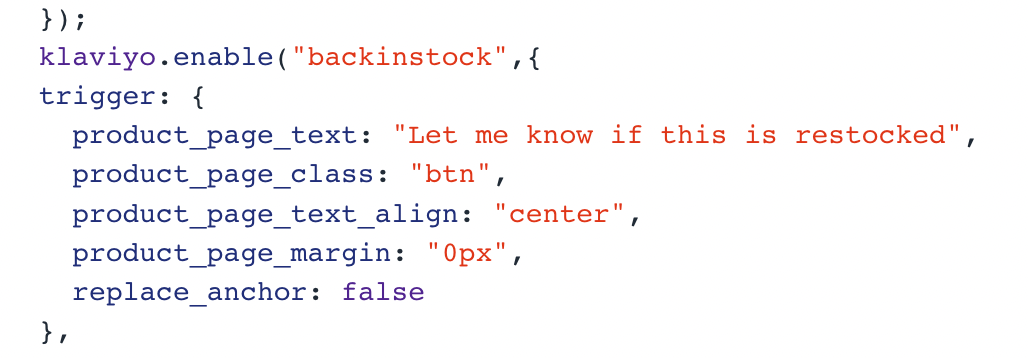
I’m trying to change the link formatting for the ‘Notify me when available’ link in shopify. The current code looks like this, and I just want to change the font and colour of the link and put a border around it. Does anyone know how to do this? 

Thanks :) 
 

    This topic has been closed for replies.
    Best answer by alex.hong

    Hi there @tia ,

    Welcome to the Community.

    If you’re looking to edit the styling of the “Notify me when available” button, then I recommend reviewing our guide on Back in Stock Styling Code Snippets for Free Shopify Themes, which shares the key changes to make for each free theme to quickly ensure your Back in Stock button and Form match your theme's styling.


    Hope that helps,

    Alex

    1 reply

    alex.hong
    alex.hongAnswer
    Klaviyo Alum
    November 25, 2022

    Hi there @tia ,

    Welcome to the Community.

    If you’re looking to edit the styling of the “Notify me when available” button, then I recommend reviewing our guide on Back in Stock Styling Code Snippets for Free Shopify Themes, which shares the key changes to make for each free theme to quickly ensure your Back in Stock button and Form match your theme's styling.


    Hope that helps,

    Alex