


Active Contributor I
November 28, 2023
Solved

How to change the text of a button within the "Product" block?

  • November 28, 2023
  • 10 replies
  • 2096 views

I’m still fairly new to this, so learning what’s what and where things are.

My current roadblock is trying to change the text of the pre-made button within the Product block. Is this possible?

I want to change the Shop Now to something else.

Thanks.

    Best answer by Taylor Tarpley

    Hi there @fandf


    Thanks for sharing your question with us! Happy to help! 


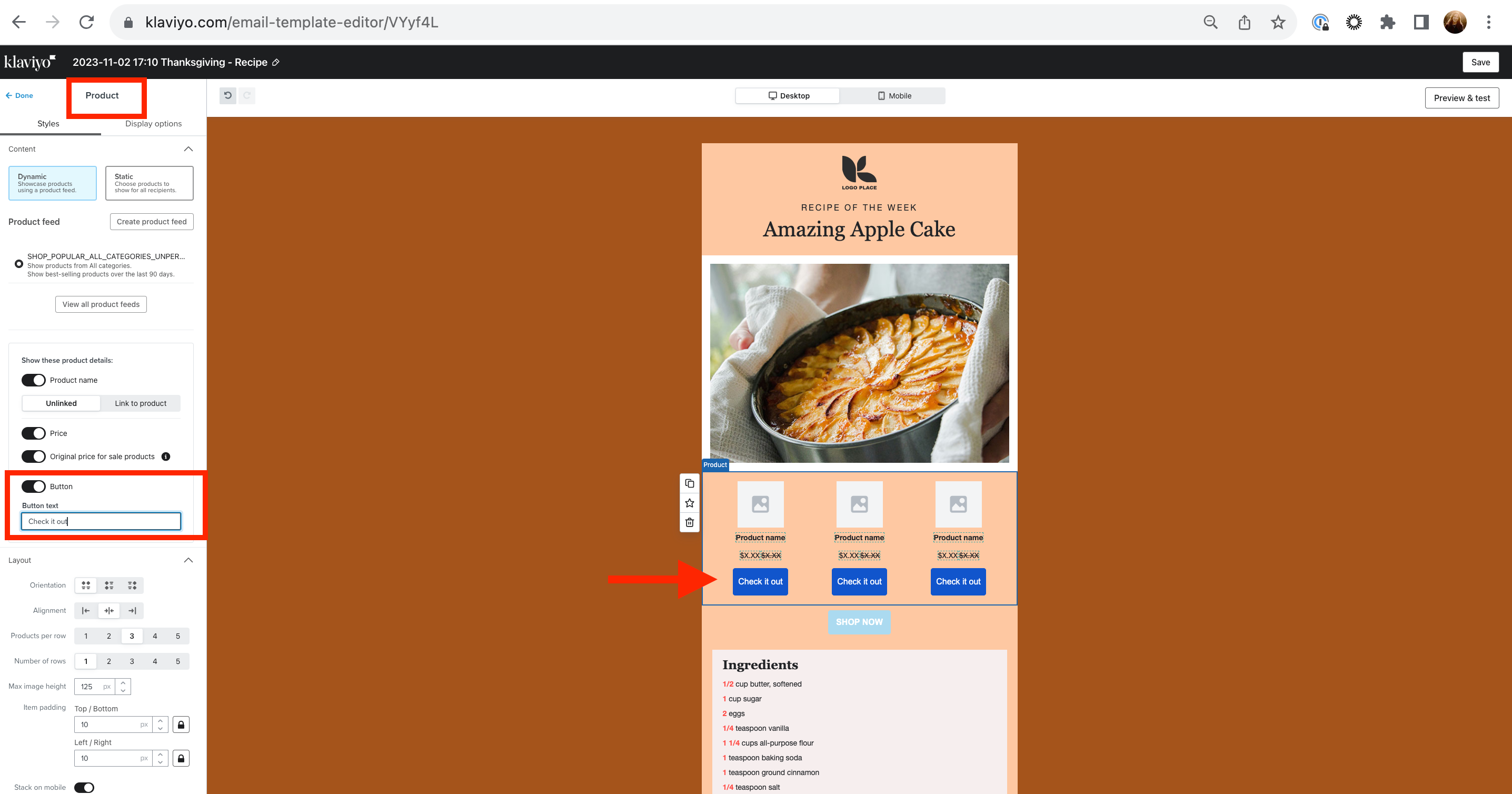
    Yes, this is definitely possible! I suggest clicking into the product block button and finding the text box under the ‘Button text’ title and changing the text there. You can check out this screenshot for more guidance!


    Additionally, as your a very new to Klaviyo, here are some more resources to get you started with a strong foundation! Make sure to join a user group based on your industry , learn from our experts in the industry, and check out our Academy courses and live trainings as well!  


    Thanks for participating in the Community!

    -Taylor 


    10 replies

    Taylor Tarpley
    Community Manager
    Community Manager
    November 28, 2023

    Hi there @fandf


    Thanks for sharing your question with us! Happy to help! 


    Yes, this is definitely possible! I suggest clicking into the product block button and finding the text box under the ‘Button text’ title and changing the text there. You can check out this screenshot for more guidance!


    Additionally, as your a very new to Klaviyo, here are some more resources to get you started with a strong foundation! Make sure to join a user group based on your industry , learn from our experts in the industry, and check out our Academy courses and live trainings as well!  


    Thanks for participating in the Community!

    -Taylor 


    fandfAuthor
    Active Contributor I
    November 29, 2023

    Thank you so much.
    I ended up finding this solution late last night. Thank you so much for your reply.

    Contributor II
    January 8, 2024

    I would like to add to this question: is it possible to change the button text also if you choose static and not dynamic content? 

    Thanks in advance!

    Taylor Tarpley
    Community Manager
    Community Manager
    January 12, 2024

    Hi @Nikolaus


    Yes you should!


    -Taylor 

    Contributor I
    February 6, 2024

    I experience that when I choose dynamic content, than I am able to change the text in button. But when I choose static content it disappears, than I am forced to have it say “Shop now”. 

    Can´t figure it out 🤔 Please help 🙏

    Taylor Tarpley
    Community Manager
    Community Manager
    February 12, 2024

    Hi  @monicahattrem


    When you navigate to a static block, you will need to click into the individual product to change the text ‘Shop Now’

    Hope that helps!

    -Taylor 

    Contributor I
    August 11, 2024

    @Taylor Tarpley re: dynamic product feed - is there a way to format the button text i.e. make it bold?

    Contributor I
    November 16, 2024

    I’m still fairly new to this, so learning what’s what and where things are.

    My current roadblock is trying to change the text of the pre-made button within the Product block. Is this possible?

    I want to change the Shop Now to something else.

    Thanks.
     

    NOT THERE

    Contributor I
    February 25, 2025

    I agree, the product options have changed and editing the text of a button is no longer possible. Seems like an odd change to make though.

    This should be unmarked as solved for this query unless I am missing something, which I hope I am…..

    Uncarved Block
    Active Contributor I
    Active Contributor I
    February 5, 2026

    Not possible to change the Button text anymore.  This is VERY important and needs to be fixed.


    Not editable in the method mentioned here anyway.  This should not be a global setting either.