


Active Contributor I
November 2, 2021
Solved

How to double check product links are working in Browse Abandonment Flow?

  • November 2, 2021
  • 12 replies
  • 1025 views

Hello, 

I’ve just set up a Browse Abandonment Flow using the Klaviyo template for this. I’m ready to go live but I wanted to double check the links are going to work. I’ve tested it in the Preview but when I click on the product link it goes to a 404 page. I presume this is because it’s not live? Or are my links broken?


This is what I’ve done…
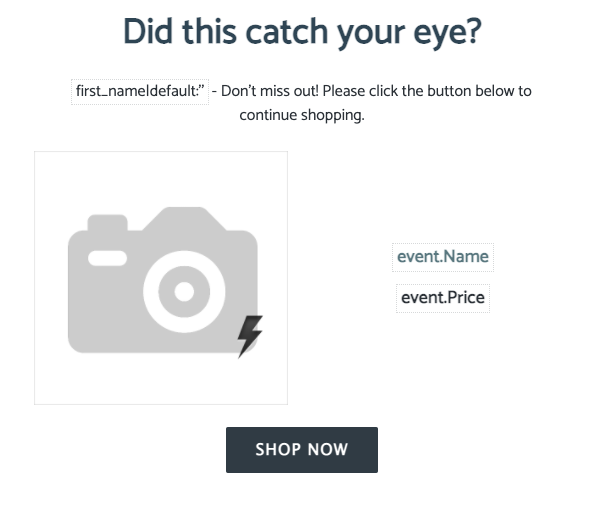
 

Here’s the code of the image:
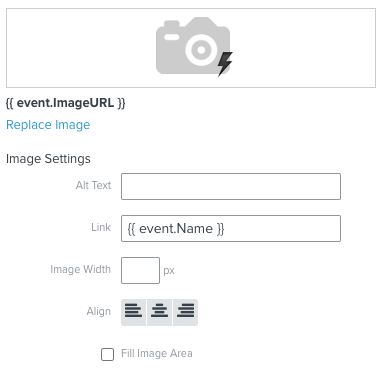
Is that Link URL correct? I’m guessing that might be the issue. Any ideas what URL should be there?


And for the text:
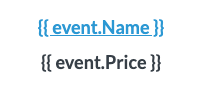
Code is:

<p style="text-align: center;"><a href="http://{{ event.Name }}"><strong><span style="font-size:18px;">{{ event.Name }}</span></strong></a></p>

<p style="text-align: center;"><strong style="text-align: center;"><span style="font-size: 18px;">{{ event.Price }}</span></strong></p>
 

And the button:

Code is:
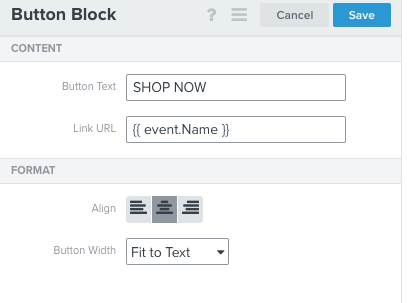
Do I need to update my links?


Thanks very much for your help. 


Jin :blush:

This topic has been closed for replies.
Best answer by stephen.trumble

Hey @Jin 

After some further investigation and conversation with the Klaviyo Community team I realized I missed the main issue with your dynamic table block. The Link URL you are using is {{ event.Name }} which would actually just pull in www.PRODUCT_NAME.com . that's gonna be the core issue. Steps three through five of the guide to dynamic table blocks will help you identify the Collection and add dynamic product information from that collection to use the proper syntax. Hope this helps clarify things more for you and my apologies for missing this earlier! 

12 replies

stephen.trumble
Klaviyo Alum
November 2, 2021

Hey @Jin 

Thank you so much for reaching out the Klaviyo Community for help with your Browse Abandonment Flow. Happy to help you figure out what’s going on!

The first thing you will want to do is verify that you added the correct “Viewed Product” tracking snippet into your ecommerce store. The code varies depending on which integration you use, the guide that i included will walk you through which code to use and how to check it.

Next, when you add web tracking to your site, Klaviyo is only able to track the browsing activity of "known browsers," i.e., browsers who have visited and engaged at least once before. There are two key ways we are able to identify a site visitor: if someone has clicked through a Klaviyo email to your website or if someone has subscribed or opted in through a Klaviyo form. Anonymous browsers are not tracked. If they haven’t done either of these two steps the product block will not populate.

Also, please check that your product block is set to static and not set to dynamic as dynamic product blocks only works in Abandoned Cart Flows and not in Browse Abandonment Flow. The syntax you are using to pull the product into the email are correct for this flow but the block settings may be the reason it isn’t populating when you are testing the flow. 

Check out these other Community post that may help you in solving why your flow isn’t populating correctly. 

Hope this helps get your flow up and running for your customers. Thank you so much for being part of the Klaviyo Community!

-Stephen
JinAuthor
Active Contributor I
November 3, 2021

Hi @stephen.trumble thanks for your help with this. 

I’ve installed the “Viewed Product” tracking to the liquid file in Shopify. That seems to be set up correctly. 

The product block is set to static too so hopefully that’s ok. If I preview the email in Klaviyo it is populating with a product so that’s great. But the links don’t work.

If I send myself a test email, and click on the product link, this is where I get the ‘page not found’ message looks like this:

If I click on the SHOP NOW button - it doesn’t link anywhere and same with the product image. I just want to make sure that these are going to work when I set it live - but perhaps you can’t test this unless it’s live? 

But could this be because this is a test email and not that my links are broken? I just want to double check this before setting it live. Let me know what you think.


Many thanks,

Jinny

stephen.trumble
Klaviyo Alum
November 5, 2021

Hey @Jin 

After some further investigation and conversation with the Klaviyo Community team I realized I missed the main issue with your dynamic table block. The Link URL you are using is {{ event.Name }} which would actually just pull in www.PRODUCT_NAME.com . that's gonna be the core issue. Steps three through five of the guide to dynamic table blocks will help you identify the Collection and add dynamic product information from that collection to use the proper syntax. Hope this helps clarify things more for you and my apologies for missing this earlier! 

-Stephen
JinAuthor
Active Contributor I
November 5, 2021

ok thanks @stephen.trumble - it’s really tricky as I don’t have the new editor. I don't suppose you have a link to instructions for the old editor? I’ll try and figure out how to set this up.

stephen.trumble
Klaviyo Alum
November 5, 2021

ok thanks @stephen.trumble - it’s really tricky as I don’t have the new editor. I don't suppose you have a link to instructions for the old editor? I’ll try and figure out how to set this up.

Hey @Jin 

Absolutely, here is the Help Center article How to Build Dynamic Table Block (original editor)!

-Stephen
JinAuthor
Active Contributor I
November 6, 2021

Hi @stephen.trumble 

Thanks for helping. I’m still having a few problems though. I have managed to fix the URL issue - which now works if I put this in the Link: (just in case anyone else has the problem)

The issue I have now is a repeating product block - over and over, the data source is set like this:


Do you know why it would be repeating and how to get it to just show once?


Thanks again!


Jinny


stephen.trumble
Klaviyo Alum
November 9, 2021

Hey @Jin 

From the looks of your screenshots you need to set the block to static instead of dynamic. This should stop it from repeating!

-Stephen
JinAuthor
Active Contributor I
November 9, 2021

oh wow, that’s fixed it! Thanks @stephen.trumble 

I thought the table had to be dynamic but it’s all working as a static one now. Thanks very much for your help. :sweat_smile:


stephen.trumble
Klaviyo Alum
November 9, 2021

oh wow, that’s fixed it! Thanks @stephen.trumble 

I thought the table had to be dynamic but it’s all working as a static one now. Thanks very much for your help. :sweat_smile:


That’s great news!! I’m so glad we were able to work together to get your product block working for your business!! Thank you so much for being an active member in the Klaviyo Community!

-Stephen
February 27, 2022

Using the new editor and the static product table for abandoned cart help worked great, but can’t get the product image to come in. As a static table, doesn’t appear I can add a “Placeholder” image in new editor like I could in the old editor. I’ve tried every possible option, including my own jpeg. Nothing works, please help!
