Contributor I
January 24, 2023
Solved

How to have a translated opt in page

  • January 24, 2023
  • 2 replies
  • 122 views

Hello!

I would like to improve our customer journey by providing the proper language when opting in based on the website they are on. 

Meaning if they are on the french and the opt in through our french pop up for example. How can I do this?

Thanks a lot for your help and sorry if it’s a silly question :)

Have a great day,


LJ

    This topic has been closed for replies.
    Best answer by Omar

    Hi @ljmiginiac,

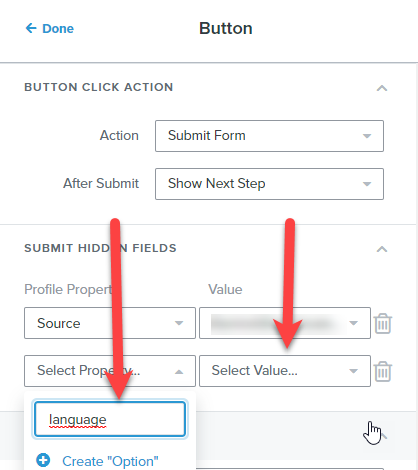
    This can be easily done by adding additional profile properties to the specific popups.

    Click on the submit button for that popup and add a new language property.
    Once you've created it you can select it from the list going forward and only add or select the correct language value i.e. FR or EN


    Did this help?


    Hope this helps,


    Omar Lovert // Polaris Growth // Klaviyo Master Platinum Partner

    We help with e-commerce growth through CRO, Klaviyo and CVO

    2 replies

    Omar
    Partner - Platinum
    OmarAnswer
    2025 Champion
    January 24, 2023

    Hi @ljmiginiac,

    This can be easily done by adding additional profile properties to the specific popups.

    Click on the submit button for that popup and add a new language property.
    Once you've created it you can select it from the list going forward and only add or select the correct language value i.e. FR or EN


    Did this help?


    Hope this helps,


    Omar Lovert // Polaris Growth // Klaviyo Master Platinum Partner

    We help with e-commerce growth through CRO, Klaviyo and CVO

    Helping E-commerce brands maximize Lifetime Value & Profits with Klaviyo, CRO & CVO - Get your free Audit - https://link.polarisgrowth.com/free-audit
    Contributor I
    January 27, 2023

    Hi @Omar ,


    Thanks a lot for the tips! It makes sense :)


    Have a great day,


    LJ