


Contributor II
February 3, 2022
Solved

How to link button to your Update Preference page

  • February 3, 2022
  • 16 replies
  • 15634 views

So far we’ve been sending out one email to all our subscribers. We’d like to better understand our customers, their needs and preference to better serve them emails that are relevant. I’m planning to send them an email to update their email preference. I’ve updated the default preference page with additional questions using the checkboxes option. What I’m struggling with is actually linking it to a button in the email. When I used {% manage_preferences %} in place of the button URL, it displays as:
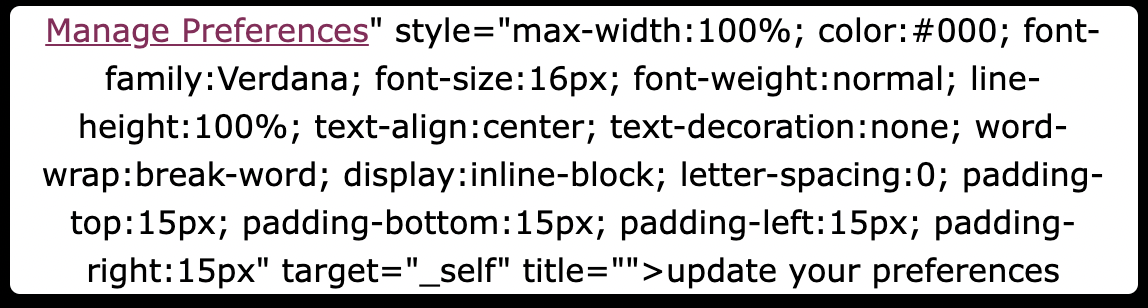


    This topic has been closed for replies.
    Best answer by Bobi N.

    @cyclist-jz 

    The link when used into buttons or imgs or linked text is different from the code you use as plain code.. so the link for preferences is {% manage_preferences_link %} or if you want to link some text, imgs or button to unsubscribe you can use {% unsubscribe_link %}

    16 replies

    Bobi N.
    Partner - Platinum
    Bobi N.Answer
    Champion & Partner
    February 4, 2022

    @cyclist-jz 

    The link when used into buttons or imgs or linked text is different from the code you use as plain code.. so the link for preferences is {% manage_preferences_link %} or if you want to link some text, imgs or button to unsubscribe you can use {% unsubscribe_link %}

    Head Email Marketing Technician at Flowium
    Contributor II
    February 4, 2022

    Thank you @Bobi N. Do you know if there’s a way to test the link before sending it out. Right now when I click on the link it says “This page is just a placeholder. In a real email, the link you clicked will be replaced with a page personalized for the email recipient.”

    Bobi N.
    Partner - Platinum
    Champion & Partner
    February 4, 2022

    @cyclist-jz 

    You are probably subscribed to your own account in klaviyo so.. 

    • the email you want to test save as template
    • than go on the search bar top left and search for your email
    • when your profile opens go top right and click messages and than below you will see option send message
    • than pick the template you previously saved from the email you want to test and send yourself an email
    • when this email comes to your inbox it will be actual email where you can test those links
    Head Email Marketing Technician at Flowium
    Contributor II
    February 4, 2022

    Fantastic! Thank you @Bobi N. 

    Contributor III
    May 17, 2023

    Hi @Bobi N. 


    Thanks so much for the info above, I’ve been having the same problems so it has been very helpful.


    However, when I have tested the email (using the instructions above) - the button which I have linked to the {% manage_preferences_link %} that you mentioned above, does not show up. It doesn’t show up in the preview, nor the test send directly to my inbox.


    Do you have any insight as to why this might be? The space where the button is supposed to be is just blank.


    Thanks


    Georgia

    Taylor Tarpley
    Community Manager
    Community Manager
    May 17, 2023

    Hi there @Georgia White


    The button won’t appear if you use the {% manage_preferences %} incorrect link mentioned above by itself, essentially the link breaks the button and causes it to display a string of unwanted HTML. However, if you are using the correct link as you stated above, it might be that there’s an added or missing space/letter, coding can be very particular like that! Can you confirm the link looks like below? It should be noted the screenshot is missing the end bracket.

    {% manage_preferences_link %}

    Thanks for partipcating in the Community!

    -Taylor


    Contributor III
    May 18, 2023

    Thanks Taylor, it is working this morning so perhaps it was just a bit of a time lag on the test send! Thanks for the help :)

    Problem Solver I
    August 7, 2023

    @Taylor Tarpley, hi, how can I allow my customers to update their profiles without the Unsubscribe button showing? When I sent my test like @Bobi N. suggested, it worked, but I would prefer if the unsubscribe button isn’t shown during my request for their information.

    David To
    Klaviyo Employee
    Klaviyo Employee
    August 8, 2023

    Hey @emailchelsea123,

    Are you talking about the unsubscribe option in the footer of your email or within your manage preference page? 

    Having an option for your recipients to unsubscribe is not only crucial and mandatory in many cases, but it also helps build trust with your customers. For this reason, an unsubscribe link is always made available and visible at the footer of your email as detailed in our How to add an unsubscribe link to Klaviyo emails Help Center article.

    If it was the unsubscribe button at the bottom of your manage preference page, you wouldn’t be able to remove the unsubscribe option from the default page option. However, you can certainly enable custom hosted pages which would allow you to custom code your own manage preference page with the design, layout, and options of your choosing. You can learn more about this option from our How to custom code consent pages Help Center article.

    I hope this helps!

    David

    Problem Solver I
    August 8, 2023

    @David To Disregard this. I didn’t read all of your message. Thanks.

    No, I’m only referring to the link. So, I have a list of people and I want to capture what their bday and know what their favorite color is, I have 6 colors for them to choose from, they can select more than one. I want to send out an email saying, “hey I want to hear from you, what colors do you love the most?” I’ll include the link showed {% manage_preferences_link %} as a back end link to this update information page that’s in klaviyo. My issue is, I would prefer that when I specifically send this customers to update their info, I don’t want them to have it in their mind that they should unsubscribe. I always include unsubscribe links at the bottom of emails, I’m only referring to this “update” flow.