I know how to integrate klaviyo with judge.me, but I don’t know how to actually send review request emails from Klaviyo where people can actually click, go, and give reviews.
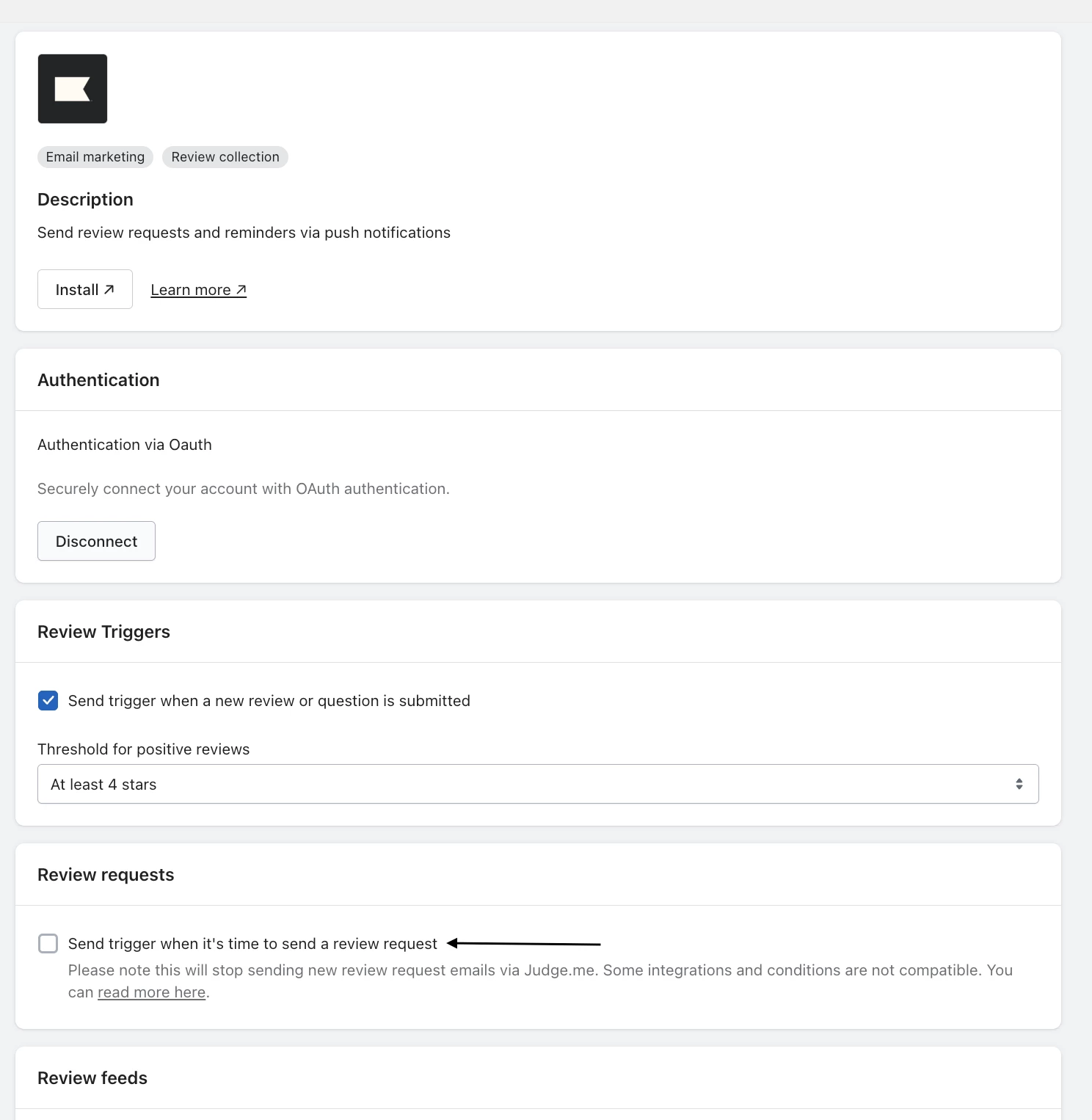
As @MANSIR2094 describes in the above you have to set up the integration - and then you’ll be able to set up the flows. However, the metric is not available to you straight away - once the first ready to review event is sent, you will have the event metric available in order to build out the flows. This happens when you turn on the “Send trigger when it’s time to send a review”.
Below image is from inside JudgeMe → General Settings → Integrations → Search for Klaviyo.
JudgeMe also allows you to set op a data feed with 5 star reviews that will populate dynamically - I highly recommend setting this up to leverage social proof throughout the customer journey.
I hope this helps!
Champion & Klaviyo Partner based in Aarhus, Denmark. It is all about communicating the right message to the right people at the right time!
Hey @Sam91 , Nice work on getting the integration done..... That's already a solid step. To actually send review request emails from klaviyo where people can click and leave a review, here's the simple path that works. In judge.me, make sure the klaviyo integration is enabled and that events like judge.me: review request ' are being sent. Then in klaviyo, check under analytics>metrics to confirm the event is showing up. Once it it, create a new flow using that event as the trigger. Inside the email, use the dynamic link {https://event.review url} this personalized link that takes the customer directly to the page. You can place it in a button or hyperlink like "leave a Review" send a test email to confirm the link works. Once that's done, your flow is ready.
Let me know if this is helpful or need help with implementation
As @MANSIR2094 describes in the above you have to set up the integration - and then you’ll be able to set up the flows. However, the metric is not available to you straight away - once the first ready to review event is sent, you will have the event metric available in order to build out the flows. This happens when you turn on the “Send trigger when it’s time to send a review”.
Below image is from inside JudgeMe → General Settings → Integrations → Search for Klaviyo.
JudgeMe also allows you to set op a data feed with 5 star reviews that will populate dynamically - I highly recommend setting this up to leverage social proof throughout the customer journey.
I hope this helps!
Champion & Klaviyo Partner based in Aarhus, Denmark. It is all about communicating the right message to the right people at the right time!
Is there a way to embed the Judge.me review functionality into a Klaviyo email so I can collect the review directly within the email? I ideally don’t want the recipient to have to click a button, that then navigates to the website to then place a review (lots of opportunity to miss conversion).