


Contributor I
June 26, 2024
Solved

How to tell the difference between my variations in Klaviyo product feed

  • June 26, 2024
  • 5 replies
  • 165 views

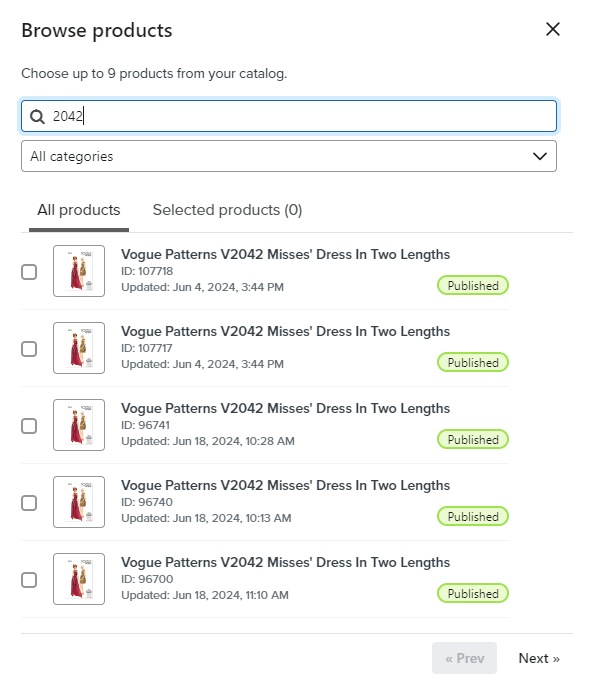
When using the product block static picker the variations for my product show but with no recognisable difference to tell you which to pick. Is there a trick to help you choose? For example is the smallest id number the parent product link and the higher numbers the variations?

Could it show the sku in future?
 

    This topic has been closed for replies.
    Best answer by Taylor Tarpley

    Hi there @AmyScarr


    Thanks for sharing your question with us! 


    Do you mind sharing if the product variations have the same image on your website? Is this how to variations also show up in your product catalog in Klaviyo?


    -Taylor 

    5 replies

    Taylor Tarpley
    Community Manager
    Community Manager
    June 28, 2024

    Hi there @AmyScarr


    Thanks for sharing your question with us! 


    Do you mind sharing if the product variations have the same image on your website? Is this how to variations also show up in your product catalog in Klaviyo?


    -Taylor 

    AmyScarrAuthor
    Contributor I
    July 1, 2024

    Hi @Taylor Tarpley 

    Yes that’s right. The image is the same for all variations.

    AmyScarrAuthor
    Contributor I
    July 22, 2024

    Hi @Taylor Tarpley Fingers crossed you know the answer? 😊

    AmyScarrAuthor
    Contributor I
    September 10, 2024

    Hey Klaviyo It’s been Two months with no answer. And today the follow up question confirming my issue gets tagged as the “answer”? Please can you help?

    retention
    Partner - Platinum
    2025 Champion
    September 10, 2024

    Hi @AmyScarr, perhaps I might be able to suggest a workaround. 

    I agree with you in that I think Klaviyo needs to put a bit more detail when you select items in their interface to make it more obvious which item variation is which.

    However, what you can do is to find the product by the product ID in the Klaviyo Product Catalog, where you can drill into each item and see what each ID represents so you know the proper one to select.  

    See here:

    Does that help?

    Joseph Hsieh // retentioncommerce.com // X: @retention
