



worcestershiresauce
Active Contributor I
April 9, 2024
Solved

Is there a way to automatically suppress Sunset recipients who didn't engage?

  • April 9, 2024
  • 6 replies
  • 1655 views

I set up a flow to remove thousands of unengaged profiles so my client wouldn’t have to include them in billing.

But chose the wrong rule at the end of the flow, so it hasn’t actually suppressed them...
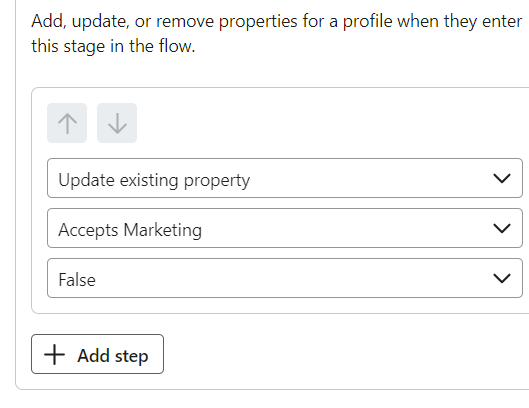
It was the closest option to “suppress” I could find, and of course I presumed that Klaviyo, the leading ESP, wouldn’t encourage me to do a Sunset flow to clean my list without mentioning that for the “automation” to work, there would be parts of it that were NOT automated and must be done manually.

Went to ask the community how to make it automatically suppress and only then learned from 2 posts  that such an option doesn’t exist.

Let me check the date… yep, it’s 2024.

Have I missed something??? Is there truly no automation that unsubscribes contacts without my participation??

And is there a way I can find the contacts who’ve already passed through so I can turn them into a list and suppress them?

Posts I reference:

Apologies if this post reads as frustrated and cynical. But I am incredulous, it feels like the dev team became very complacent at keeping current with expected features.

    This topic has been closed for replies.
    Best answer by DavidSandel

    Yes, you have missed something.

    https://www.klaviyo.com/blog/solution-recipe-9-use-klaviyo-flow-webhooks-to-automate-suppressions-using-segments-and-klaviyos-apis


    Just make sure the Suppression endpoint they reference in the article is the latest version (it looks like they are).

    https://developers.klaviyo.com/en/reference/suppress_profiles

    6 replies

    DavidSandel
    Partner - Silver
    Partner - Silver
    April 9, 2024

    Yes, you have missed something.

    https://www.klaviyo.com/blog/solution-recipe-9-use-klaviyo-flow-webhooks-to-automate-suppressions-using-segments-and-klaviyos-apis


    Just make sure the Suppression endpoint they reference in the article is the latest version (it looks like they are).

    https://developers.klaviyo.com/en/reference/suppress_profiles

    Klaviyo Silver Master --> LowGravitySolutions.com
    bluesnapper
    Partner
    Champion & Partner
    April 9, 2024

    Thanks @DavidSandel 

    It's really useful info to have as I was looking for an automated sunset/suppression approach!

    Your first link only took me so far but the webhook preview was failing. However when I amended the JSON body to correspond to the example in your 2nd dev link, the preview webhook was successful. My flow is now at manual for testing.

    Thanks again 😀 

    Andy

    https://bluesnapper.com - Klaviyo Champion '24 & Partner
    retention
    Partner - Platinum
    2025 Champion
    April 9, 2024

    @DavidSandel - Super glad you brought up Developer Solution recipes, they use to be on the Klaviyo Developer Blog on medium.com, but it looks like Klaviyo is migrating them over to the Klaviyo blog.

    For @worcestershiresauce, the second part of your question:

    And is there a way I can find the contacts who’ve already passed through so I can turn them into a list and suppress them?

    The easiest way that I know of is to create a Segment of those that “pass through” your Flow.  Assuming you still have the “Update Property” action to mark the custom property “Accept Marketing” as False, then you can create a Segment of people who’s property “Accepts Marketing” is “False.”

    Via Uploading to Suppress via CSV

    Then you can export that Segment as a CSV, and then go to your Profiles → Viewed Suppress Profiles (Upper Right Corner).  Then click on “Import” (Upper Right Corner) and upload the CSV that you exported from your Segment.  Make sure your CSV has nothing but one column with the header “Email” and the list of email addresses you want to suppress.

    Via Segment Quick Action Menu to Suppress

    The other and faster way is to simply click on the quick action menu for “Suppress current members” when viewing the Segment in the List & Segments view.  See here:


    I’m a bit old fashion, and prefer the upload feature so I always have hard copy “paper trail” record of email address who I know I have manually suppressed in case I ever need to go back to verify.  As a convention, I save every manual suppressed people in a secured folder with the date/time as the filename just in case!

    Here’s a Klaviyo guide to walk you through it just in case:

    Hope this helps.

    Joseph Hsieh // retentioncommerce.com // X: @retention
    worcestershiresauce
    Active Contributor I
    Active Contributor I
    April 10, 2024

    Thanks all for your help!

    Have gone with the segment>click suppress for now, going to investigate the webhook version and see if I can get that done for future ease. I got stuck at the endpoint API step cos I am a humble copywriter etc, not familiar coding and developer stuff, but I’ll just ask dumb questions 😅

    Appreciate your help @DavidSandel and @retention. David would you mind if I tag you if I get stuck setting it up?

    DavidSandel
    Partner - Silver
    Partner - Silver
    April 10, 2024

    Would be my pleasure.

    Klaviyo Silver Master --> LowGravitySolutions.com
    bluesnapper
    Partner
    Champion & Partner
    April 10, 2024

    Hi @worcestershiresauce 

    If you do decide to use a webhook, I’ve just created one following @DavidSandel posting those help pages. All works well so happy to share.

    The flow is triggered when contacts join a sunset segment. In my flow, the suppression occurs after one attempted ‘re-subscribe’ email plus a time delay to allow them to re-engage.

    Webhook steps

    Create new private API key: https://www.klaviyo.com/settings/account/api-keys for use in the authorization header below.

    Add a webhook to your flow (see image below):

    • Destination URL is https://a.klaviyo.com/api/profile-suppression-bulk-create-jobs/
    • accept value is application/json
    • content-type value : application/json
    • revision value is a date (think I used yesterday’s date format: 2024-09-04)
    • Authorization value is Klaviyo-API-Key your-private-api-key

    Replace your-private-api-key with the key created in the first step above.

    copy this into the JSON body section:

    {
      "data": {
        "type": "profile-suppression-bulk-create-job",
        "attributes": {
          "profiles": {
            "data": [
              {
                "type": "profile",
                "attributes": {
              "email": "{{person.email}}"
            }
              }
            ]
          }
        }
      }
    }


    You can preview the webhook against a profile to ensure you get a success message from Klaviyo. Nothing will be updated on that profile.

    Then add the suppression webhook as the first step to your sunset flow at manual just for testing. When a new contact enters the segment, they’ll be in the webhook's ‘needs review’ tab. You can choose to initiate the webhook to see if they are unsubscribed OK (example also below). When you’re happy, you can move the suppression webhook to where you want the suppression to occur in your sunset flow and set it to live.

    Hope that helps

    Regards

    Andy

    webhook config.
     
    Test webhook for profile


    https://bluesnapper.com - Klaviyo Champion '24 & Partner