Hi, I have been to a couple of events and visitors have signed up to a manual subscribe list. Would I add them to my Master List from a CSV doc, but I wanted to kinda segment them and send them an email, like >>>> great to see at the plant fair last weekend. I am very new to Klaviyo and would be grateful of any pointers of how I would acheive this OR if this is a good or bad idea (as not that converse with Klaviyo yet) . Thank you in advance.
Welcome to the community (and Klaviyo) @JulietteX0
The more personalisation the better! So, yes, your approach is spot on!
If your master List is double opt-in you may not want confirmation emails sent to those contacts when you import. If so, then create a new single opt-in list ‘Plant Fair’ and import your list into that new list. However, if your Master list is single opt-in, I’d recommend using that list for the import so you maintain a master list for all your contacts.
To identify the plant fair contacts for your campaign, you’ll need to add a custom property. If you may attend events in the future, I would create this custom property as a list data-type. That one custom property will be able to hold multiple values (each event you attend). Let’s call that custom property ‘event_attended’
Steps to import:
Prepare your .csv. My example below will import email, event_attended, firstname, lastname. Note that the value in event_attended is enclosed by square brackets and quotations - this lets Klvaiyo know it’s a list
Select the list for the import (See my comments above) and under ‘Manage list’ top right, choose ‘import contacts’ and then upload your csv
On the next screen, check the fields you want to import. For 'event_attended' under 'Klaviyo profile property choose 'create a new field'. On the next dialog 'Create a new profile property' select 'List'. Ensure the data type for new 'event_attended' property shows as 'List' when you’re done. Then click the 'Next button.
On the next screen enable 'Yes, update subscription status for all imported contacts to 'subscribed' i.e as you say they’ve subscribed in person.
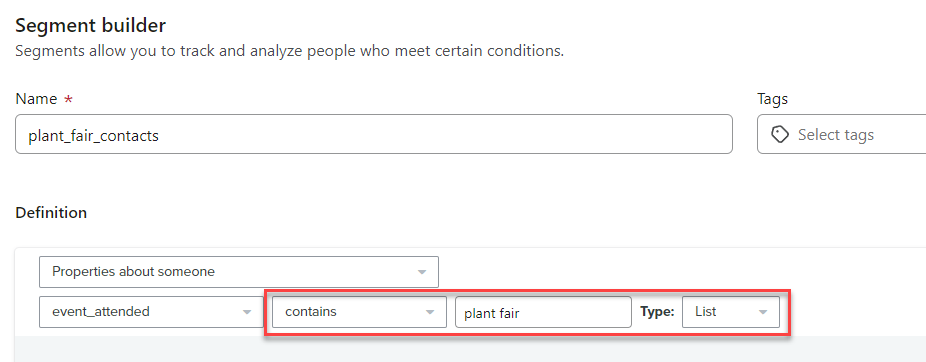
For your follow-up email campaign, create a segment as below. Ensure it uses ‘contains’ and type ‘list’. that’s your sending segment.
I recommend you do all the above on a test list/import so you’re comfortable with the results before tackling the actual list.
Hope that helps but any questions, please let me know
Welcome to the community (and Klaviyo) @JulietteX0
The more personalisation the better! So, yes, your approach is spot on!
If your master List is double opt-in you may not want confirmation emails sent to those contacts when you import. If so, then create a new single opt-in list ‘Plant Fair’ and import your list into that new list. However, if your Master list is single opt-in, I’d recommend using that list for the import so you maintain a master list for all your contacts.
To identify the plant fair contacts for your campaign, you’ll need to add a custom property. If you may attend events in the future, I would create this custom property as a list data-type. That one custom property will be able to hold multiple values (each event you attend). Let’s call that custom property ‘event_attended’
Steps to import:
Prepare your .csv. My example below will import email, event_attended, firstname, lastname. Note that the value in event_attended is enclosed by square brackets and quotations - this lets Klvaiyo know it’s a list
Select the list for the import (See my comments above) and under ‘Manage list’ top right, choose ‘import contacts’ and then upload your csv
On the next screen, check the fields you want to import. For 'event_attended' under 'Klaviyo profile property choose 'create a new field'. On the next dialog 'Create a new profile property' select 'List'. Ensure the data type for new 'event_attended' property shows as 'List' when you’re done. Then click the 'Next button.
On the next screen enable 'Yes, update subscription status for all imported contacts to 'subscribed' i.e as you say they’ve subscribed in person.
For your follow-up email campaign, create a segment as below. Ensure it uses ‘contains’ and type ‘list’. that’s your sending segment.
I recommend you do all the above on a test list/import so you’re comfortable with the results before tackling the actual list.
Hope that helps but any questions, please let me know
Hi Bluesnapper, Firstly my sincere apologies for the delay in responding. Thank you so much for the welcome, it is good to be here. Soon after putting this out I had a freak accident and semi ruptured my knee and have been hopping about in agony, just before the UK was going into a bank holiday weekend (so feeling a bit sorry for myself) whilst like all of us, negotiating many other tasks - called life! You have been so incredibiliy helpful I really appreciate your time, for your very detailed response. I am going to work slowly through your advice (literally hanging off your every word) and fingers crossed it all goes okay. Fortunately my Master list is single opt-in. Just one initial question before I go in, I raise a custom source ie event_attended and then I differentiate each event i.e. “{plant fair}” or “{hummingbird event}” etc and then when I go to send a follow up campaign I create a segment that must include contain and list - but I am a little lost as to how do I find the right event i.e. plant fair or hummingbird event, so I send my message to the right event audience? I am sorry that these are very elementary questions. Also I have obtained their location postcode, so can I just add a new column after last name? It is a little while since I put together the Master list and I am a bit unsure. Thank you Juliette