Contributor I
October 14, 2022
Solved

"Messages" Not Showing Up Under Property Field

  • October 14, 2022
  • 1 reply
  • 152 views

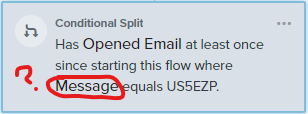
Hello! Total newbie here, so apologies in advance if this is a silly question. I am trying to create a conditional split in an e-mail flow and I’m unable to find “Message” under the properties dropdown list; I am essentially trying to trigger an e-mail #2 when a subscriber does not open e-mail #1, but I’m not sure if I’m missing something that is preventing “Messages” from showing up under the where field:
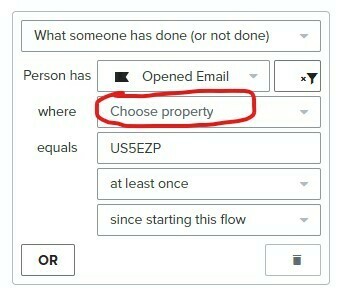
Trying to have “Message” under this field to connect to my e-mail ID
Nothing shows up under property list?

I manually typed in “Message,” would that even work?! Haha. Thanks for your help, everyone!
 

    This topic has been closed for replies.
    Best answer by David To

    Hello @soulfulgreetings,

    Welcome to the Klaviyo Community!

    This sort of behavior is pretty common and occurs when the object you’re filtering for hasn’t occurred yet. I would suggest taking a look at some past Community posts where I’ve explained this behavior in greater detail:

    Since it doesn’t seem like you have any available dimensions under the Opened Email metric to specific, this makes me suspect that there hasn’t been any Opened Email metrics recorded yet. Once you’ve recorded at least one, you should be able to see the “Message” property appear. Further specification of the message ID will be another matter where you can either manually enter it as an exact match format or wait until someone opens that exact email to see it available in the dimensions dropdown.

    I hope this helps!

    David

    1 reply

    David To
    Klaviyo Employee
    David ToAnswer
    Klaviyo Employee
    October 17, 2022

    Hello @soulfulgreetings,

    Welcome to the Klaviyo Community!

    This sort of behavior is pretty common and occurs when the object you’re filtering for hasn’t occurred yet. I would suggest taking a look at some past Community posts where I’ve explained this behavior in greater detail:

    Since it doesn’t seem like you have any available dimensions under the Opened Email metric to specific, this makes me suspect that there hasn’t been any Opened Email metrics recorded yet. Once you’ve recorded at least one, you should be able to see the “Message” property appear. Further specification of the message ID will be another matter where you can either manually enter it as an exact match format or wait until someone opens that exact email to see it available in the dimensions dropdown.

    I hope this helps!

    David