

Contributor I
November 22, 2022
Solved

Pop up teaser background hover effect issue

  • November 22, 2022
  • 4 replies
  • 456 views

Hello,

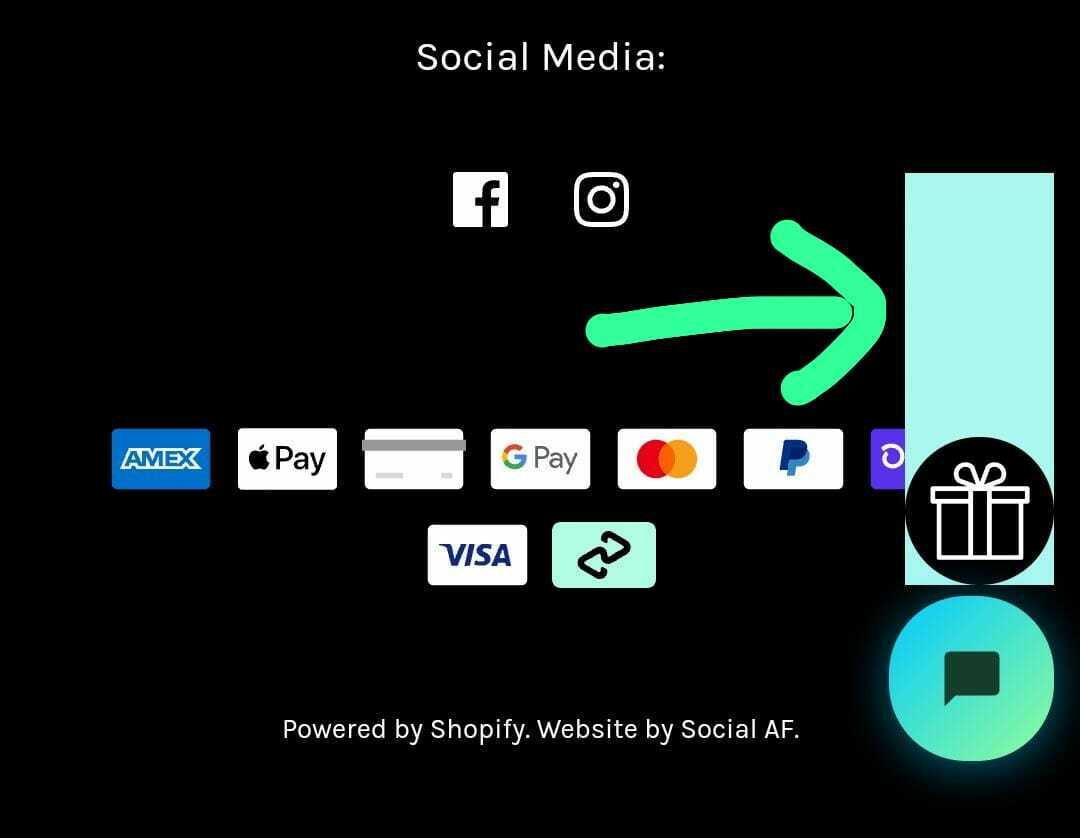
Could anyone help me to remove the blue background hover effect behind pop up teaser. Please find the attached screenshot.


Thank you in advance


    This topic has been closed for replies.
    Best answer by Taylor Tarpley

    Hi @Abdullah,


    Sorry for the delay! 


    To clarify, there might be conflicting CSS on your site that is creating this unintended box behind your teaser. I would connect with our support team who can further investigate this issue for you! 


    -Taylor 

    4 replies

    Taylor Tarpley
    Community Manager
    Community Manager
    November 22, 2022

    Hi there @Abdullah


    Welcome to the Community! Happy to help! 


    Can you access your form builder and ensure that your drop shadow and background image buttons are both toggled off? Like the screenshot below. 


    If you have, this issue could be related to conflicting CSS on your website. 


    Thanks for participating in the Community!

    -Taylor 


    AbdullahAuthor
    Contributor I
    November 23, 2022

    Hi there @Abdullah


    Welcome to the Community! Happy to help! 


    Can you access your form builder and ensure that your drop shadow and background image buttons are both toggled off? Like the screenshot below. 


    If you have, this issue could be related to conflicting CSS on your website. 


    Thanks for participating in the Community!

    -Taylor 


    I have already did this. I didn’t work. Still same 

    AbdullahAuthor
    Contributor I
    November 23, 2022

    Hi, I have also tried using CSS. CSS doesn’t work for it also. The issue is on Klaviyo's end. Kindly let me know how to fix it. 


    Thank you

    Taylor Tarpley
    Community Manager
    Community Manager
    November 29, 2022

    Hi @Abdullah,


    Sorry for the delay! 


    To clarify, there might be conflicting CSS on your site that is creating this unintended box behind your teaser. I would connect with our support team who can further investigate this issue for you! 


    -Taylor

