I setup pop-ups with A/B testing, only one is showing on my desktop, the other variation is not showing. And on my mobile, it's not showing at all, even after selecting the option to display on both desktop and mobile, what could be the issue?
If your popup is working at least on desktop, it sounds like you have Klaviyo properly setup for Klaviyo Signup Forms to work at the minimal.
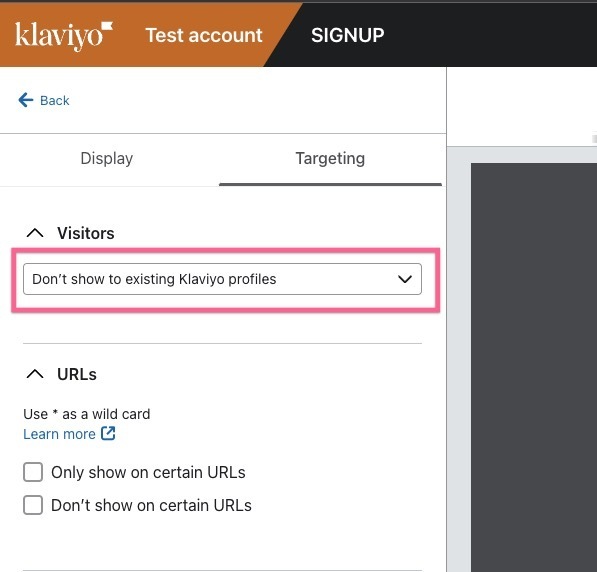
My suspicion is you have your Targeting set to “Don’t show to existing Klaviyo profiles” selected like this:
Since you signed up on your Desktop, then when you go to mobile, you’re now a recognized “existing Klaviyo Profile” so it shouldn’t show the popup anymore. It depends on the sequence of events on how you test.
A few troubleshooting ideas:
Try clearing your cookies and browser cache when you test, or use an entirely different browser or Incognito mode - this will reset any cookies on you from Klaviyo and make you appear as a new anonymous user to Klaviyo (if that’s what you want to test).
Check the “Profiles” section of Klaviyo to see recent activity. You can go here: https://www.klaviyo.com/people - this will give you clues of various recent events while you’re testing.
As a last resort, temporarily set the Targeting to: “Show to all Visitors” if you just want to see what your popups (or forms) look like while you’re testing. Just be careful since this will be live to all visitors on your site. I sometimes restrict the popup to a specific page by specifying a URL (on a hidden page on the site, or with a special parameter like #test in the URL) with the “Only show on certain URLs” checkbox option.
Hope that helps!
Joseph Hsieh // retentioncommerce.com // X: @retention
If your popup is working at least on desktop, it sounds like you have Klaviyo properly setup for Klaviyo Signup Forms to work at the minimal.
My suspicion is you have your Targeting set to “Don’t show to existing Klaviyo profiles” selected like this:
Since you signed up on your Desktop, then when you go to mobile, you’re now a recognized “existing Klaviyo Profile” so it shouldn’t show the popup anymore. It depends on the sequence of events on how you test.
A few troubleshooting ideas:
Try clearing your cookies and browser cache when you test, or use an entirely different browser or Incognito mode - this will reset any cookies on you from Klaviyo and make you appear as a new anonymous user to Klaviyo (if that’s what you want to test).
Check the “Profiles” section of Klaviyo to see recent activity. You can go here: https://www.klaviyo.com/people - this will give you clues of various recent events while you’re testing.
As a last resort, temporarily set the Targeting to: “Show to all Visitors” if you just want to see what your popups (or forms) look like while you’re testing. Just be careful since this will be live to all visitors on your site. I sometimes restrict the popup to a specific page by specifying a URL (on a hidden page on the site, or with a special parameter like #test in the URL) with the “Only show on certain URLs” checkbox option.
Hope that helps!
Joseph Hsieh // retentioncommerce.com // X: @retention
I actually set it to show to all visitors, when I use a different browser though, the 2nd pop up variation will show then the other won't show, if I use the normal browser, the 1st pop up variation will show and not the other one.
It's all so confusing. I'll try to clear cookies again.