
MAD Merch
Contributor I
Contributor I
September 22, 2024
Solved

Setting up Added to Cart Snippet Dawn Theme

  • September 22, 2024
  • 3 replies
  • 328 views

Hello,

I have followed the steps outlined in Klaviyo tutorial as shown below. When I get to step 5, however, I am not sure where to "add section"? 

And step 6 what “provided snippet” is this referring to and where do I find this snippet? I see the snippet folder within my theme editor but which one do i use and do you just copy and paste it into the section? I am using Shopify Dawn Theme. 

If your store has custom liquid blocks, you should use one for the snippet 

  1. In Shopify, navigate to Online Store > Themes.
  2. Find your theme and click Customize.
  3. At the top of the page, click the Home page dropdown.
  4. Select Products > Default product to be brought to your default product page.
  5. Click Add section in the left sidebar and then select Custom Liquid.
  6. Paste the provided snippet in the box.
  7. Click Save in the upper right.
  8. In the left sidebar, your new Custom Liquid block for Added to Cart should automatically appear below the other sections on the page.

    This topic has been closed for replies.
    Best answer by ArpitBanjara

    hey @MAD Merch 

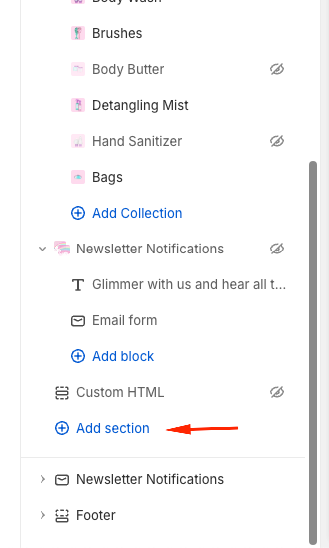
    To add a section - go to your theme and add section as shown below.

    The code to add can be found here

    However if it still doesn’t work, there are a few cases where you might need to change the code snippet slightly according to how you have things setup, which is also mentioned in the article. Try snippet 2 or snippet 3, if you fall into that category.

    I hope that helps

    Cheers

    Arpit

    3 replies

    ArpitBanjara
    Principal User II
    Principal User II
    September 22, 2024

    hey @MAD Merch 

    To add a section - go to your theme and add section as shown below.

    The code to add can be found here

    However if it still doesn’t work, there are a few cases where you might need to change the code snippet slightly according to how you have things setup, which is also mentioned in the article. Try snippet 2 or snippet 3, if you fall into that category.

    I hope that helps

    Cheers

    Arpit

    Arpit Banjara - Lead Email Marketing Specialist at Flowium
    MAD Merch
    Contributor I
    MAD MerchAuthor
    Contributor I
    September 22, 2024

    Does it matter where the section is added, I have several areas that I could add a section to?


    Mona
    ArpitBanjara
    Principal User II
    Principal User II
    September 23, 2024

    Hey @MAD Merch 

    Add a section above the “footer” part as marked in screenshot below. 


    Arpit Banjara - Lead Email Marketing Specialist at Flowium