


Contributor I
August 31, 2024
Solved

Show/hide logic using Boolean properties

  • August 31, 2024
  • 1 reply
  • 281 views

I’m trying to show/hide blocks based on the value of a Boolean profile property.

I’ve set up two Properties

BooleanFALSE that I have set to false in a test profile, and

BooleanTRUE that I have set to true in a test profile.

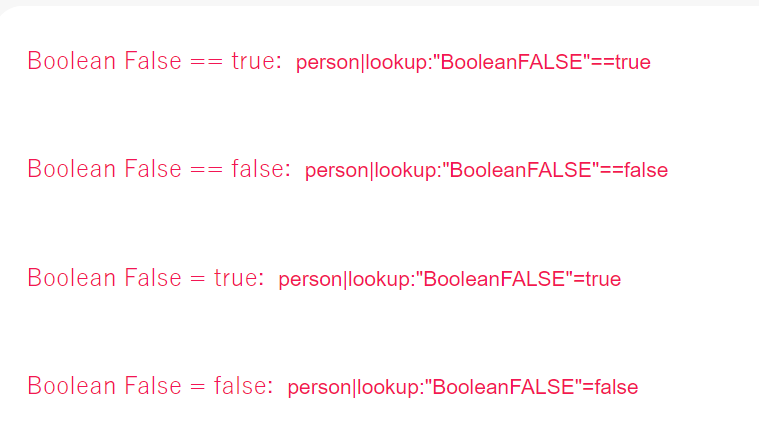
I have set up a number of text blocks in an attempt to identify the correct logic and the content of each block shows what syntax I have used for the show/hide logic. 

It is confusing that the blocks are showing for both true and false values of the same property - this is the preview. Any suggestions??



    This topic has been closed for replies.
    Best answer by chloe.strange

    Hi @EricaM

    If the data is stored as a boolean, you’ll need to use 1 and 0 rather than “true” and “false” in your show/hide condition definition, and make sure not to surround the 1 or 0 in quotes. Here we also have a helpful article and video to walk you through the process. I hope this helps!

    ~Chloe

    1 reply

    chloe.strange
    Community Manager
    Community Manager
    September 18, 2024

    Hi @EricaM

    If the data is stored as a boolean, you’ll need to use 1 and 0 rather than “true” and “false” in your show/hide condition definition, and make sure not to surround the 1 or 0 in quotes. Here we also have a helpful article and video to walk you through the process. I hope this helps!

    ~Chloe