


Contributor I
October 5, 2021
Solved

Sign up form list defaulting to a different list

  • October 5, 2021
  • 2 replies
  • 379 views

I created my sign up form on my shopify website. Created a list to collect the emails. However the emails are defaulting to a different list (potential purchasers) thereby preventing new subscribers from receiving the welcome message and the welcome discount. Please how do i rectify?

This topic has been closed for replies.
Best answer by retention

Hi @oma - welcome to the community.

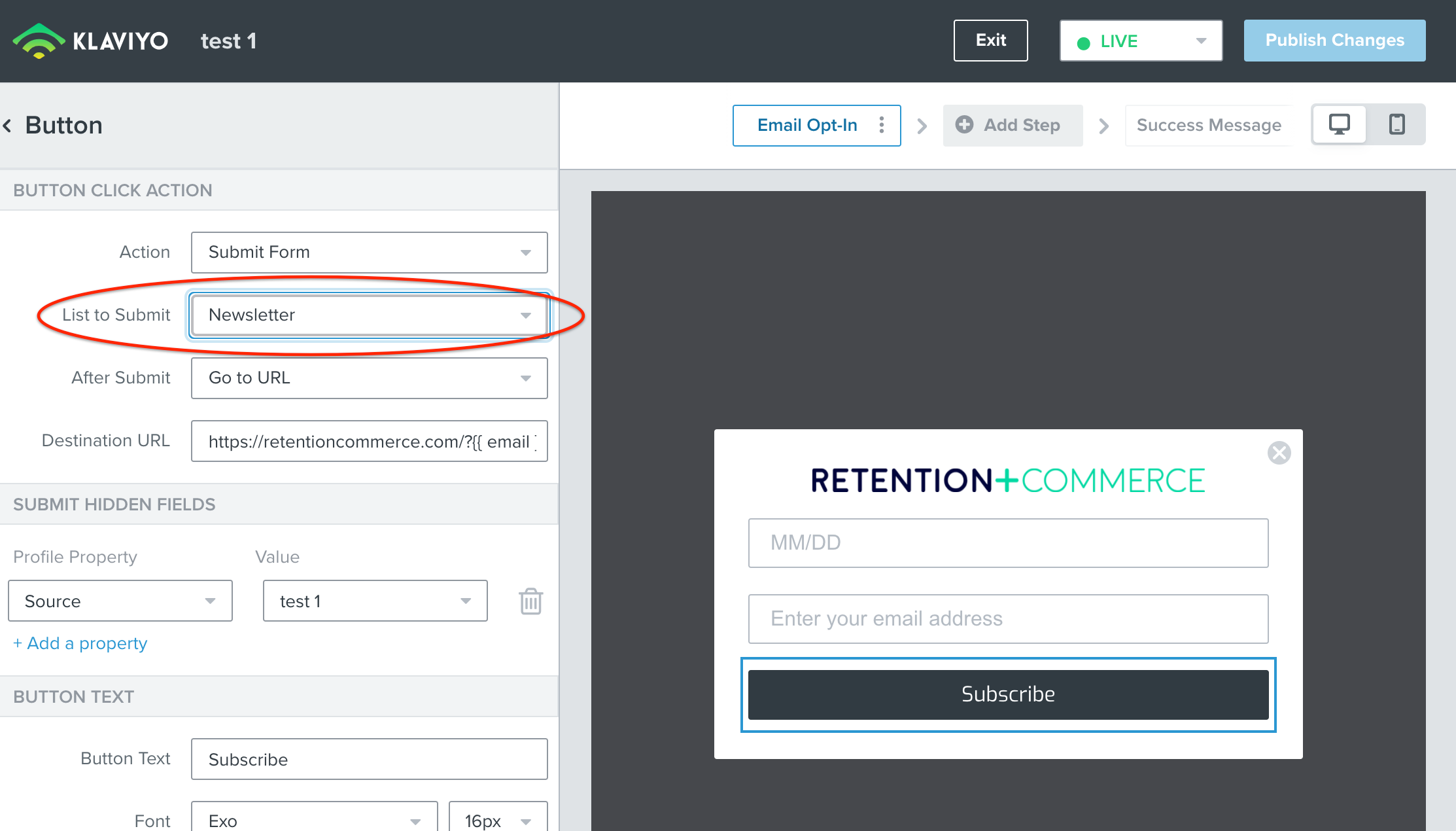
You can change the “List” for your Signup Form by selecting the submit Button in the form editor and changing your preferred list in the List to Submit dropdown.

Here’s a screenshot to help:

Hope this helps!

2 replies

retention
Partner - Platinum
retentionAnswer
2025 Champion
October 5, 2021

Hi @oma - welcome to the community.

You can change the “List” for your Signup Form by selecting the submit Button in the form editor and changing your preferred list in the List to Submit dropdown.

Here’s a screenshot to help:

Hope this helps!

Joseph Hsieh // retentioncommerce.com // X: @retention
Contributor I
September 5, 2024

I have the same issue - but  I cannot find the submit Button in the form editor - below is the screenshot of what is displayed when I’m in the form editor. Where  do I find the submit Button?