Contributor I
September 23, 2024
Solved

Sum of two fields from an event

  • September 23, 2024
  • 1 reply
  • 165 views

Hi There,

I am currently creating an abandoned cart email flow. But having an issue with pricing.

We have a ‘sub total’ and a ‘tax amount’ field coming through from our site. But I want these two prices adding together.

Is this possible from within klaviyo?

Thanks

Tom

    This topic has been closed for replies.
    Best answer by annasophiefc

    HI @TomVufold 

    Usually when I have run into this problem, I always check the catalog data to see if I can pull it from there instead of the event data.

    By using this in a text field, you can pull in all data on your product to see if the item.price is correct.

    {% catalog event.ProductID %}

    {{ catalog_item }}

    {% endcatalog %}


    If this works, I would use this the abandoned cart block depending on what integration your are working in: 


    {% catalog item.ProductID %}

    {% currency_format catalog_item.metadata|lookup:"price" %}

    {% endcatalog %}


    If this doesn’t work for you - and you know the tax amount, you can use the django filter below to adjust the shown price:
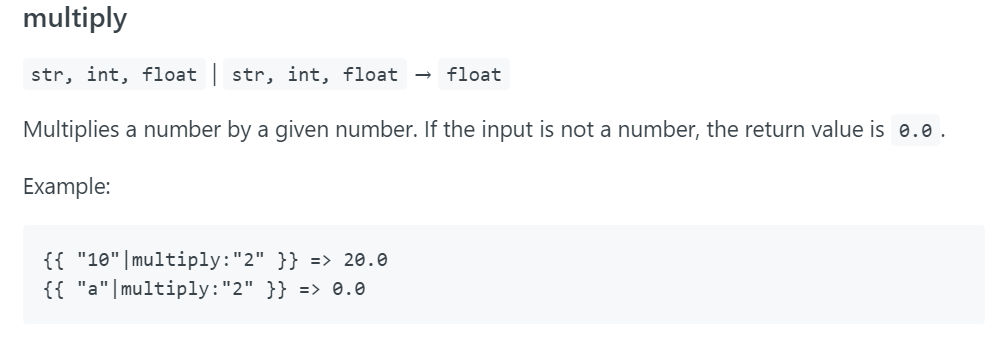
    More info here: https://developers.klaviyo.com/en/docs/glossary_of_variable_filters#multiply


    I hope this helps!


    1 reply

    annasophiefc
    Partner - Platinum
    2025 Champion
    September 23, 2024

    HI @TomVufold 

    Usually when I have run into this problem, I always check the catalog data to see if I can pull it from there instead of the event data.

    By using this in a text field, you can pull in all data on your product to see if the item.price is correct.

    {% catalog event.ProductID %}

    {{ catalog_item }}

    {% endcatalog %}


    If this works, I would use this the abandoned cart block depending on what integration your are working in: 


    {% catalog item.ProductID %}

    {% currency_format catalog_item.metadata|lookup:"price" %}

    {% endcatalog %}


    If this doesn’t work for you - and you know the tax amount, you can use the django filter below to adjust the shown price:

    More info here: https://developers.klaviyo.com/en/docs/glossary_of_variable_filters#multiply


    I hope this helps!


    Champion & Klaviyo Partner based in Aarhus, Denmark. It is all about communicating the right message to the right people at the right time!