Contributor I
April 7, 2022
Solved

Unable to integrate Klaviyo with Magento 2.4.3

  • April 7, 2022
  • 1 reply
  • 480 views

Hello Everyone,


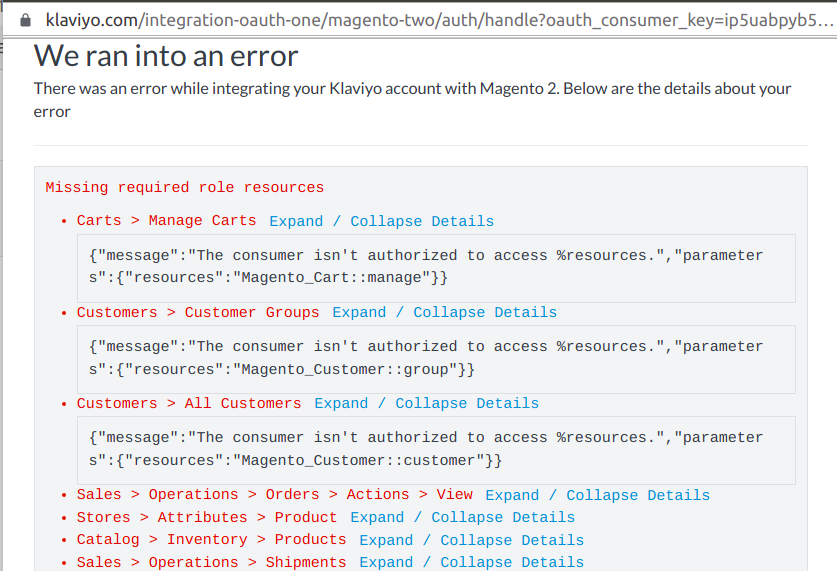
I am having issue in Klaviyo integration with Magento 2. I have added public and private keys as suggested in documentation but when I try to start the integration by clicking on activate button. It throws error with the consumer isn’t authorised to access the resource 

Below is the screenshot of error I am on Magento 2.4.3. Please help to fix this issue.


    This topic has been closed for replies.
    Best answer by klaviyojad

    Based on what I see from the screenshots there is a positive sign that Oauth handshake worked so now we need to determine why api calls did not.
     
    The entry under Integrations in Magento 2 should show up as active.  Could you click on Edit then scroll down to Integration Details and from the 4 values you see like below:
     
    ?name=image.png


    and try executing the curl command like below:

    curl --location --request GET '[hostname]/index.php/rest/V1/categories' \
    --header 'Authorization: Bearer [access token]'

    Does that return a 200 JSON response? 

    If not then attempt it like below:

    curl --location --request GET '[hostname]/rest/V1/categories' \
    --header 'Authorization: Bearer [access token]'

    If this works but the first call didn’t it means you need to add ReWrite Rules to your server like below:

    RewriteRule ^index.php/rest/(.*)$ https://%{HTTP_HOST}/rest/$1 [L,R=301]

    Hope this helps.



    1 reply

    Klaviyo Employee
    April 7, 2022

    Based on what I see from the screenshots there is a positive sign that Oauth handshake worked so now we need to determine why api calls did not.
     
    The entry under Integrations in Magento 2 should show up as active.  Could you click on Edit then scroll down to Integration Details and from the 4 values you see like below:
     
    ?name=image.png


    and try executing the curl command like below:

    curl --location --request GET '[hostname]/index.php/rest/V1/categories' \
    --header 'Authorization: Bearer [access token]'

    Does that return a 200 JSON response? 

    If not then attempt it like below:

    curl --location --request GET '[hostname]/rest/V1/categories' \
    --header 'Authorization: Bearer [access token]'

    If this works but the first call didn’t it means you need to add ReWrite Rules to your server like below:

    RewriteRule ^index.php/rest/(.*)$ https://%{HTTP_HOST}/rest/$1 [L,R=301]

    Hope this helps.