Contributor I
April 10, 2024
Solved

unverified sender

  • April 10, 2024
  • 2 replies
  • 2238 views

Hi,


When someone sign up to my pop up form they are added to a flow . They get emails from me . But in the emails they receive under the subject line it’s written “unverified sender” . What’s that and how to fix that issue. I was migrated my list from systeme.io . But the list that i am using now is new . And the list that i migrated from systeme.io is deleted. 
 

i saw article in this topic but i am nothing getting clear answer 

    This topic has been closed for replies.
    Best answer by bluesnapper

    Welcome to the community @Ameera Creations 

    This is likely due to you not having configured a branded sending domain, so the recipient’s email system cannot verify whether the sender is genuine.

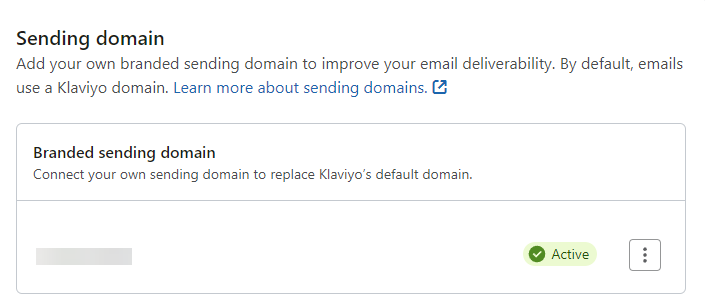
    If you look here: https://www.klaviyo.com/settings/email/domains do you see ‘Active’ as in the image below?

    If not you need to follow these instructions to add a branded sending domain: https://help.klaviyo.com/hc/en-us/articles/115000357752 

    That will add records for SPF (detects forged sender addresses) and DKIM (a digital signature that ensures the email hasn’t changed). These are required so your sending domain is verified, though the DMARC record needs to be added separately.

    DMARC is just the reporting mechanism that states where reports of emails that fail SPF/DKIM are sent, and what the receiving email system should do with those emails - none (accept), quarantine, or reject). You should start with p=none;

    More info on that subject here: https://help.klaviyo.com/hc/en-us/articles/4402601857307

    Hope that helps.

    Regards

    Andy


    2 replies

    bluesnapper
    Partner
    Champion & Partner
    April 11, 2024

    Welcome to the community @Ameera Creations 

    This is likely due to you not having configured a branded sending domain, so the recipient’s email system cannot verify whether the sender is genuine.

    If you look here: https://www.klaviyo.com/settings/email/domains do you see ‘Active’ as in the image below?

    If not you need to follow these instructions to add a branded sending domain: https://help.klaviyo.com/hc/en-us/articles/115000357752 

    That will add records for SPF (detects forged sender addresses) and DKIM (a digital signature that ensures the email hasn’t changed). These are required so your sending domain is verified, though the DMARC record needs to be added separately.

    DMARC is just the reporting mechanism that states where reports of emails that fail SPF/DKIM are sent, and what the receiving email system should do with those emails - none (accept), quarantine, or reject). You should start with p=none;

    More info on that subject here: https://help.klaviyo.com/hc/en-us/articles/4402601857307

    Hope that helps.

    Regards

    Andy


    https://bluesnapper.com - Klaviyo Champion '24 & Partner
    Contributor I
    April 28, 2024

    Welcome to the community @Ameera Creations 

    This is likely due to you not having configured a branded sending domain, so the recipient’s email system cannot verify whether the sender is genuine.

    If you look here: https://www.klaviyo.com/settings/email/domains do you see ‘Active’ as in the image below?

    If not you need to follow these instructions to add a branded sending domain: https://help.klaviyo.com/hc/en- an7 whatsapp /115000357752

    That will add records for SPF (detects forged sender addresses) and DKIM (a digital signature that ensures the email hasn’t changed). These are required so your sending domain is verified, though the DMARC record needs to be added separately.

    DMARC is just the reporting mechanism that states where reports of emails that fail SPF/DKIM are sent, and what the receiving email system should do with those emails - none (accept), quarantine, or reject). You should start with p=none;

    More info on that subject here: https://help.klaviyo.com/hc/en-us/articles/4402601857307

    Hope that helps.

    Regards

    Andy


    Thanks for providing such detailed instructions, Andy!