Contributor I
June 23, 2024
Solved

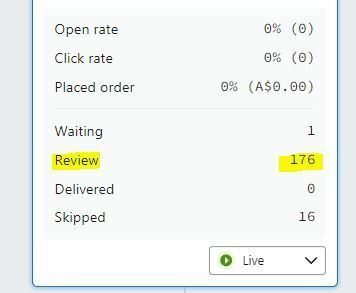
What does "review' mean on a welcome flow email metrics

  • June 23, 2024
  • 3 replies
  • 417 views

HI Guys as the title says does anyone know what this means and how to make sure these customers get the flow. tia


    This topic has been closed for replies.
    Best answer by Anyi

    Hi @Scruffydoo 

    I can see that this messages is currently set to Live, but it must have been set to Manual at the time those 176 recipients got to this far into the flow. You can resolve this by manually dispatching the message for the 176 already caught in review, others should send automatically.

    To do this:

    • Click on the message in your flow.
    • Click View details in the Performance section of the right sidebar.
    • On the Recipient activity tab, click Needs Review in the sidebar.
    • Click Send All in the top right corner.


    Hope this helps.

    3 replies

    Anyi
    Problem Solver II
    AnyiAnswer
    Problem Solver II
    June 23, 2024

    Hi @Scruffydoo 

    I can see that this messages is currently set to Live, but it must have been set to Manual at the time those 176 recipients got to this far into the flow. You can resolve this by manually dispatching the message for the 176 already caught in review, others should send automatically.

    To do this:

    • Click on the message in your flow.
    • Click View details in the Performance section of the right sidebar.
    • On the Recipient activity tab, click Needs Review in the sidebar.
    • Click Send All in the top right corner.


    Hope this helps.

    Top 10% Email dev. on Upwork - upwork.com/freelancers/raymond
    Contributor I
    June 23, 2024

    Hi @Scruffydoo 

    I can see that this messages is currently set to Live, but it must have been set to Manual at the time those 176 recipients got to this far into the flow. You can resolve this by manually dispatching the message for the 176 already caught in review, others should send automatically.

    To do this:

    • Click on the message in your flow.
    • Click View details in the Performance section of the right sidebar.
    • On the Recipient activity tab, click Needs Review in the sidebar.
    • Click Send All in the top right corner.


    Hope this helps.


    Perfect, thanks a lot for the help 😊

    Anyi
    Problem Solver II
    Problem Solver II
    June 23, 2024

    You’re welcome. 

    Top 10% Email dev. on Upwork - upwork.com/freelancers/raymond