


3 ways to use multi-branch splits in your Klaviyo flows
There's a flow sitting in someone's account right now that everyone's a little afraid to open. Four splits deep, one nested inside the last "no" path, built one language at a time until nobody's quite sure which branch does what anymore. That's not a hypothetical. That's what happens every time Klaviyo's old binary splits meet an audience with more than two groups in it.
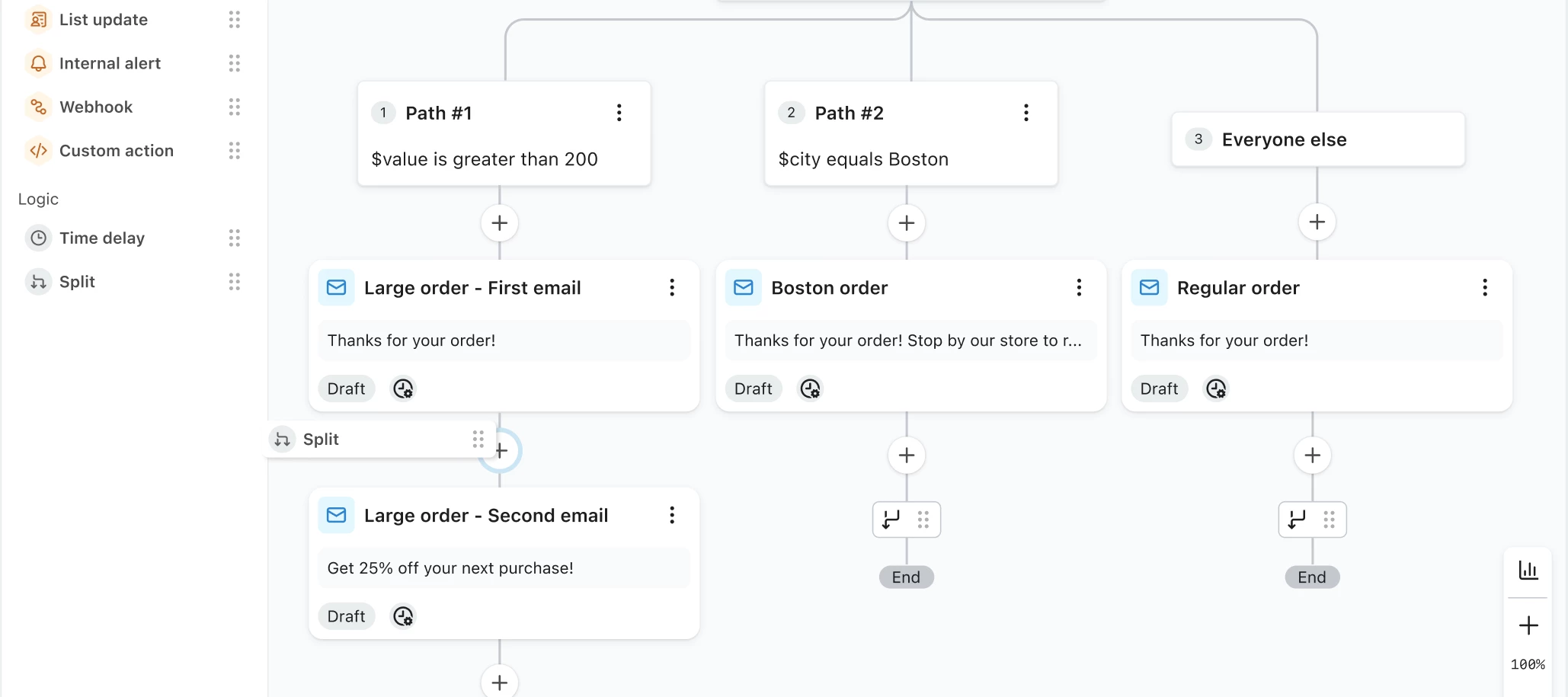
Multi-branch splits fix that specific problem. One split now handles up to 20 paths, each with its own conditions, evaluated in order. Here's what that actually looks like once you use it, in three stages, plus the fine print before you touch anything live.
What changed
A multi-branch split replaces what used to be two separate actions, the conditional split and the trigger split, with a single split that holds multiple paths at once. Klaviyo checks each path in the order you've arranged them ("Check first," "Check second," and so on) and sends a profile down the first one it qualifies for. Anyone who doesn't match a configured path falls through to "Everyone else," which is always last and can't be removed.
That's the whole mechanic. It's also the reason the four-splits-deep flow doesn't have to exist anymore.
Stage 1: The easy win, language or location
Start here, because it's the clearest before-and-after. A welcome series for a brand selling in the US, Canada, France, and Germany used to mean four chained conditional splits, one per language, each one buried inside the "no" path of the last. It worked, right up until someone had to edit it and had to trace through all four to find the right branch.
With a multi-branch split, that's one split with four paths, one condition per language or country property. Anyone who doesn't match gets the default English path through "Everyone else." Same logic, one card instead of four, and the next person who opens this flow doesn't need a map to understand it.
Stage 2: The one your flows actually need, product line or category
Once the easy win clicks, this is the natural next stop. If you sell across categories, say skincare and apparel, a post-purchase flow can route each buyer down a path built around what they actually bought. Skincare buyers get skincare follow-up. Apparel buyers get apparel follow-up. Anyone outside those categories falls into "Everyone else" and gets general post-purchase messaging instead of nothing.
No nested splits, and no risk of someone getting routed down two category paths at once, since a profile only ever qualifies for one path per split.
Stage 3: The one that means you've basically got this, customer tier or loyalty segment
By this point, you're not just using multi-branch splits, you're thinking in them. If you run a loyalty program or a VIP segment, you can give those profiles their own path inside the exact same split that handles everyone else, instead of building a separate flow (or a chain of splits) just to isolate your top-spend customers. Tier-based messaging and tier-based offers, all inside one flow that still reads clearly six months from now.
The fine print before you climb
A few things worth knowing before you start converting flows over:
- Deleting paths has a floor. Once a split is down to one condition path plus "Everyone else," you can't delete the last path on its own. At that point you delete the whole split and choose which path's downstream actions to keep.
- Waiting contacts get dropped. If someone's actively waiting inside a split or a path when you delete it, they exit the flow. If you've got contacts mid-flow, check before you make structural changes.
- Reordering changes who goes where. Paths are evaluated top to bottom, so moving a path up means it gets checked earlier. A profile that used to qualify for a lower path might now match the one above it instead. Review the full path order any time you rearrange.
- Your existing splits aren't touched. Old-style conditional and trigger splits keep running exactly as they are. They're not automatically converted, and Klaviyo hasn't shared a migration date yet. For now, you'll likely see both formats across your account.
- Rollout is phased. You may already have this in your account, or you might get an in-app notification when it's enabled for you. If you don't see it yet in the flow builder, that's expected, not a bug.
Higher ground
The flow that used to scare people to open now reads at a glance. Not because it got simpler exactly, but because the complexity finally lives in one place instead of four nested guesses. That's the actual win here: not any single use case, but not having to build a workaround every time your audience has more than two groups in it.
Which of these three would clean up the most splits in your account right now, language, product category, or customer tier? Drop it in the comments, especially if you've already rebuilt something and want to compare notes on how it went.