Contributor I
July 23, 2026
Solved

Double Opt-in – Confirmation email not received during testing and unsure how to customize it

  • July 23, 2026
  • 4 replies
  • 67 views

Hello,

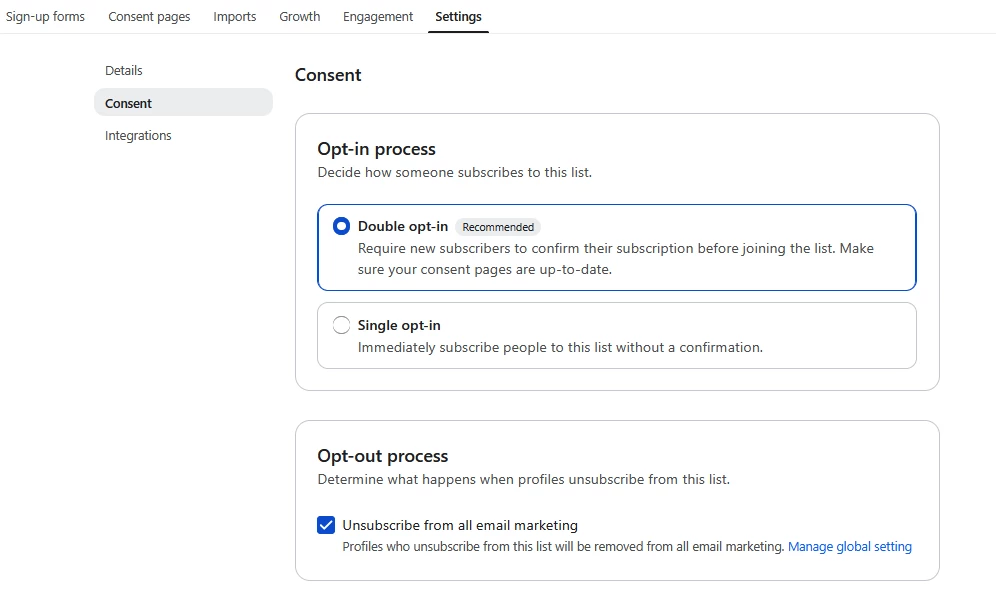
I have activated Double Opt-in for my list, but I am facing two issues I need help with:

  1. When testing, I do not receive a confirmation email at my test address.
  2. I cannot find the option to customize the confirmation email, even though the Double Opt-in toggle is activated in my list settings.

Could you please guide me on how to resolve both issues?

Thank you


Best answer by bluesnapper

Welcome to the community ​@DISOA82 

Regarding not receiving the double opt-in email, the first things to check:

  • Did the opt-in email go into your spam?
  • Is your test email already in your list? If it is, you won’t receive the double opt-in email for subsequent submissions.
  • Ensure your email sending domain is verified (domain status = active). If it isn’t, that could be affecting deliverability before it even reaches your inbox. That domain listing check is here: https://www.klaviyo.com/settings/account/domains

For editing the double opt-in email for all lists, open https://www.klaviyo.com/settings/other/consent-pages then ‘email confirmation’. From there you can make basic edits to the email and success page but those edits are restricted to subject line, styles, text, and images.

You can also make non-global edits to the double opt-in that are specific to a list. Open your list and then select ‘consent pages’ then ‘customise for this list’, then ‘email conformation’.

I hope that helps

Andy

4 replies

bluesnapper
Partner
Champion & Partner
July 24, 2026

Welcome to the community ​@DISOA82 

Regarding not receiving the double opt-in email, the first things to check:

  • Did the opt-in email go into your spam?
  • Is your test email already in your list? If it is, you won’t receive the double opt-in email for subsequent submissions.
  • Ensure your email sending domain is verified (domain status = active). If it isn’t, that could be affecting deliverability before it even reaches your inbox. That domain listing check is here: https://www.klaviyo.com/settings/account/domains

For editing the double opt-in email for all lists, open https://www.klaviyo.com/settings/other/consent-pages then ‘email confirmation’. From there you can make basic edits to the email and success page but those edits are restricted to subject line, styles, text, and images.

You can also make non-global edits to the double opt-in that are specific to a list. Open your list and then select ‘consent pages’ then ‘customise for this list’, then ‘email conformation’.

I hope that helps

Andy

https://bluesnapper.com - Klaviyo Champion '24 & Partner
DISOA82Author
Contributor I
July 24, 2026

Hi,

Thank you for your helpful reply!

I tested again with a completely new email address (one that has never been used in Klaviyo before) via my Shopify popup form. After submitting, the form correctly shows the message: “A message has been sent to confirm your subscription.”

However, no confirmation email arrives in the inbox or spam folder.

Regarding the domain check: I don’t have a sending domain set up yet. I’ve attached a screenshot of the Domains section in my account settings where it looks like I still need to add one.

Could you please confirm whether the missing sending domain is likely the reason the double opt-in email isn’t being delivered? And if so, is setting one up the next step I should take?

Thanks again for your help!


bluesnapper
Partner
Champion & Partner
July 25, 2026

No problem ​@DISOA82 

Have you double-checked that the form is submitting to the correct Klaviyo list? While editing the form, select the submit button. In the left hand pane it will show you which list is associated.

Regarding the sending domain: yes, you should definitive set this up irrespective of whether this is causing your current deliverability issue.

This configuration tells receiving email systems that Klaviyo is authorised to send emails on behalf of your organisation. If this is not configured, it's likely that your campaign and flow emails will be sent to spam or not delivered. Having it configured also means your recipients see your sender email in the header rather than 'sent on behalf' (or similar wording), which is not great for brand

You need to choose a sending domain that is not used elsewhere. For example, if your root domain is xyz.com, you might add a sending domain of send.xyz.com or email.xyz.com etc

Once you add that sending domain here: https://www.klaviyo.com/settings/account/domains, Klaviyo will automatically provide you with some DNS records that need to be added to where the DNS for your domain is hosted. This is usually, but not always, with the service you registered the domain e.g. GoDaddy, 123 reg, Easyspace etc

More information on how to do this is here: https://help.klaviyo.com/hc/en-us/articles/115000357752

Adding DNS records is pretty straightforward, but if you're not comfortable with the techie side, you may want to get someone who is to add these. Once added, Klaviyo will verify they are correct and flag your sending domain in https://www.klaviyo.com/settings/account/domains as 'active'

I hope that helps

Andy

https://bluesnapper.com - Klaviyo Champion '24 & Partner
DISOA82Author
Contributor I
July 25, 2026

Hi Andy,

Thank you again for your help!

I’ve now completed the branded sending domain setup. The domain is verified and active (Static routing).

I also double-checked the form – it is correctly linked to the intended list, and double opt-in is enabled on that list.

Additionally, I updated the default sender email address to one that matches my domain.

However, the confirmation email is still not being sent. When I submit the form with a new email address, a profile is created with “Form submitted” and “Form completed” events, but the status remains “Never subscribed” and no confirmation email arrives (not even in spam).

Do you have any idea what else could be causing this?

Thanks in advance!