


Contributor I
Oct 6, 2026 3:46 PM UTC
Solved

Customer accidentally deleted review, original link blocks resubmission

A customer accidentally deleted her review. The original review request link now says “Your review is successfully deleted” and won’t allow her to submit again. The review is missing from All reviews. Can the request be reset so she can submit a new review with verified buyer status? I’m on a free plan and cannot access an agent.
Meghan F.Answer
Community Manager
Oct 7, 2026 1:42 PM UTC

Hi Qasir, 
Happy to help here! 

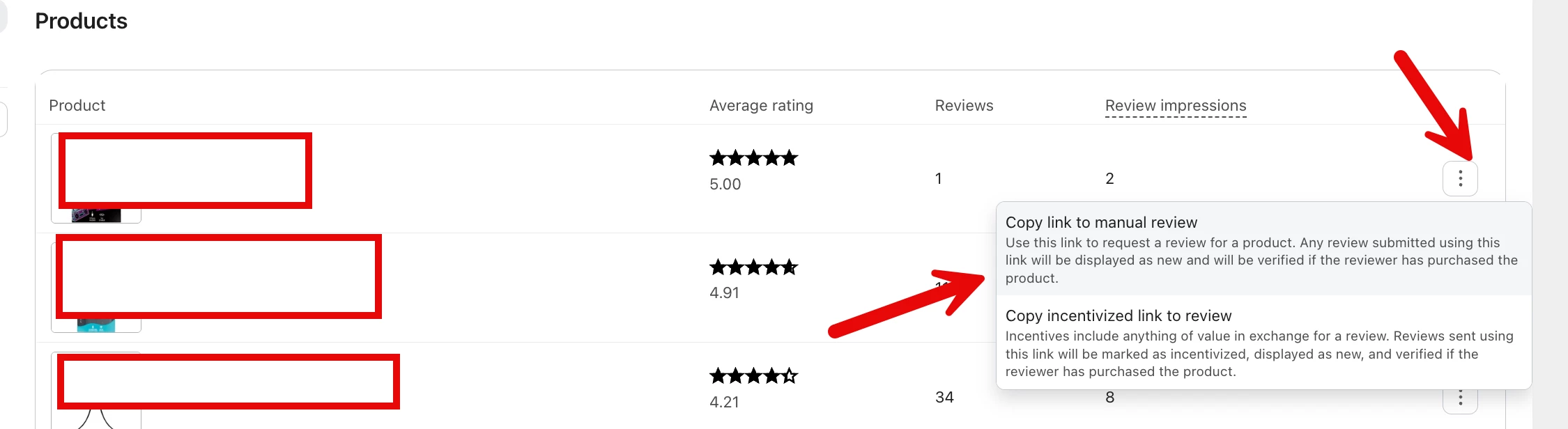
You should be able to use a new manual review link rather than the deleted review-request link:

  1. Go to Reviews → Products: https://www.klaviyo.com/reviews/products
  2. Open the product’s three-dot menu.
  3. Select Copy link to manual review.
  4. Send that link to the customer.

However, a manual link will not mark the review as Verified Buyer. Verified status is applied when the customer submits through a personalized link from a Klaviyo Ready to review flow.

Guide for reference: https://klaviyo.zendesk.com/hc/en-us/articles/16319809379611-How-to-request-reviews-from-your-customers-with-Klaviyo-Reviews-flows#:~:text=manual%20review%20request%20link

1 reply

Meghan F.Answer
Community Manager
Oct 7, 2026 1:42 PM UTC

Hi Qasir, 
Happy to help here! 

You should be able to use a new manual review link rather than the deleted review-request link:

  1. Go to Reviews → Products: https://www.klaviyo.com/reviews/products
  2. Open the product’s three-dot menu.
  3. Select Copy link to manual review.
  4. Send that link to the customer.

However, a manual link will not mark the review as Verified Buyer. Verified status is applied when the customer submits through a personalized link from a Klaviyo Ready to review flow.

Guide for reference: https://klaviyo.zendesk.com/hc/en-us/articles/16319809379611-How-to-request-reviews-from-your-customers-with-Klaviyo-Reviews-flows#:~:text=manual%20review%20request%20link