


Ask Composer before, during, and after BFCM: 32 prompts to try
The most expensive BFCM mistakes are often the silent ones: an abandoned cart flow that stopped sending, a welcome code that clashes with your sale, or two campaigns aimed at the same people. Composer can help you spot those issues while there's still time to act.
I grouped these prompts around the way BFCM actually unfolds: prepare, monitor, then learn. Copy one, replace anything in {{brackets}}, and keep the conversation going after Composer answers.
One quick reality check: what Composer can see and do depends on your account, role, connected data, and feature rollout. Ask it to separate verified findings from assumptions, and review every recommendation or proposed edit before it goes live.
Before BFCM: find problems while you still have time to fix them
Start here, ideally two to four weeks before peak. Use your BFCM flow plan to decide what changes, what stays live, and who owns the switch back to evergreen.
Find the biggest gaps first
-
Analyze our email campaigns and flows from the last 90 days. Identify the three highest-priority opportunities ahead of BFCM. For each one, show the account data that supports the finding and explain what I should review first.
-
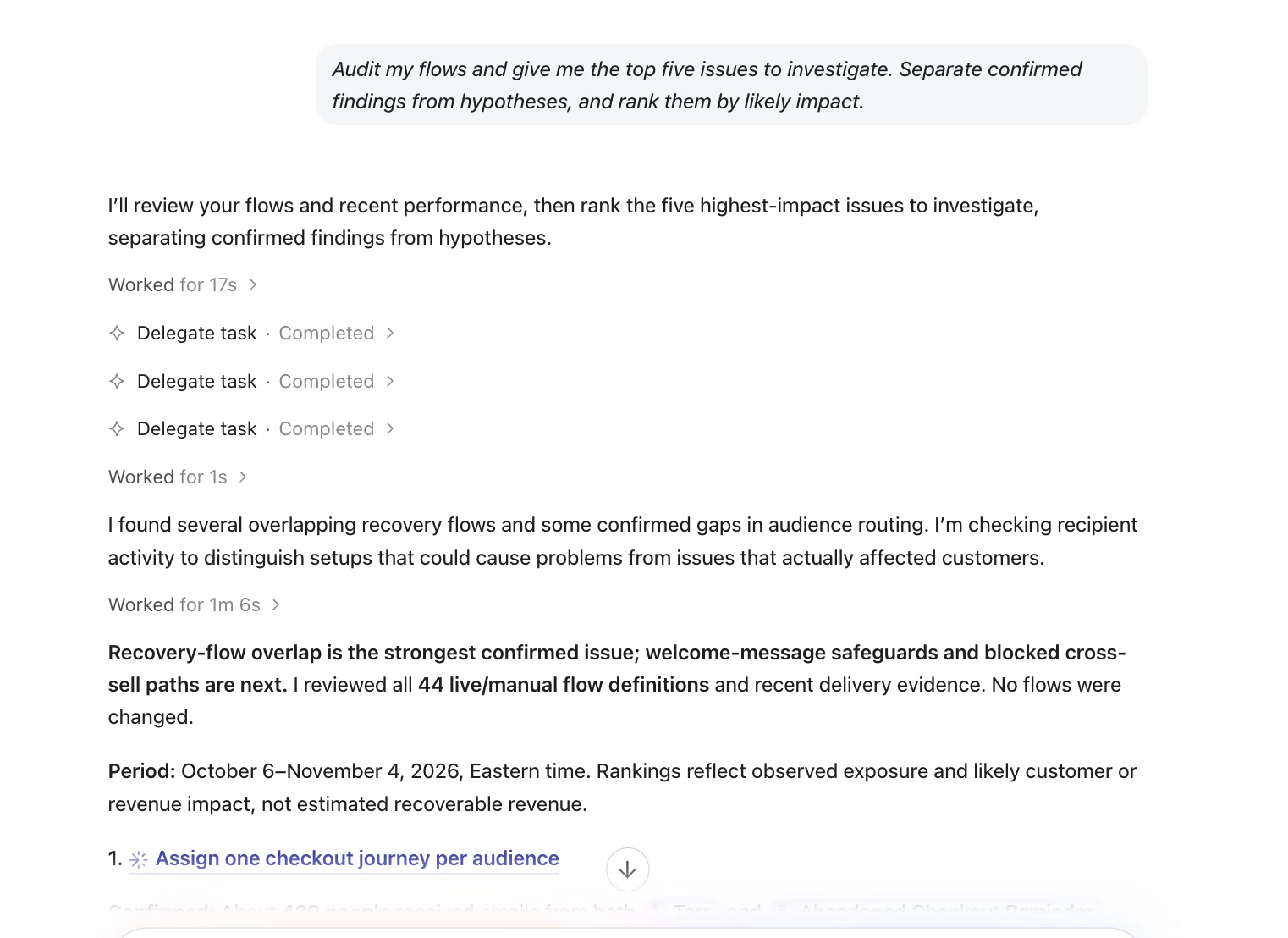
Audit my flows and give me the top five issues to investigate. Separate confirmed findings from hypotheses, and rank them by likely impact.
-
Review my live and draft flows against these BFCM goals: {{goals}}. Which lifecycle gaps should I investigate? Flag any assumptions about flows or data you can't see.
-
Which flows are in draft or manual status? Based on their purpose and recent performance, which ones should I review before Black Friday? Don't recommend turning anything live without explaining why.
Check the plumbing
-
Audit the logic in these BFCM segments: {{segment names}}. Check for conflicting conditions, unexpected exclusions, duplicates, and gaps. If you can't calculate exact audience overlap, say so.
-
Review the deliverability signals available in my account and tell me what needs attention before BFCM. Include engagement, bounces, spam complaints, and sending patterns. List any settings you can't verify, including sending domain authentication.
-
Check whether the expected Shopify events are arriving for my abandoned cart and browse abandonment flows. Show the evidence you can verify, then give me the exact event and flow settings to check for anything you can't.
-
Review my live sign-up forms. Compare recent sign-up performance, flag major changes, and identify forms whose offer, targeting, or creative may need a manual BFCM review. Don't infer a cause unless the data supports it.
Protect your discounts
-
I'm launching the code
{{code}}for Black Friday. Review where it appears in my campaigns, flows, and forms. Flag possible conflicts with other discount codes, and list any checkout or platform settings you can't verify. -
Find the flow messages that promise a discount. Create a table with the flow, message, offer, code, expiration language, and status. Flag anything missing or inconsistent.
Plan the send calendar
-
Based on campaign performance from the last 90 days, give me five BFCM campaign ideas worth testing before peak week. Tie each idea to a specific finding, audience, or past result.
-
Review my recent send frequency and engagement by audience. Suggest a deliverability warm-up plan for BFCM, including which engaged segments to start with and which metrics should make me slow down.
-
Audit my flows, campaigns, and key BFCM audiences in three stages: risks, opportunities, and recommended send calendar. Use my historical performance where available, explain every recommendation, and list data gaps instead of estimating.
During BFCM: catch mistakes before your customers do
You'll send more than usual in a very short window. Use these prompts as a second set of eyes, then complete your normal preview, test-send, and approval process.
Check each send before it goes
-
QA this campaign before I send it. Check links and tracking, audience and exclusions, send configuration, test setup, compliance basics, and mobile readability. Put send-blocking issues first.
-
Review this campaign's links, offer, discount code, audience, exclusions, and send time. Identify the exact setting or content behind each finding, and separate verified issues from items I need to test manually.
-
Compare the planned audiences and exclusions for these campaigns: {{campaign names}}. Flag likely overlap, explain the logic behind it, and say clearly if you can't calculate the exact shared audience.
-
Review this last-chance campaign. Confirm whether recent purchasers since
{{sale start date}}are excluded. Show me the exclusion logic and the exact setting I should verify before scheduling. -
Audit this email for clipping risk and mobile readability. Identify the sections adding the most weight or length, then suggest specific cuts that preserve the offer and primary CTA.
For more human checks to pair with campaign QA, preview on a phone and test with images turned off. Peak week is a bad time to discover that your offer only makes sense when every image loads.
Set up watches that run themselves
If scheduled or recurring tasks are enabled for your account, these are worth setting up before the weekend. Keep a human owner on every alert.
-
Every morning through Cyber Monday, review scheduled campaigns for send time, audience, exclusions, and configuration. Flag anything unusual, cite the setting that triggered the alert, and don't make changes without my approval.
-
Twice a day through Cyber Monday, review the discount codes promoted in my live campaigns and flows. Flag missing, inconsistent, or expired offer details, and list anything the task can't verify at checkout.
-
Every day through Cyber Monday, check catalog availability for the products featured in my scheduled campaigns and live flows. Tell me which promoted products appear out of stock, and cite the campaign or flow where each one appears.
-
Every four hours through Cyber Monday, review send volume for these core flows: {{flow names}}. Alert me to a meaningful stop or drop, compare it with the prior seven-day baseline, and state whether the data supports a real issue or only a possible anomaly.
Investigate one problem fast
-
{{email address}}says they didn't get{{campaign name}}. Check the profile's eligibility, consent, suppression status, audience membership, exclusions, Smart Sending, and delivery events. Tell me what you can verify and what I still need to check.
After BFCM: learn what worked and keep your new customers
The weekend is over, but your best dataset of the year just landed. Use it while the campaign decisions and customer behavior are still fresh.
Recap and explain
-
Summarize BFCM week from
{{start date}}to{{end date}}: attributed revenue from campaigns and flows, top-performing sends, and year-over-year change. State the attribution window and metric definitions, flag missing data, and write the result as a short executive recap. -
Compare this year's BFCM performance with last year's. Separate verified changes from possible explanations, then show which campaigns, audiences, channels, or offers contributed most to the difference.
-
Rank every BFCM campaign by revenue per recipient. Show delivered volume, conversion rate, revenue, and unsubscribe rate beside it. What do the top three have in common, and which similarities are only hypotheses?
-
Compare BFCM performance across these segments: {{segment names}}. Report delivered volume, conversion rate, revenue per recipient, and unsubscribe rate where available. Flag segments that can't be compared fairly and explain why.
When you're reviewing BFCM results, the useful question isn't only “Who won?” It's “What should we repeat, retest, or stop?”
Keep the customers you just won
-
How many first-time buyers placed their first order between
{{start date}}and{{end date}}? Show which live flows they can enter now and flag any gaps or conflicting offers. -
Create a segment definition for BFCM first-time buyers, then draft a post-purchase journey designed to support a second purchase. Include the trigger, filters, timing, message purpose, and exit conditions for me to review.
-
Review my welcome flow logic and confirm whether people who bought during BFCM can still receive the welcome offer. Show the relevant filters and recommend a change only if the current logic creates a conflict.
-
Every week through January, identify customers who newly meet this lapse definition:
{{definition}}. Report the segment size and draft one win-back message for review. Don't publish or send anything without approval.
Plan next year now
-
Based on this year's BFCM results, give me three things to repeat, three tests to run, and three problems to fix earlier next year. Tie every recommendation to a specific result and label assumptions clearly.
Get better answers from every prompt
-
Name the thing. Type
@to point Composer at a specific campaign, flow, or segment, or paste its exact name. -
Give it a date range. “Last 30 days” or “November 27 to December 1” is sharper than “recently.”
-
Ask for evidence. Add: “Show what in my account supports this finding, and separate facts from hypotheses.”
-
Narrow the follow-up. A reliable prompting pattern is: go wide, choose one finding, then ask for the exact settings or content to review.
-
Save what you repeat. If skills are available in your account, save the checks your team will run every peak season.
-
Keep the final call. Verify audiences, consent, offers, product details, dates, links, and proposed edits before anything goes live.
Share below
Which Composer check is already part of your BFCM routine, and which one are you adding this year? Drop the prompt you use, what Composer found, and the follow-up that helped you get to a useful next step.