Contributor I
August 15, 2022
Solved

Adding a clickable email address to image/button

  • August 15, 2022
  • 2 replies
  • 4490 views

Does anyone know how I can add a hyperlink to an email address (such as info@) within an image. I have an image that lists the email address, and ideally I want people to be able to click the image that would then open an email to that address. I was able to do this in MailChimp easily, but can’t find a way to do it here.


Thanks!

    This topic has been closed for replies.
    Best answer by stephen.trumble

    Hey @deannabackos 

    Welcome to the Klaviyo Community! Thanks for asking the community for help.

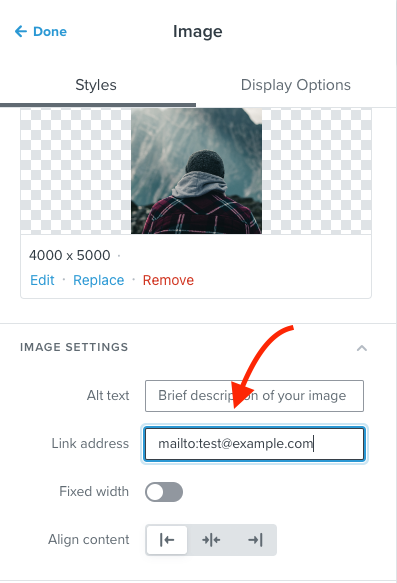
    If you want to have an image link to an email address, you can enter this:mailto:test@example.com  as the Link address on an image block within the template editor.

    You can even prefill the subject line for the email with something like this mailto:test@example.com?subject=Test_subject&body=Test_bodyYou can replace the parts in bold (as well as the email) with the content you want. For example, replace "Test_subject" with the actual subject line. 

    Hope this helps! 
     

    2 replies

    stephen.trumble
    Klaviyo Alum
    August 16, 2022

    Hey @deannabackos 

    Welcome to the Klaviyo Community! Thanks for asking the community for help.

    If you want to have an image link to an email address, you can enter this:mailto:test@example.com  as the Link address on an image block within the template editor.

    You can even prefill the subject line for the email with something like this mailto:test@example.com?subject=Test_subject&body=Test_bodyYou can replace the parts in bold (as well as the email) with the content you want. For example, replace "Test_subject" with the actual subject line. 

    Hope this helps! 
     

    -Stephen
    Contributor I
    August 16, 2022

    Thank you so much! Exactly what I needed.