October 19, 2023
Solved

"Add to cart metric not working"

  • October 19, 2023
  • 3 replies
  • 883 views

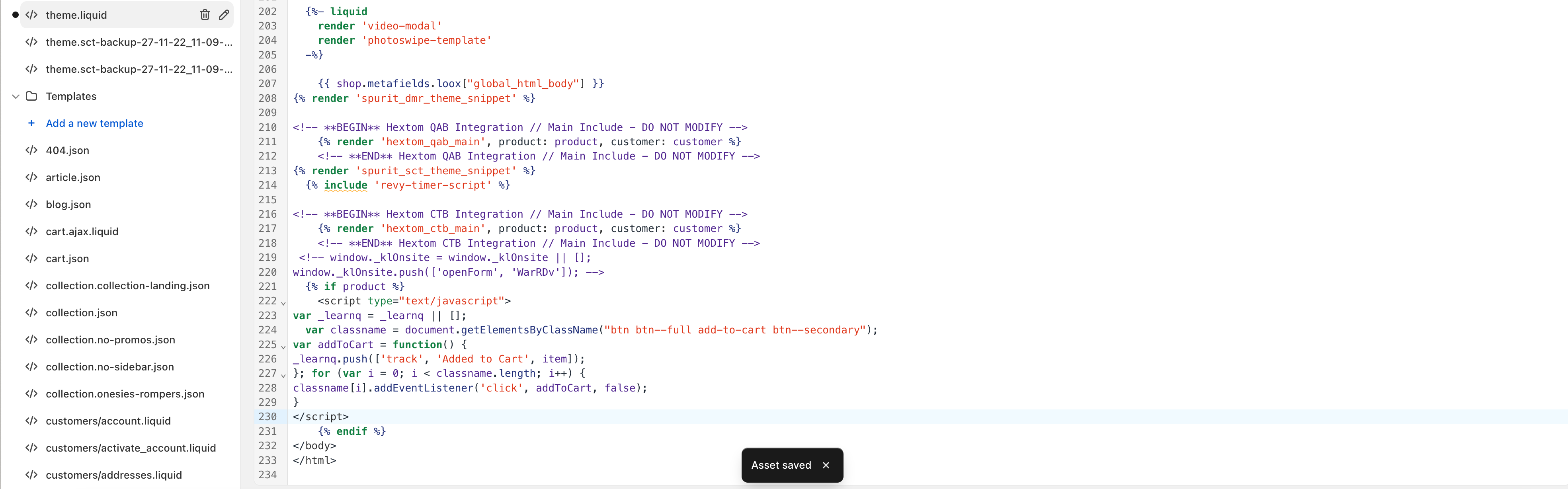
Before you ask I have read every discussion on here. I have reached out to Klaviyo support but there is no resolution to this. I have attached the code snippet Klaviyo advised me to use and I have tested the metric by going to my homepage an entering the email. My viewed product and Active on site are both working but not the bloody “add to cart”. I don’t know what to do and I really feel this is too valuable not to persist with finding an answer to. Can anyone please help? Thanks


screenshot attached


    This topic has been closed for replies.
    Best answer by Ashley I.

     Hi @babyvella,

    Welcome to the Community! I am sorry to hear about the frustration you are having regarding the Added to Cart metric tracking. 

    Looking at the screenshot you provided, it appears that you are trying to integrate your Shopify storefront with your Klaviyo account. The code snippet you include in your screenshot does appear to be different than the suggested code provided in Klaviyo’s documentation. So, I would recommend revisiting this for where and what to add to your theme’s custom liquid blocks.

    There is a very detailed thread here on how to do this step-by-step:


    Alternatively, a less technical solution:

    I trust you have already done this, but have you tried to trigger an Added to Cart event yourself on the site? If the website does not receive much traffic, and no items have been added to the cart by any visitor with a Klaviyo profile, this can also cause the Added to Cart metric to not populate in Klaviyo. 

    To rule out that your code is incorrect and you wish to trigger the event by Test Web Tracking, follow these steps to see if the metric fires in your account:

    • Navigate to your website
    • Add the following to the end of your store url, replacing example@gmail.com with your email address:
      ?utm_email=example@gmail.com
    • After you reload the page, add a product to your cart 
    • Navigate back to Klaviyo and look up your profile to see if you see the event recorded 

    This approach is further explained in this post: 

    --

    Hope this helps!

    -- Ashley Ismailovski

    3 replies

    Ashley I.
    Partner - Platinum
    Ashley I.Answer
    2025 Champion
    October 19, 2023

     Hi @babyvella,

    Welcome to the Community! I am sorry to hear about the frustration you are having regarding the Added to Cart metric tracking. 

    Looking at the screenshot you provided, it appears that you are trying to integrate your Shopify storefront with your Klaviyo account. The code snippet you include in your screenshot does appear to be different than the suggested code provided in Klaviyo’s documentation. So, I would recommend revisiting this for where and what to add to your theme’s custom liquid blocks.

    There is a very detailed thread here on how to do this step-by-step:


    Alternatively, a less technical solution:

    I trust you have already done this, but have you tried to trigger an Added to Cart event yourself on the site? If the website does not receive much traffic, and no items have been added to the cart by any visitor with a Klaviyo profile, this can also cause the Added to Cart metric to not populate in Klaviyo. 

    To rule out that your code is incorrect and you wish to trigger the event by Test Web Tracking, follow these steps to see if the metric fires in your account:

    • Navigate to your website
    • Add the following to the end of your store url, replacing example@gmail.com with your email address:
      ?utm_email=example@gmail.com
    • After you reload the page, add a product to your cart 
    • Navigate back to Klaviyo and look up your profile to see if you see the event recorded 

    This approach is further explained in this post: 

    --

    Hope this helps!

    -- Ashley Ismailovski

    Ashley Ismailovski, Klaviyo Champion & Director of Email Marketing at SmartSites https://www.smartsites.com/

    October 19, 2023

    Thank you Ashley but it doesn’t work :(


    Brian Turcotte
    Klaviyo Alum
    January 24, 2024

    Hi @babyvella!


    I see this issue has been resolved via a Support ticket, which would have been my next recommended course of action after exhausting the above resolutions.


    Best,

    Brian