Contributor I
July 12, 2022
Solved

How to display variant options in Back In Stock modal?

  • July 12, 2022
  • 1 reply
  • 483 views

Hello,

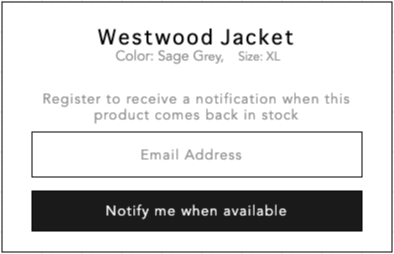
I am going to display variant options such as Color/Size below product name in BIS modal.

I followed the sample code snippet provided from Klaviyo. It introduced {product_name} only but I want to display more information below product name like below image.

Could you please help me on how I can do this in Shopify?

    This topic has been closed for replies.
    Best answer by Taylor Tarpley

    Hi @Tiago


    Thanks for sharing your question with us! 


    Yes, you can definitely change the display of the BIS modal to also display the product’s color and size. As long as the variant information is available, all you will need to do need to pull the product color and size is to adjust the backend of the BIS code snippet. However, if you’re using a custom theme for Shopify and not a a supported, free theme in our documentation list, neither Support nor Community can help troubleshoot how to create the specific code for you as custom themes don’t respect of backend installation of the BIS feature. 


    However, if you don’t feel comfortable custom coding yourself, I would reach out to your developer or connect with one of our Partners or Champions, who would be more than helpful to help build this out for you! 


    Thanks for participating in the Community!

    -Taylor 

    1 reply

    Taylor Tarpley
    Community Manager
    Community Manager
    July 13, 2022

    Hi @Tiago


    Thanks for sharing your question with us! 


    Yes, you can definitely change the display of the BIS modal to also display the product’s color and size. As long as the variant information is available, all you will need to do need to pull the product color and size is to adjust the backend of the BIS code snippet. However, if you’re using a custom theme for Shopify and not a a supported, free theme in our documentation list, neither Support nor Community can help troubleshoot how to create the specific code for you as custom themes don’t respect of backend installation of the BIS feature. 


    However, if you don’t feel comfortable custom coding yourself, I would reach out to your developer or connect with one of our Partners or Champions, who would be more than helpful to help build this out for you! 


    Thanks for participating in the Community!

    -Taylor