


Contributor IV
January 11, 2023
Solved

Klaviyo webhooks...for Klaviyo

  • January 11, 2023
  • 5 replies
  • 764 views

Hi, i’ve recently read a case study where a webhook was used in a flow to send data from Klaviyo to Klaviyo. This was done to enrich data inside customer profiles and update profile properties.

Quoting the user who did this:

“One example is to take the Abandoned Cart URL from the metric and copy it to the profile. This enables us to add a conditional block to every email saying:
Remember we have saved your cart. Retrieve it right here:”

Now, i’m trying to replicate this but i don’t understand how to do it.


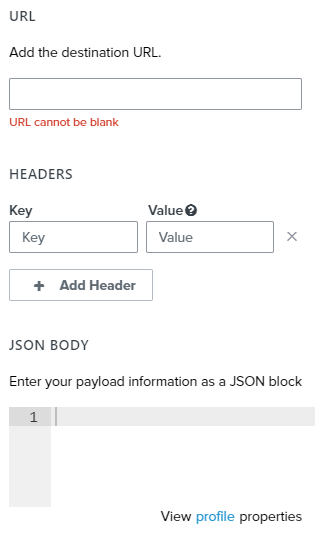
Which is the correct destination URL for Klaviyo? Also, should i put a public key and a private key respectively inside the “Key” and “Value” fields? I’m reading the documentation but i can’t understand how i can change custom properties indise a profile.


Thank you!


    This topic has been closed for replies.
    Best answer by ezra

    Hi, it’s difficult to see the correct JSON format in the screenshot from the blog post, so I suggest you review the documentation for “POST example JSON object” here: https://developers.klaviyo.com/en/v1-2/docs/identify-api-reference#post

    The changes you will need to make are to add your Public API Key (you can find it at https://www.klaviyo.com/account#api-keys-tab) as “token”, nest email into properties, and prepend email with $ (so “$email”).

    {
      "token" : "<your Public API Key / Site ID>",
      "properties" : {
        "$email" : "matt.kemp@klaviyo-demo.com",
        "Test" : "Prova"
      }
    }

    Are you now able to get it working as expected?

    5 replies

    January 11, 2023
    January 11, 2023


    Contributor IV
    January 12, 2023

    Hi, thank you for your reply! i have tried the following:


    i also tries using the https://a.klaviyo.com/client/profiles Destination URL, but it won’t update my “Test” property to the “prova” value (i’m trying with a fixed, hard-coded value here)


    This is the Json i’ve been using:

    {
        "email": "matt.kemp@klaviyo-demo.com",
        "properties": {
            "Test": "prova"
        }
    }


    What am i doing wrong?

    ezraAnswer
    Klaviyo Employee
    January 12, 2023

    Hi, it’s difficult to see the correct JSON format in the screenshot from the blog post, so I suggest you review the documentation for “POST example JSON object” here: https://developers.klaviyo.com/en/v1-2/docs/identify-api-reference#post

    The changes you will need to make are to add your Public API Key (you can find it at https://www.klaviyo.com/account#api-keys-tab) as “token”, nest email into properties, and prepend email with $ (so “$email”).

    {
      "token" : "<your Public API Key / Site ID>",
      "properties" : {
        "$email" : "matt.kemp@klaviyo-demo.com",
        "Test" : "Prova"
      }
    }

    Are you now able to get it working as expected?

    Contributor IV
    January 13, 2023

    Hi @ezra, it worked, thank you everyone! :)