
CoBE_Sean
Problem Solver I
Problem Solver I
March 17, 2023
Solved

Placed Order value not showing up in Profile metric data

  • March 17, 2023
  • 2 replies
  • 336 views

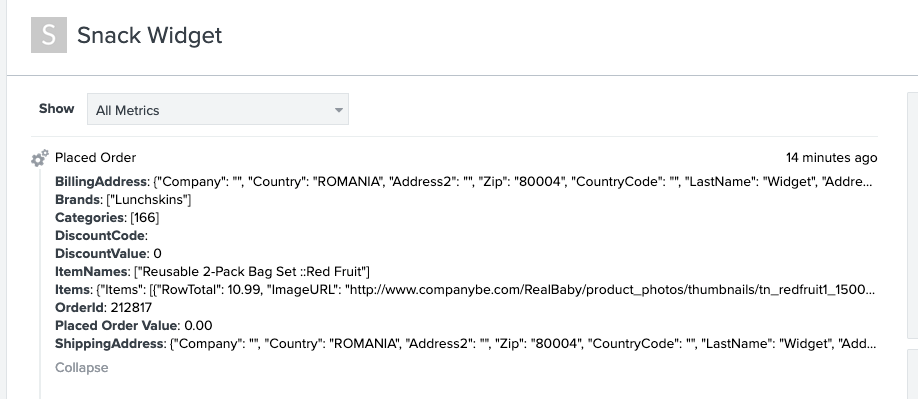
We are testing the ‘Place Order’ API event in our sandbox account and everything seems to be working fine, except the value that we are sending through is not showing up as the ‘placed order value’, when I view the metric, in the Profile associated to this order.  I’m attaching a screenshot of the body we are sending (with value highlighted) and the view in the Klaviyo Profile.  Is there some other variable we should be passing here?  Or, do we have it formatted incorrectly?
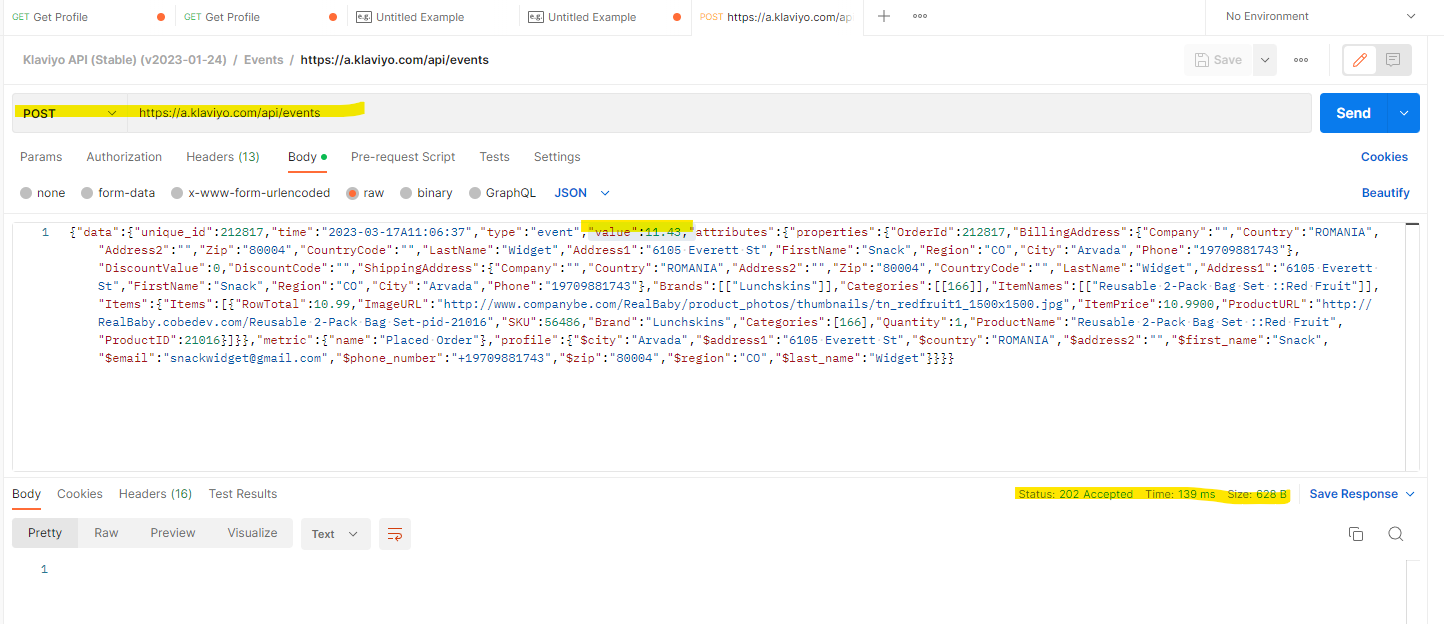
 

value is set to 11.43


see that Placed Order Value is 0.00


    This topic has been closed for replies.
    Best answer by retention

    Hi @CoBE_Sean,

    I think you have to nest the value key/value under the attributes object and not at the root of data object.  See the example in Klaviyo’s Create Event endpoint:

    curl --request POST \
    --url https://a.klaviyo.com/api/events/ \
    --header 'Authorization: Klaviyo-API-Key your-private-api-key' \
    --header 'accept: application/json' \
    --header 'content-type: application/json' \
    --header 'revision: 2023-02-22' \
    --data '
    {
    "data": {
    "type": "event",
    "attributes": {
    "profile": {
    "newKey": "New Value"
    },
    "metric": {
    "name": "Viewed Product"
    },
    "properties": {
    "newKey": "New Value"
    },
    "time": "2022-11-08T00:00:00",
    "value": 9.99
    }
    }
    }
    '

    value is under the attributes Object.

    Give that a try!

    2 replies

    retention
    Partner - Platinum
    retentionAnswer
    2025 Champion
    March 17, 2023

    Hi @CoBE_Sean,

    I think you have to nest the value key/value under the attributes object and not at the root of data object.  See the example in Klaviyo’s Create Event endpoint:

    curl --request POST \
    --url https://a.klaviyo.com/api/events/ \
    --header 'Authorization: Klaviyo-API-Key your-private-api-key' \
    --header 'accept: application/json' \
    --header 'content-type: application/json' \
    --header 'revision: 2023-02-22' \
    --data '
    {
    "data": {
    "type": "event",
    "attributes": {
    "profile": {
    "newKey": "New Value"
    },
    "metric": {
    "name": "Viewed Product"
    },
    "properties": {
    "newKey": "New Value"
    },
    "time": "2022-11-08T00:00:00",
    "value": 9.99
    }
    }
    }
    '

    value is under the attributes Object.

    Give that a try!

    Joseph Hsieh // retentioncommerce.com // X: @retention
    CoBE_Sean
    Problem Solver I
    CoBE_SeanAuthor
    Problem Solver I
    March 18, 2023

    Thank you @retention that did the trick!  👍