Contributor I
June 16, 2023
Solved

Abandoned Cart Email - Is it possible to display only one abandoned cart item?

  • June 16, 2023
  • 3 replies
  • 734 views

I’ve created an abandoned cart block in Klaviyo that displays all items in someone’s cart. This makes the email size really large, which creates a email clipping issue. I wanted to see if there’s a way to show only the first abandoned cart item in Klaviyo with a dynamic block.

    This topic has been closed for replies.
    Best answer by Omar

    Hi @Chunks,

    Welcome to the community and a great question you ask.
    In short, the answer is yes.

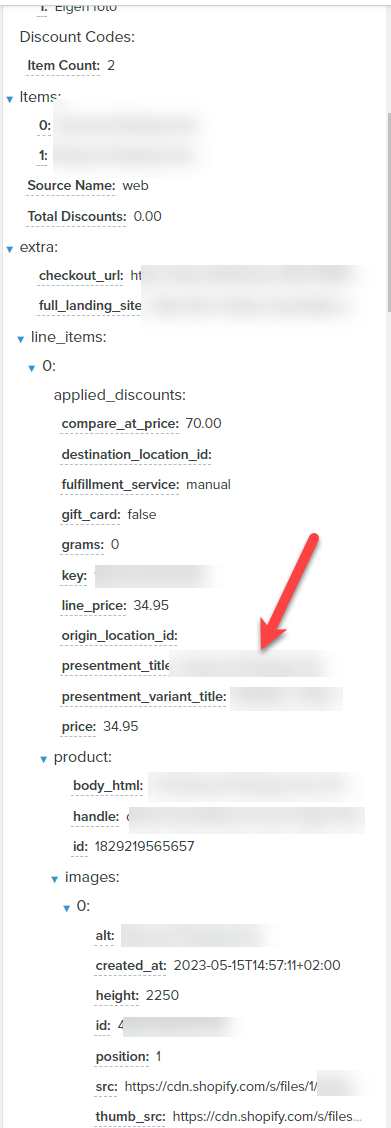
    You do need to play around with the dynamic codes to make it work but in short it comes down to using the direct link to the first product in the feed and not using the repeat/loop function.


    If you're using Shopify this means that for the Title you can use this:

    {{ event.extra.line_items.0.product.title|default:'' }}

    For the image source:
    {{ event.extra.line_items.0.product.images.0.src|default:'' }}

    For the image thumbnail:
    {{ event.extra.line_items.0.product.images.0.thumb_src|default:'' }}

    For the Price:
    {{ event.extra.line_items.0.price|default:'' }}


    This does mean it will always only take the first image & the first product.

    These are the “direct” links to the variable for the first product in the list below.


    Regards,

    Omar Lovert // Polaris Growth // Klaviyo Master Platinum Partner

    We help with e-commerce growth through CRO, Klaviyo and CVO

    3 replies

    Omar
    Partner - Platinum
    OmarAnswer
    2025 Champion
    June 16, 2023

    Hi @Chunks,

    Welcome to the community and a great question you ask.
    In short, the answer is yes.

    You do need to play around with the dynamic codes to make it work but in short it comes down to using the direct link to the first product in the feed and not using the repeat/loop function.


    If you're using Shopify this means that for the Title you can use this:

    {{ event.extra.line_items.0.product.title|default:'' }}

    For the image source:
    {{ event.extra.line_items.0.product.images.0.src|default:'' }}

    For the image thumbnail:
    {{ event.extra.line_items.0.product.images.0.thumb_src|default:'' }}

    For the Price:
    {{ event.extra.line_items.0.price|default:'' }}


    This does mean it will always only take the first image & the first product.

    These are the “direct” links to the variable for the first product in the list below.


    Regards,

    Omar Lovert // Polaris Growth // Klaviyo Master Platinum Partner

    We help with e-commerce growth through CRO, Klaviyo and CVO

    Helping E-commerce brands maximize Lifetime Value & Profits with Klaviyo, CRO & CVO - Get your free Audit - https://link.polarisgrowth.com/free-audit
    Problem Solver I
    July 27, 2023

    Can you show the code you used to display multiple items? 

    David To
    Klaviyo Employee
    Klaviyo Employee
    July 27, 2023

    Hey @emailchelsea123,

    To learn how to build your own dynamic table block that pulls in multiple items, I would recommend taking a look at our How to build dynamic blocks in a flow email Help Center article. 

    Our template expert, @Anna McCarthy has also previously offered a super in-depth tutorial which I’ve included below: 

    David