Contributor I
October 17, 2024
Solved

Abandoned Cart flow triggered by ADD TO CART Dynamic block not working

  • October 17, 2024
  • 3 replies
  • 148 views

Could somebody please share the correct tags for Abandoned Cart flow (trigger is Add to Cart) for the dynamic block? I am using Shopify


The default Dynamic block set by Klavyio is not showing up on my emails, it is showing like this when you edit by default:

 

But on the preview only this is visible:



So only word Price is showing, no picture, product name etc. I even have an example flow open which should clearly show a product and  price at least.

How is this dynamic block incorrect and can somebody please share correct tags for me?

Thank you

This topic has been closed for replies.
Best answer by bluesnapper

Welcome to the community @merilynr 

Here are the settings that work for me on Shopify for an add-to-cart fllow.

Table text code:

<div><h3><a href="{{ event.URL }}">{{ event.Name }}</a></h3>

<p><strong>Price: </strong>{{ event.Price }}</p>

</div>

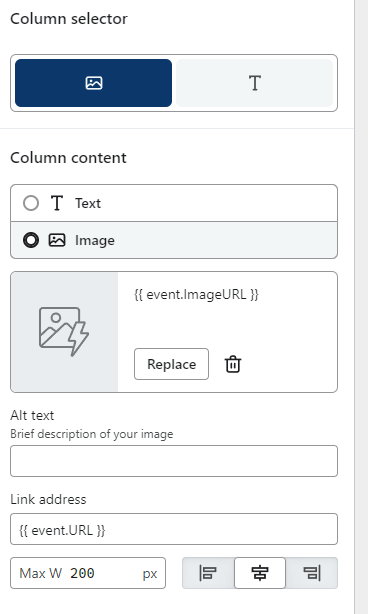
Table image settings:


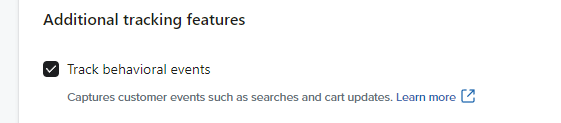
Do you have the additional tracking features enabled (below and found here: https://www.klaviyo.com/integration/shopify) or have you added the add-to-cart snippet to the theme code? Are you seeing Shopify added-to-cart events in your metrics? 


Hope that helps

Andy

3 replies

bluesnapper
Partner
Champion & Partner
October 17, 2024

Welcome to the community @merilynr 

Here are the settings that work for me on Shopify for an add-to-cart fllow.

Table text code:

<div><h3><a href="{{ event.URL }}">{{ event.Name }}</a></h3>

<p><strong>Price: </strong>{{ event.Price }}</p>

</div>

Table image settings:


Do you have the additional tracking features enabled (below and found here: https://www.klaviyo.com/integration/shopify) or have you added the add-to-cart snippet to the theme code? Are you seeing Shopify added-to-cart events in your metrics? 


Hope that helps

Andy

https://bluesnapper.com - Klaviyo Champion '24 & Partner
merilynrAuthor
Contributor I
October 17, 2024

Hi Andy!

Yes I have done all the actions and I can see my last action added to cart with the specific product as preview as well. But as soon as I add that dynamic block to my email, with your code or with Klavyio’s default, it is not working unfortunately and I am so giving up on this.


Briefly on one of the previews before testing it came up correctly and I added the block, and now when sending test or previewing, it shows only that PRICE field by itself. I have tried everything and spent so much time on this. I even created a draft Klavyio’s one and on that preview it doesn’t work either, so I really am not sure anymore

bluesnapper
Partner
Champion & Partner
October 17, 2024

Hi @merilynr 

Do you have access to Klaviyo support?

Regards

Andy 

https://bluesnapper.com - Klaviyo Champion '24 & Partner