Answer

Back in stock notification styling

  • August 22, 2022
  • 4 replies
  • 234 views

Forum|alt.badge.img+3

Hello everyone. I am very new to Klaviyo. :-)

I have installed a back in stock notification on my Shopify store (yes I am super proud of myself).

I have totally tailored the pop-up with all my brand colours, but the notify me button on the actual product page looks awful and I can’t for the life of me work out how to change the colours of it?

It’s set to btn but it comes up like this (see screenshot). I’m using the Taste theme if that’s relevant.

The script says ‘centre’… but it’s not centred and while the text font matches the other text on the page, I’d really rather have it in another colour (we use a teal and a watermelon pink as our branding colours for which I have the hex codes). Thank you so much for any advice to fix this annoying issue! 



Best answer by Mailbox Manny

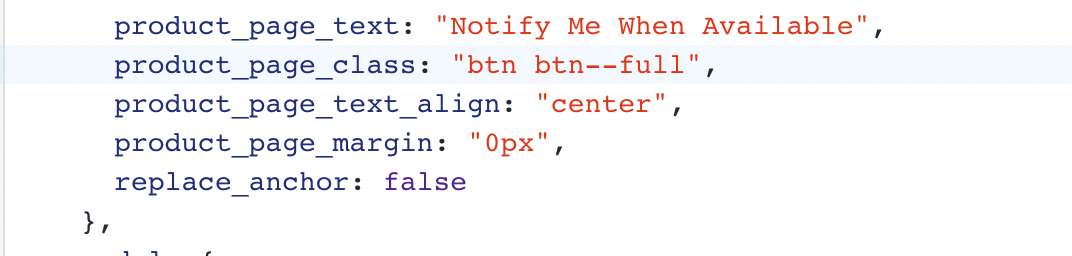
Thanks so much for replaying. I changed it to what you said (screenshot attached) and it’s still a horrible little hyperlink blue line! Waaaaaah! Any other ideas? 


I’m guessing it’s most likely your css properties for that class in Shopify is not set up on that class.

4 replies

stephen.trumble
Forum|alt.badge.img+60

Hey @IsyO 

Thanks for reaching out!  You should also be able to modify the product_page_class in the trigger settings of the snippet depending on the theme. You can see the basic free themes that we support listed in our Customizing Back in Stock Styling for Free Shopify Themes help center article. Since I didn't see Taste on the list I did a little more digging. Although I don't know for certain that it will work, I would give this product_page_class a try:

 product_page_class: 'btn btn--full'

Let me know if this helps put the link into a button.  


Forum|alt.badge.img+3
  • Author
  • Contributor I
  • August 22, 2022

Thanks so much for replaying. I changed it to what you said (screenshot attached) and it’s still a horrible little hyperlink blue line! Waaaaaah! Any other ideas? 


chelsgrove
Partner - Gold
Forum|alt.badge.img+18
  • Partner - Gold
  • September 28, 2022

@IsyO what is the URL where one of these back in stock links show? I just want to take a look at the source code to try and help!


Mailbox Manny
Partner - Silver
Forum|alt.badge.img+38
  • Partner - Silver
  • Answer
  • September 28, 2022

Thanks so much for replaying. I changed it to what you said (screenshot attached) and it’s still a horrible little hyperlink blue line! Waaaaaah! Any other ideas? 


I’m guessing it’s most likely your css properties for that class in Shopify is not set up on that class.