Contributor I
July 11, 2025
Solved

Bug with command-z undo on mac

  • July 11, 2025
  • 2 replies
  • 127 views

Alright this one is incredibly aggravating.

I just finished writing and formatting a ton of information in an email, and I pressed command-z to undo the last bit of text that I wrote, and the entire block of text reverted back to how it was prior to my edits. Re-do command doesn’t fix it. This has happened to me several times - is there a fix here that could help me avoid this inconvenice?

Thanks

    Best answer by emma.owens

    Hi ​@colefromfoodsocial ! 

    I wanted to let you know that I’ve submitted a product feature request for this so our product team is aware! 

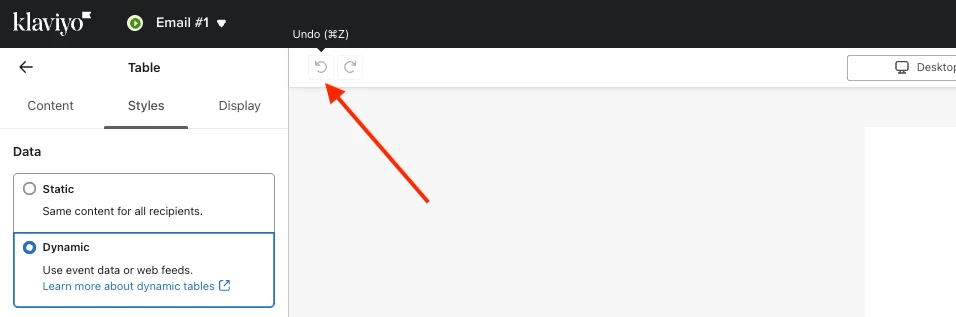
    To clarify, does the same thing happen when you click the in-app undo feature (screenshot below)? 


    2 replies

    ArpitBanjara
    Principal User II
    Principal User II
    July 14, 2025

    hey ​@colefromfoodsocial 

    Totally hear you — that’s incredibly frustrating, and you’re definitely not alone. The undo (Cmd+Z) behavior in Klaviyo’s email editor can be unpredictable, especially when editing longer blocks of text or making several formatting changes. Unfortunately, when this happens, the redo function often doesn’t restore things properly, which makes the experience even more aggravating. While there isn’t an official fix at the moment, many of us have found it safer to draft longer content outside of Klaviyo first, then paste it in once finalized, just to avoid losing work. Hopefully, Klaviyo improves the editor’s stability in future updates, because this is something a lot of users have run into. I hope this helps and thank you for sharing your question here in the community.

    Cheers

    Arpit

    Arpit Banjara - Lead Email Marketing Specialist at Flowium
    emma.owens
    Community Manager
    Community Manager
    July 14, 2025

    Hi ​@colefromfoodsocial ! 

    I wanted to let you know that I’ve submitted a product feature request for this so our product team is aware! 

    To clarify, does the same thing happen when you click the in-app undo feature (screenshot below)?