


I’m running into an issue with my embed form on my Shopify site. In Klaviyo, it looks like this:
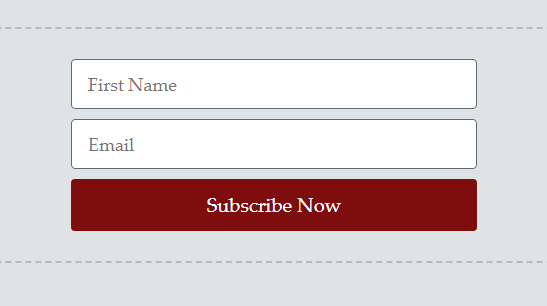
But when I put it up on my Shopify site, the font on the button isn’t coming through, and it looks like this:
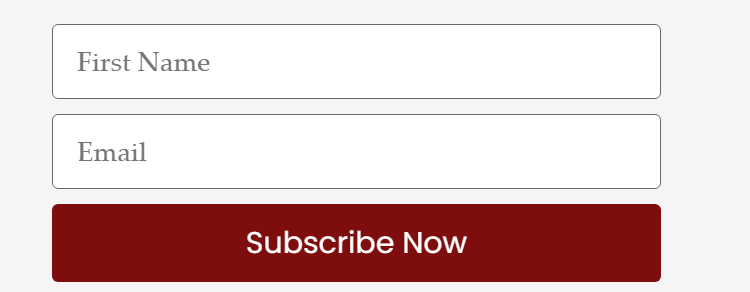
I have a popup form on the site, and it looks great, as do all my emails. The only issue is with this embedded form. Any ideas how I can correct this?
Thank you!!

Best answer by Kylie W
Hi @LMayberry
Thank you for your question in the Klaviyo Community 😊
This looks to be due to font hierarchy - essentially it can come down to fonts in Shopify taking priority, or due to a selected font in Klaviyo not being used as desired.
Here are a few other Community Posts of other Klaviyo Users who have experienced similar issues and their resolutions can provide paths for investigation for you.
I hope this helps.
Please do reach out if the issue continues with the font.
Thank you for your question in the Klaviyo Community 😊
This looks to be due to font hierarchy - essentially it can come down to fonts in Shopify taking priority, or due to a selected font in Klaviyo not being used as desired.
Here are a few other Community Posts of other Klaviyo Users who have experienced similar issues and their resolutions can provide paths for investigation for you.
I hope this helps.
Please do reach out if the issue continues with the font.
I had seen these, and none of them solved the problem completely. However, I did just try changing to a Google Font (GFS Didot), which is very similar to my brand font (Palatino Linotype), and that one came though, so I think it’s good enough. I guess the form just doesn’t like Palatino for some reason.
Thanks for the help!
Search saves time. Contributing compounds value.
The ROI of your reply? One helpful answer can support dozens of teams, build your credibility, sharpen your own expertise over time, foster connectivity, and create good karma – because what goes around comes around. The community is what YOU make it.
