Contributor I
July 16, 2024
Solved

Campaign Unsubscribe

  • July 16, 2024
  • 11 replies
  • 287 views

When creating my Campaign I have already contained an area that is meant for Unsubscribe, however when I sent a test email there is a section below anything I could see in the campaign editing area that says “ You received this email from 1st Relief Pro.
If you would like to unsubscribe, click here. “ How can I remove this or change the wording?

    This topic has been closed for replies.
    Best answer by ArpitBanjara

    Hey @Abdunn18 

    Yes that’s correct, that is how it is supposed to be when you test and preview within Klaviyo. When an email will be sent out as a campaign or a flow email, it will re-direct you to the ‘Unsubscribe page’ 

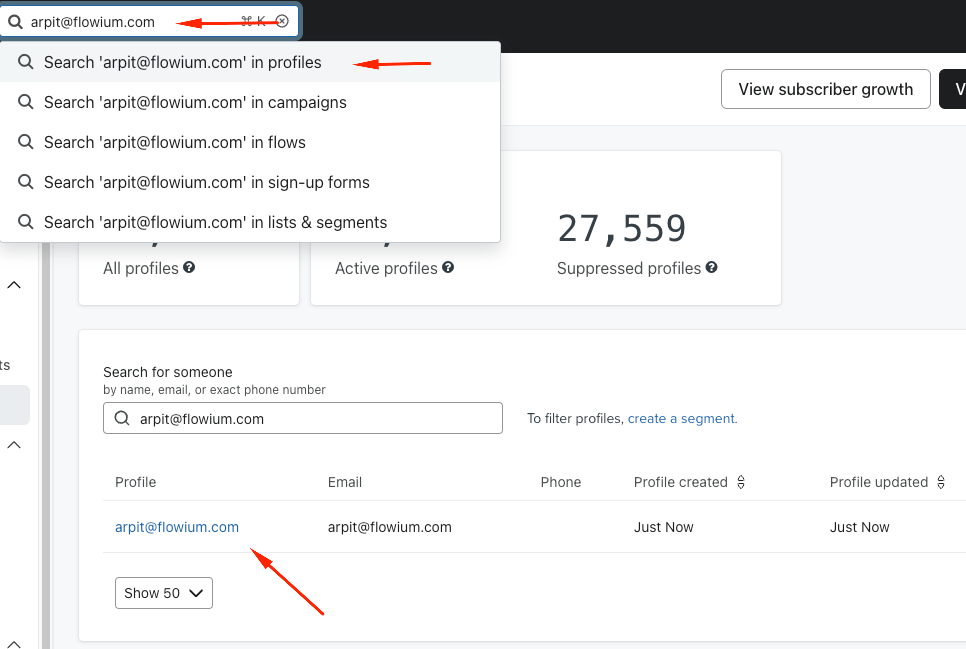
    You can test this yourself by sending yourself an email (NOT the test preview email). To do this search for your email in Klaviyo (as a profile) - 

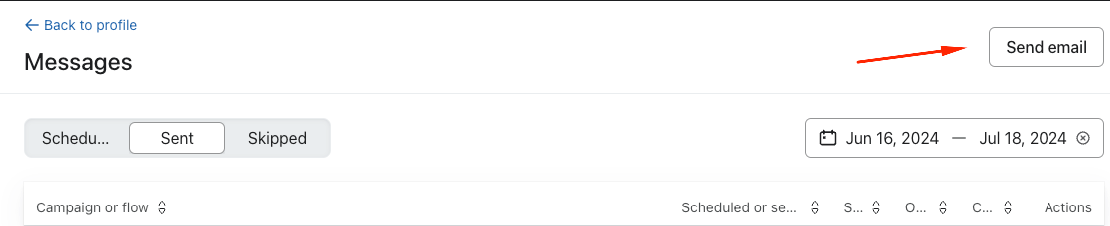
    Click on your email and click on ‘view messages’ and then send yourself an email 

    select a random template that has you unsubscribe link in it and then schedule this email to send immediately.

    Once you receive this email from Klaviyo, you can test your unsubscribe link.


    I hope this helps

    Thanks,
    Arpit

    11 replies

    In the Inbox
    Partner - Platinum
    2025 Champion
    July 16, 2024

    Hi @Abdunn18 

    Thank you for posting your question in the community, hopefully I can help you out. Would you be able to share a few screenshots of the email and block element where you are seeing the unsubscribe you want to remove as well as the one you created?

    Thanks,

    @In the Inbox 

    Bryan Richey // Klaviyo Champion & Email Strategist at In the Inbox // https://intheinbox.co/
    Abdunn18Author
    Contributor I
    July 16, 2024

    it is at the very bottom of the email

    ArpitBanjara
    Principal User II
    Principal User II
    July 16, 2024

    Hey @Abdunn18 

    Can you check your footer and make sure the link is {% unsubscribe_link %} 
     

    Usually when Klaviyo doesn’t find Unsubscribe link, they will add that link automatically for profiles to unsubscribe if they dont want to receive emails from your brand.

    I hope this helps.

    Thanks
    Arpit

    Arpit Banjara - Lead Email Marketing Specialist at Flowium
    Abdunn18Author
    Contributor I
    July 16, 2024

    No it is not on there. Do you see the Unsubscribe link I put in the image above? how would I add that without losing the layout I have?


    Abdunn18Author
    Contributor I
    July 16, 2024

    I was able to figure it out. I created a text box and put {% unsubscribe_link %} in the text box, then just made the image text the same as the back ground. 

    Abdunn18Author
    Contributor I
    July 16, 2024

    but with that being said if I wanted to keep (You received this email from 1st Relief Pro.
    If you would like to unsubscribe, click here.) that Klaviyo automatically attaches is there a way to change the wording in that?


    ArpitBanjara
    Principal User II
    Principal User II
    July 16, 2024

    Hey @Abdunn18 

    You can add that link by selecting the text and adding it as shown below 

    Any reason why you want to keep what Klaviyo added? when you can add that sentence by adding your own text block? or you could just copy that sentence add it to your own footer?

    Arpit Banjara - Lead Email Marketing Specialist at Flowium
    Abdunn18Author
    Contributor I
    July 16, 2024

    When I do that above this is what the email looks like when I send the text to myself. 

    Also the link goes to a this page now when I click the unsubscribe button.


    ArpitBanjara
    Principal User II
    Principal User II
    July 16, 2024

    Hey @Abdunn18 
    Can you try adding this link here and test? remove everything else that you added.

    Let me know if this helps.

    Thanks

    Arpit Banjara - Lead Email Marketing Specialist at Flowium
    Abdunn18Author
    Contributor I
    July 16, 2024

    that works but when I click the Unsubscribe button this is the url it sends me to