Sorry if this is a basic question but I need to ask it anyway!
Virtually every visitor to our website gets their profile pulled through to Klaviyo, meaning we constantly have to clean up profiles that haven’t subscribed.
Is there a flow I can set up that automatically suppresses these folk, or send their profiles to a segment I can quickly and easily tidy up?
Just to add to what @annasophiefc shared which is a much better automated process, but if you aren’t comfortable with webhooks, there is a manual way as well based on the subscriber status.
The problem you have I see a lot when users via an ecommerce integration get added to Klaviyo, but never specifically opt-in/subscribe to emails, but because they started a checkout for example, they are added to Klaviyo has an active profile.
With Klaviyo’s new structure focused on Active Profiles, maintaining your active profiles is an important aspect of managing your account. I bring this up only because its been top of mind, and I went through the process of creating segments and then doing a bulk suppression based off of that segment.
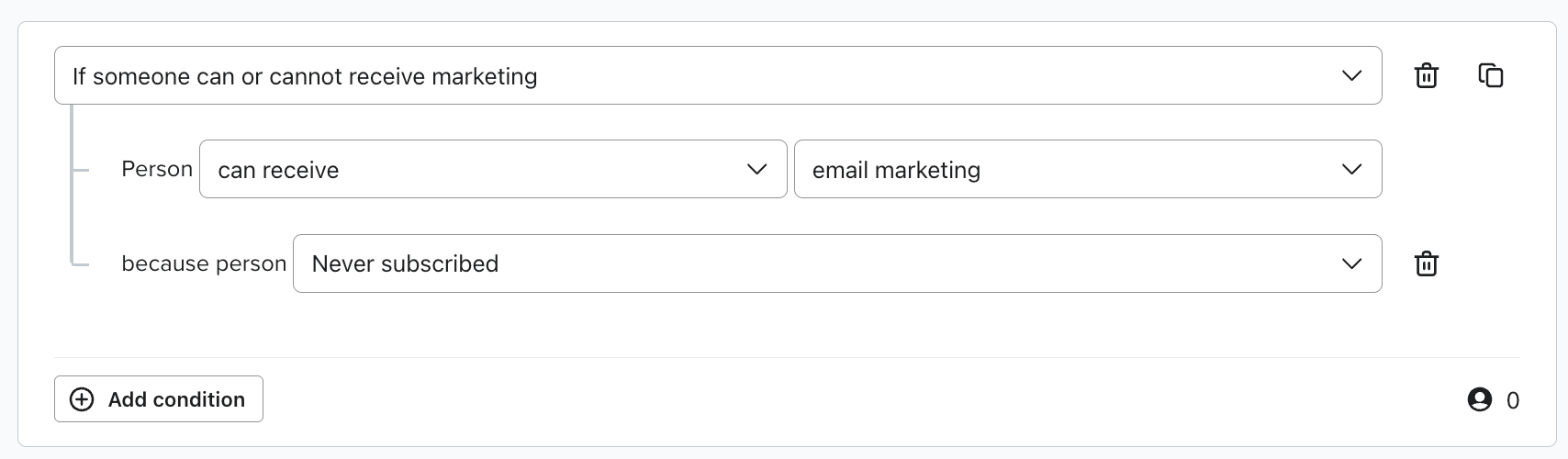
For you, you’d likely want to use the segment similar to the following where you are looking for users who either are allowed to receive email, but are not subscribed (ie. Status = Never Subscribed):
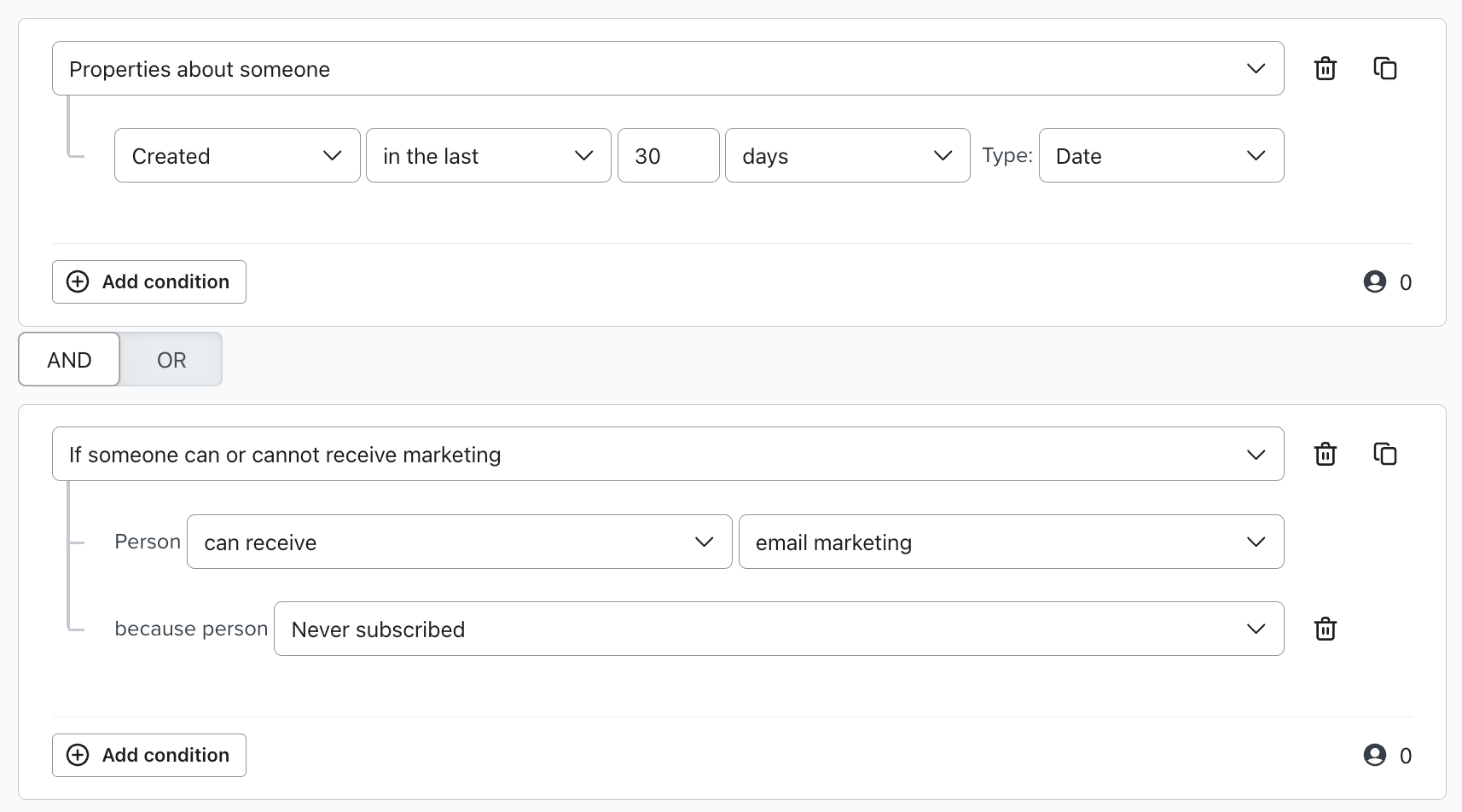
Or, you could add another layer to the segment looking at when the contact profile was created:
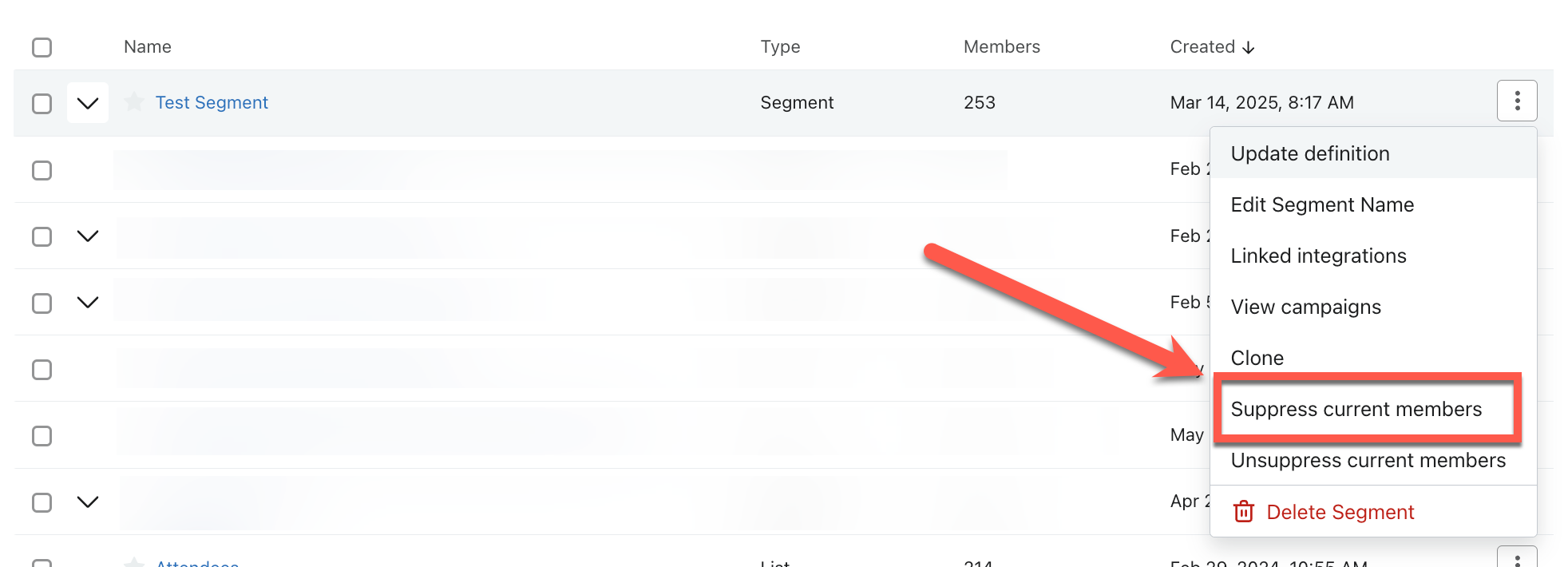
Once you have created the segment, when you are in the List & Segment list of all your list, if you click on the mini menu for your segment on the right side, you’ll see an option to “Suppress Current Members“
This will suppress all current members in the segment.
But, one thing to keep in mind, is that new users to the segment will still need to be suppressed moving forward. So, you’ll want to make a reminder for yourself to come back and click the “Suppress current members” option.
Again, @annasophiefc option will be automated to remove the need to come back and do this regularly, but if you want to start with a more simple manual process, this would work.
I hope this helps.
@in the
Bryan Richey // Klaviyo Champion & Email Strategist at In the Inbox // https://intheinbox.co/
Just to add to what @annasophiefc shared which is a much better automated process, but if you aren’t comfortable with webhooks, there is a manual way as well based on the subscriber status.
The problem you have I see a lot when users via an ecommerce integration get added to Klaviyo, but never specifically opt-in/subscribe to emails, but because they started a checkout for example, they are added to Klaviyo has an active profile.
With Klaviyo’s new structure focused on Active Profiles, maintaining your active profiles is an important aspect of managing your account. I bring this up only because its been top of mind, and I went through the process of creating segments and then doing a bulk suppression based off of that segment.
For you, you’d likely want to use the segment similar to the following where you are looking for users who either are allowed to receive email, but are not subscribed (ie. Status = Never Subscribed):
Or, you could add another layer to the segment looking at when the contact profile was created:
Once you have created the segment, when you are in the List & Segment list of all your list, if you click on the mini menu for your segment on the right side, you’ll see an option to “Suppress Current Members“
This will suppress all current members in the segment.
But, one thing to keep in mind, is that new users to the segment will still need to be suppressed moving forward. So, you’ll want to make a reminder for yourself to come back and click the “Suppress current members” option.
Again, @annasophiefc option will be automated to remove the need to come back and do this regularly, but if you want to start with a more simple manual process, this would work.
I hope this helps.
@in the
Bryan Richey // Klaviyo Champion & Email Strategist at In the Inbox // https://intheinbox.co/