


Contributor I
March 29, 2023
Solved

Can I choose the properties that fields default to when importing CSV?

  • March 29, 2023
  • 1 reply
  • 172 views

We often import CSVs to our database with custom properties like ‘Order ref’ ‘Error’. 

When uploading these CSV files, these fields will very often auto default to the incorrect properties - see image below
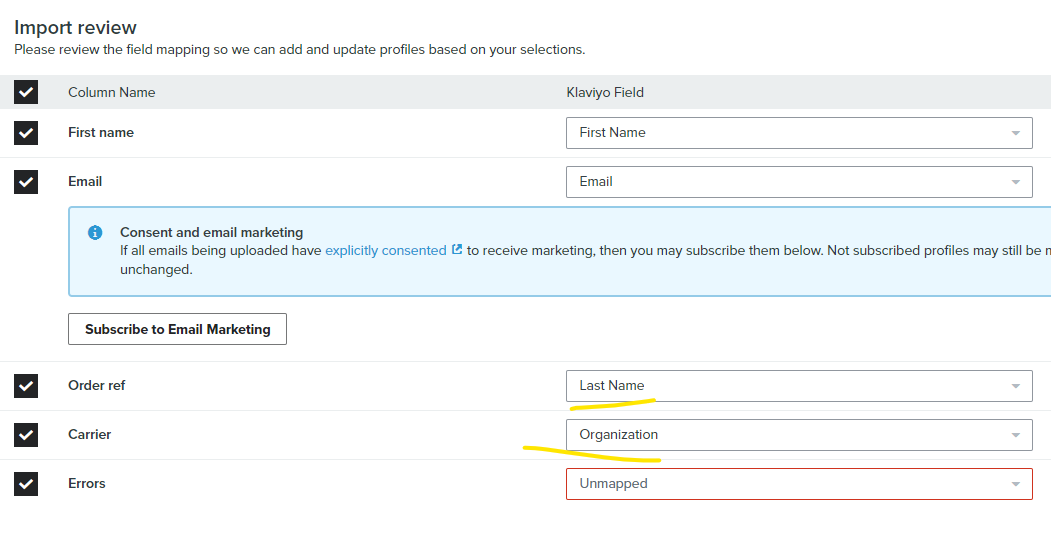
Is there a way we can configure these properties to match up within Klaviyo so that they default to the correct types once uploaded in the future?

This topic has been closed for replies.
Best answer by Tonio

One possible solution for this issue is to adjust the CSV file itself before importing it into Klaviyo. This can be done by rearranging the order of the columns to match the order of the properties in Klaviyo. For example, if the "Order ref" property in Klaviyo is the first property, make sure that the "Order ref" column in the CSV file is also the first column. This can help ensure that the properties are correctly mapped when the file is uploaded into Klaviyo.
OR

Create a custom import template: Klaviyo allows you to create custom import templates that can be used to import CSV files. By creating a custom import template, you can specify the order and format of the properties in the CSV file, which can help ensure that they are correctly mapped when the file is uploaded into Klaviyo.

1 reply

TonioAnswer
Expert Problem Solver I
March 29, 2023

One possible solution for this issue is to adjust the CSV file itself before importing it into Klaviyo. This can be done by rearranging the order of the columns to match the order of the properties in Klaviyo. For example, if the "Order ref" property in Klaviyo is the first property, make sure that the "Order ref" column in the CSV file is also the first column. This can help ensure that the properties are correctly mapped when the file is uploaded into Klaviyo.
OR

Create a custom import template: Klaviyo allows you to create custom import templates that can be used to import CSV files. By creating a custom import template, you can specify the order and format of the properties in the CSV file, which can help ensure that they are correctly mapped when the file is uploaded into Klaviyo.