Hi @jvancampen
Thank you for posting your question in the community, and I’d be happy to try and help!
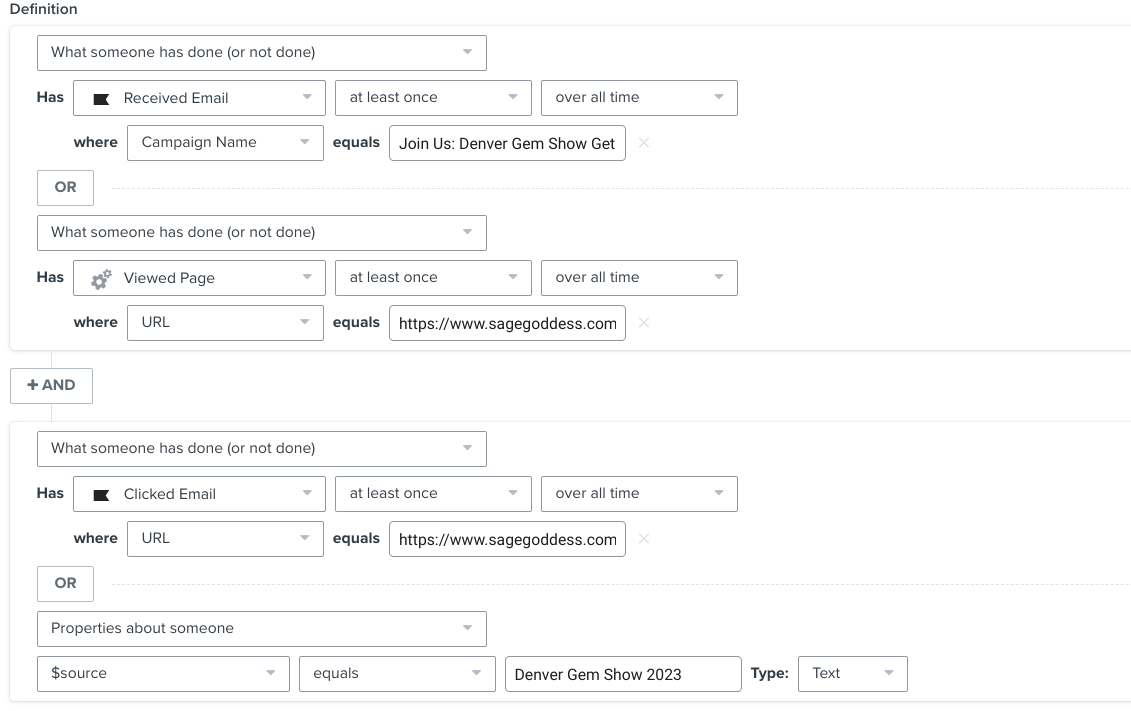
To confirm, based on your screenshot, it looks like you’ve set up a segment (which I am assuming is your trigger for your flow), where you want to use either an embedded form submit or engagement with a recent email campaign to trigger someone into the flow.
A couple of questions:
For the embedded form, did that subscribe contacts to a specific list with the source = Denver Gem Show 2023? If so, that might be a better option than the viewed page.
Is it a requirement that the user clicked on a specific link or any link within the email they received?
Based on those questions, I have a couple of thoughts:
- I would group the email engagement into one nested set of criteria and the form submit in another nested set of criteria.
- If someone received a specific email “message = Join Us: Denver Gem Show 2023” then I would set the click (if the action of clicking is required to be entered into the flow) criteria to the same message, not a specific link. (My guess is the parameter of “URL =” is tripping you up a bit here.
- I would swap out the “viewed page” event to “Subscribed to a list” (if the contacts were actually added to a list when the opted in)
So, your segment criteria might look like:
- What someone has done (or not done):
- Subscribed to a list at least once over all time,
- where “$source” = “Denver Gem Show 2023”
- OR
- What someone has done (or not done):
- Clicked email at least once over all time,
- where “message” = “Join Us: Denver Gem Show 2023”
I hope this helps! Let me know if you have any questions.
@In the Inbox
Bryan Richey // Klaviyo Champion & Email Strategist at In the Inbox // https://intheinbox.co/