October 8, 2023
Solved

Can't send test email

  • October 8, 2023
  • 2 replies
  • 851 views

I receive this message when I tried to send test mail. What does this mean?

“Could not send preview email.

Please make sure this template has a non-empty subject and try again.”



    This topic has been closed for replies.
    Best answer by Kylie W

    Hi @Doraemon 

    Thank you for your question in the Klaviyo Community 😊

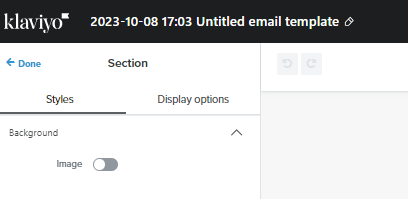
    It sounds like from your error message that the Template your are trying to send, has a blank Subject Line. To add one, if you are in the Template screen, is to select on the Pencil icon on the top left navigation. Here you should be able to enter the Subject. This will also become the Name of the Template when viewing all templates. 


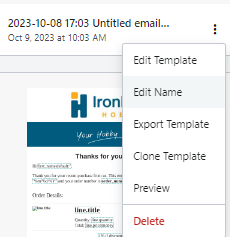
    You can also add one from the Template Listing Page, simple select on the 3 dots in the bottom right and then select ‘Edit Name’

    I hope this is of assistance. 

    Kylie

    2 replies

    Kylie W
    Partner - Silver
    Kylie WAnswer
    Champion & Partner
    October 8, 2023

    Hi @Doraemon 

    Thank you for your question in the Klaviyo Community 😊

    It sounds like from your error message that the Template your are trying to send, has a blank Subject Line. To add one, if you are in the Template screen, is to select on the Pencil icon on the top left navigation. Here you should be able to enter the Subject. This will also become the Name of the Template when viewing all templates. 


    You can also add one from the Template Listing Page, simple select on the 3 dots in the bottom right and then select ‘Edit Name’

    I hope this is of assistance. 

    Kylie

    Berridge Strategy Group, Your eCommerce Partner - eCommerce results, without the Complexity | Klaviyo Partner & 2024 Klaviyo Community Champion | www.berridgestrategy.com
    October 9, 2023

    Thank you Kyle! I fixed and it worked!