Solved
Can the recipient display name in the email "To" header be reordered or omitted? (Japanese names)
Hi everyone,
We send emails to Japanese customers. In Japanese, the family name comes first and the given name second. Our profiles store first_name = given name and last_name = family name correctly. However, the recipient display name in the "To" header of emails sent from Klaviyo is built in Western order, which looks reversed to Japanese readers, and we have received complaints.
We did not set this name anywhere in the template or campaign. I could not find a related setting under Settings > Email, Messaging or Account, and the documentation does not describe it. Here is what I saw in test sends to my own address (screenshot attached for the first case):
- first_name + last_name → "<first_name> <last_name>"
- first_name only → "<first_name>"
- last_name only → "<last_name>"
- first_name empty, last_name = "Family Given" → "Family Given"
- both empty → <email> only
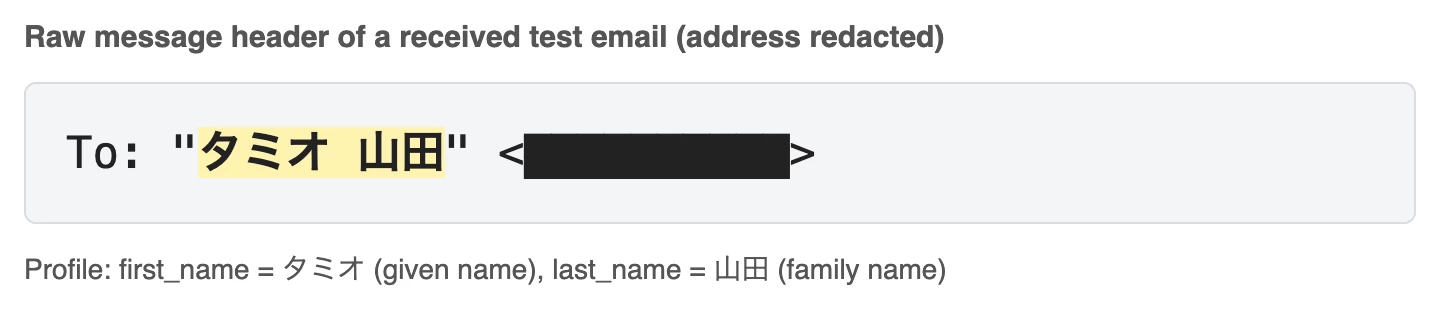
Questions:
- Is there any setting or supported method to change the order of this display name, replace it with a custom property, or omit it?
- Has anyone put the full name in last_name and left first_name empty as a workaround? Any side effects?
Thanks in advance.