Contributor I
October 9, 2026
Question

Can the recipient display name in the email "To" header be reordered or omitted? (Japanese names)

Hi everyone,

We send emails to Japanese customers. In Japanese, the family name comes first and the given name second. Our profiles store first_name = given name and last_name = family name correctly. However, the recipient display name in the "To" header of emails sent from Klaviyo is built in Western order, which looks reversed to Japanese readers, and we have received complaints.

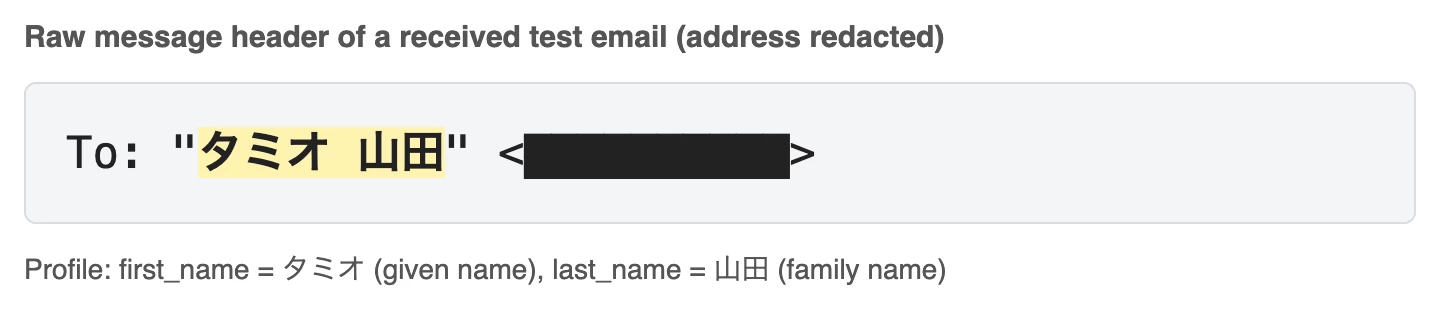
We did not set this name anywhere in the template or campaign. I could not find a related setting under Settings > Email, Messaging or Account, and the documentation does not describe it. Here is what I saw in test sends to my own address (screenshot attached for the first case):

  • first_name + last_name → "<first_name> <last_name>"
  • first_name only → "<first_name>"
  • last_name only → "<last_name>"
  • first_name empty, last_name = "Family Given" → "Family Given"
  • both empty → <email> only

Questions:

  1. Is there any setting or supported method to change the order of this display name, replace it with a custom property, or omit it?
  2. Has anyone put the full name in last_name and left first_name empty as a workaround? Any side effects?

Thanks in advance.

1 reply

Temi O.
Community Manager
Community Manager
October 13, 2026

Hi there ​@Takadanobaba ,

Thank you for sharing this! At this time, Klaviyo does not have a documented setting to change the name order by market, use a custom property for the header, or remove recipient display names globally. Your email provider may also replace the displayed name using its own contacts or address book, so checking the raw message headers is the best way to confirm what Klaviyo sent.

I wouldn’t recommend permanently storing the full Japanese name in last_name. While this may produce the desired header in some cases, it can affect greetings, personalization, segmentation, exports, Shopify or other integration syncs, and any logic that expects last_name to contain only the family name.

A safer approach would be to:

  • Keep first_name and last_name in their standard format.

  • Create a custom property such as name_display_ja and store the preferred format there

  • Use that property in the email body when needed, more on personalization within our message personalization reference.

If the “To” header itself must display the Japanese order, the available profile-based workaround would be to store the preformatted full name in one built-in name field and leave the other blank. I would use this only for a dedicated group and only after confirming that your integrations will not overwrite the value. 

Clearing both name fields may cause the email address to appear instead, but it’s not a reliable way to prevent an inbox from adding a name from its own contact data. To confirm the source, compare the raw headers from a delivered email with the name displayed by the email client. If the name is present in the Klaviyo-generated header, this is a product limitation rather than a template setting.

I hope this is helpful, and I’m curious how others have handle this in the community! 


Temi@Klaviyo