Contributor I
June 7, 2023
Solved

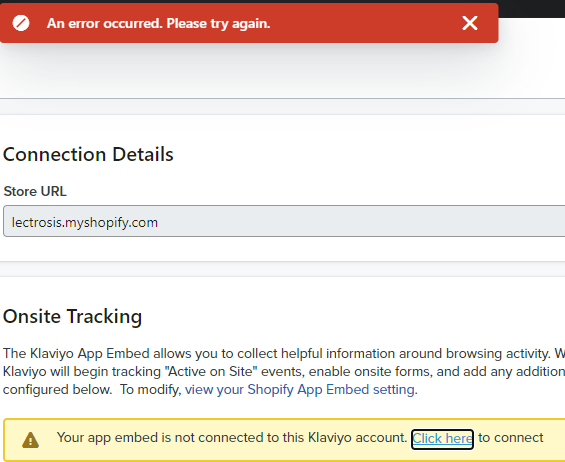
Cant connect embed to klaviyo account

  • June 7, 2023
  • 1 reply
  • 241 views


    This topic has been closed for replies.
    Best answer by Brian Turcotte

    Hi @Lectrosis!


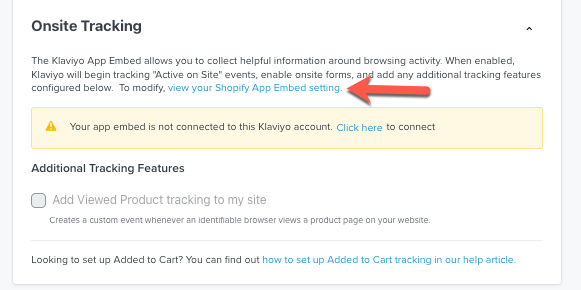
    As a first step, can you try clicking the highlighted link shown in the screenshot below (“view your Shopify App Embed setting”): 
     
    ?name=2023-03-23_17-13-56.png
     

    Next, toggle off the App Embed and then toggle it back on. The following guide will walk you through how to setup this up: How to Enable Klaviyo App Embed in Shopify
     

    If you are still seeing the same error after making those changes, then please follow the below steps: 
     
    1. Completely REMOVE (not disable) the Shopify integration in Klaviyo: https://www.klaviyo.com/integration/shopify

    ?name=2023-03-23_17-11-51.png
     
    2. Log out of Klaviyo
    3. Log back into Klaviyo via an incognito window
    4. Re-add Shopify from the All Integrations tab: https://www.klaviyo.com/integrations
    5. Follow the steps in our documentation to integrate with Shopify as if doing so for the first time: Guide to Integrating with Shopify
     
    You can test out the onsite tracking to ensure it is working after making these changes by following the steps here: How to Test Onsite Tracking
     

    I hope this helps get you started, and thanks for using the Community!

    - Brian

    1 reply

    Brian Turcotte
    Klaviyo Alum
    June 8, 2023

    Hi @Lectrosis!


    As a first step, can you try clicking the highlighted link shown in the screenshot below (“view your Shopify App Embed setting”): 

     
    ?name=2023-03-23_17-13-56.png
     

    Next, toggle off the App Embed and then toggle it back on. The following guide will walk you through how to setup this up: How to Enable Klaviyo App Embed in Shopify
     

    If you are still seeing the same error after making those changes, then please follow the below steps: 
     
    1. Completely REMOVE (not disable) the Shopify integration in Klaviyo: https://www.klaviyo.com/integration/shopify
    ?name=2023-03-23_17-11-51.png
     
    2. Log out of Klaviyo
    3. Log back into Klaviyo via an incognito window
    4. Re-add Shopify from the All Integrations tab: https://www.klaviyo.com/integrations
    5. Follow the steps in our documentation to integrate with Shopify as if doing so for the first time: Guide to Integrating with Shopify
     
    You can test out the onsite tracking to ensure it is working after making these changes by following the steps here: How to Test Onsite Tracking
     

    I hope this helps get you started, and thanks for using the Community!

    - Brian