


Contributor I
February 14, 2021
Solved

changing my "return to your cart" button url

  • February 14, 2021
  • 2 replies
  • 7753 views

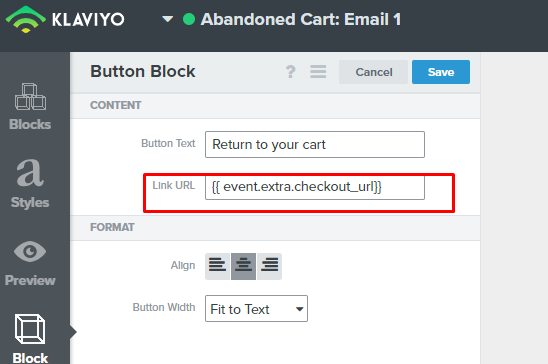
Hello. i have a problem. I want to make an abandoned cart email flow but I want to change "return to your cart" button URL so that it leads to cart view / view cart section, not checkout.  can I do it?


This topic has been closed for replies.
Best answer by biosnutrients

If anyone stumbles on this thread because their return to checkout link isn’t working anymore, use this instead! {{ event.extra.checkout_url|default:'' }}. 


This can be found in your “test & preview” section of any email flow and you can find the link here incase it ever changes again 👇 just click the “checkout_url:” and it’ll paste to your clipboard where you can then just paste it into your link button. 


2 replies

Bobi N.
Partner - Platinum
Champion & Partner
February 15, 2021

@AnimalLoversCo 

Yes you can.. your website must have cart link so all you should do is add link something like this.. www.yourwebsitename.com/cart or whatever the handle to your cart is. Usually websites use cookies and save the cart so you don’t need dynamic code for it. When people will click on that link everyone will be brought to their cart on your website.

Head Email Marketing Technician at Flowium
Contributor I
November 7, 2023

If anyone stumbles on this thread because their return to checkout link isn’t working anymore, use this instead! {{ event.extra.checkout_url|default:'' }}. 


This can be found in your “test & preview” section of any email flow and you can find the link here incase it ever changes again 👇 just click the “checkout_url:” and it’ll paste to your clipboard where you can then just paste it into your link button.

