January 27, 2021
Solved

Checkbox Appears on Woocommerce Checkout Page after Klaviyo Plugin

  • January 27, 2021
  • 17 replies
  • 3381 views

Hi,

We integrated our Woocommerce website with Klaviyo today and we noticed a checkbox appeared on the checkout page as soon as we activated the Klaviyo plugin on Wordpress. It’s just a checkbox underneath the email field and with the words “(optional)” next to it.

Any ideas how to remove this? I’m guessing it’s meant to be the Newsletter signup but then I’m not sure where to go to customise the text or to remove the option entirely.

I’d appreciate any help!

Thanks!

    This topic has been closed for replies.
    Best answer by retention

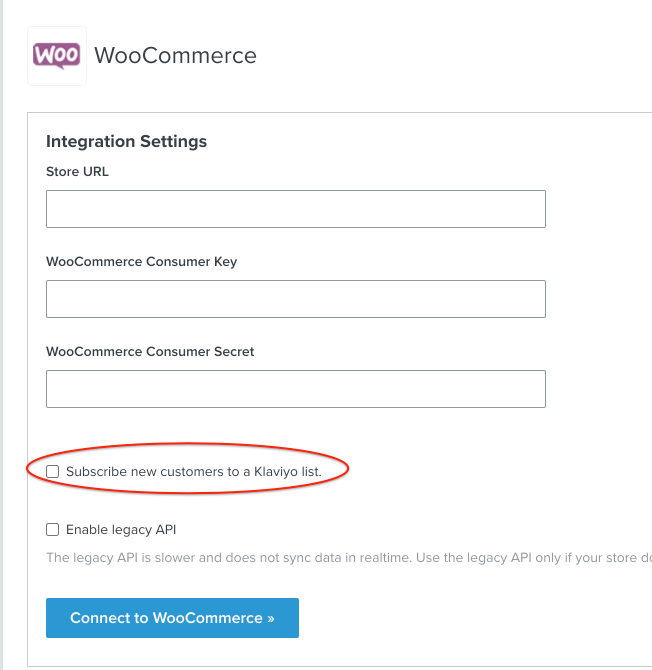
    @wlondon13 - You can disable the option for the checkbox in your Integrations → Woocommerce Settings like this:

    If you do decide to do this, just note that all customers’ email will still get passed into Klaviyo as a profile.  However, they are not technically “Subscribed” to any List (for marketing purposes). You can still build Segments for Campaigns or send emails from Flows if they are transactional in nature and not marketing related.

    Generally, you should always inform customers (and give them option) to opt-in into marketing emails if you intend on sending them marketing related emails.  It’s not only the right thing to do, but it can impact your performance and deliverability if people start marking your emails as Spam with their inbox provider. Over time, your deliverability will suffer and your email engagement rate will drop.

    And, depending on your region or local laws, it may be legally required. For example, the CAN-SPAM ACT (in the United States) and GDPR in the European Union both require subscribers’ consent for marketing emails.  

    Hope this helps!

    17 replies

    Problem Solver I
    November 12, 2021

    Hi @travisl1212 


    Did you find a solution yet? I have the same problem :(

    Contributor I
    November 19, 2021

    got same problem guy . need it to be checkedd

    Taylor Tarpley
    Community Manager
    Community Manager
    November 19, 2021

    Hi @Sergobaba and @kim


    Want to clarify what Klaviyo can and can’t do here so you guys aren’t left hanging! 


    Unfortunately, upon further investigation, Klaviyo’s WooCommerce plugin actually does not natively allow for the opt-in box to be checked by default. The reason for this is to prevent the accumulation of passive subscribers who might be more likely to unsubscribe or mark as spam (negatively impacting your deliverability ) as previously mentioned. 


    While you could implement this without a Klaviyo plugin, I can't advise what type of code changes that would entail. However, I know we've had customers in the past use the Woofunnels plugin to accomplish it.


    Thanks for sharing your question with the Community!

    -Taylor 

    Contributor II
    April 3, 2022

    Has anyone figured out how to have the option checked by default?

    Contributor I
    May 18, 2022

    We paid a developer to do this. He added this code goes to the functions.php file in your child theme.


    /**
    * Make Klaviyo checkbox default checked.
    */
    function wr_klaviyo_default_checked() {
    ?>
    <script>
    jQuery(document).ready(function() {
    console.log("yes");
    if( jQuery("#kl_newsletter_checkbox").length > 0 ) {
    jQuery("#kl_newsletter_checkbox").attr('checked','checked');
    }

    })
    </script>
    <?php
    }
    add_action( 'wp_footer' ,'wr_klaviyo_default_checked' );


    Contributor I
    June 1, 2022

    @LittleSnail thank’s for sharing! 🙏

    Contributor I
    June 30, 2022

    Just to add to @LittleSnail generous share - if your child theme isn’t yet populated with any existing code (I just built a fresh child theme for our site and this was the first thing in there) you’ll need to make sure that the above code is contained within a <?php bracket. As per the below:


    <?php
    /**
     * Make Klaviyo checkbox default checked. 
     */
    function wr_klaviyo_default_checked() {
        ?>
         <script>
            jQuery(document).ready(function() {
                console.log("yes");
                if( jQuery("#kl_newsletter_checkbox").length > 0 ) {
                    jQuery("#kl_newsletter_checkbox").attr('checked','checked');
                }

            })
        </script>
        <?php
    }
    add_action( 'wp_footer' ,'wr_klaviyo_default_checked' );
    ?>